
Overview of the Admin API architecture for Optimizely Configured Commerce.
The Optimizely Configured Commerce Admin Console exposes OData APIs for reading and writing administrative data. These APIs can be used by third-party applications to integrate with and manage the platform programmatically.
NoteAccess the OpenAPI Specification (aka Swagger) to view and test endpoints by using
[YOUR_WEBSITE_URL]/swagger.
Consume the Admin API
The following code shows a typical method of consuming the admin api. Note that the clientId/clientSecret are the same across all environments.
const baseUrl = "http://localhost:30100";
const username = "admin";
const password = "Password1";

async function getAdminBearerToken(username, password) {
    const clientId = "isc_admin";
    const clientSecret = "F684FC94-B3BE-4BC7-B924-636561177C8F";
    const basicAuth = btoa(`${clientId}:${clientSecret}`);

    const response = await fetch(`${baseUrl}/identity/connect/token`, {
        method: "POST",
        headers: {
            "Content-Type": "application/x-www-form-urlencoded",
            Authorization: `Basic ${basicAuth}`,
        },
        body: new URLSearchParams({
            grant_type: "password",
            username: `admin_$USERNAME`,
            password: password,
            scope: "isc_admin_api",
        }),
    });

    if (!response.ok) {
        throw new Error(
            `Auth failed: ${response.status} ${await response.text()}`,
        );
    }

    const data = await response.json();
    return data.access_token;
}

const token = await getAdminBearerToken(username, password);

const fileContent = "hello world";
const blob = new Blob([fileContent], { type: "text/plain" });

const formData = new FormData();
formData.append("destinationDirectory", "SomeFolder");
formData.append("file", blob, "example.txt");

const response = await fetch(`${baseUrl}/api/v1/admin/websites`, {
    headers: {
        Authorization: `Bearer ${token}`,
    },
});

console.log(response.status, await response.json());
Unlike the Storefront API, the Admin API uses OData syntax.
For more information regarding OData parameters please visit the OData URI conventions website.
Configured Commerce returns a maximum of 100 results in a Admin API request, and the OData.NextLink requests the next set of results. This OData.NextLink JSON value is the name of the API endpoint plus the query string with skip=100.
Return a single object from the Admin API
The following example shows how to retrieve a single product using the Storefront API and the Admin API:
Admin API return a single object syntax – /api/v1/admin/products(f88d5c07-eb72-42eb-ab36-a5d201168a49)
Return a child collection from the Admin API
Because OData only supports the entity and no child collections, Configured Commerce supports one level deep child collections. You can retrieve child collections on a RESTful JSON result in two ways:
- Use the expand parameter for the query string.
- Use the name of the child entity after the slash.
The following example shows how to retrieve a child collection of a website using the Admin API:
Use the expand parameter for the query string – /api/v1/websites(d24h5c07-eb72-42eb-ab36-a5d201168jh5)?$expand=countries
Use the name of the child entity after the slash – /api/v1/websites(d24h5c07-eb72-42eb-ab36-a5d201168jh5)/countries
Update entities using the Admin API
All entities within Configured Commerce contain a Patch endpoint for the Admin API.
The following is an example of how to update a specific website to make it inactive.
{
  	"isActive": false
}
In the body of the request, set the property and value using JSON notation. Additionally, the request header must contain the authentication bearer token.
Swagger
You can view and interact with both the Storefront and Admin API endpoints via Swagger. Configured Commerce Help contains links for both the Storefront API and Admin API.
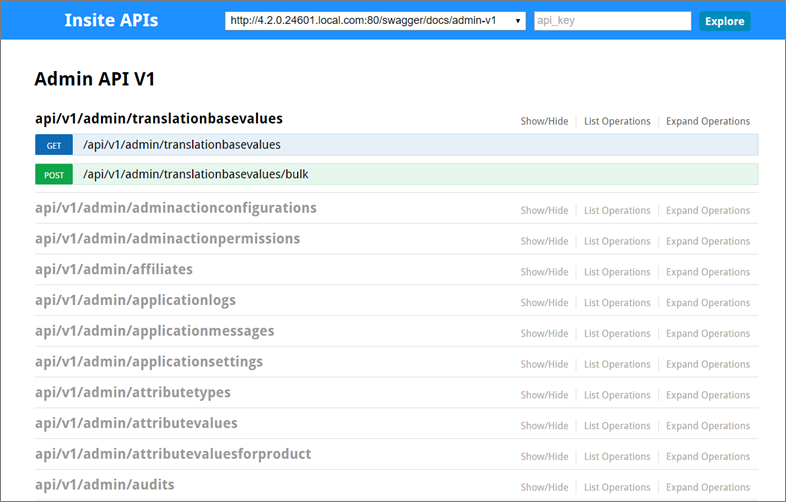
NoteYou can also view the available endpoints by scrolling in the left navigation to Storefront API V1, Storefront API V2, or Admin API V1.
Admin API Endpoints
The following definitions describe the API endpoints for data-level objects, also known as Admin objects.
Generic endpoint definitions
Url Prefix: /api/v1/admin/
| HTTP Verb | URL | Description |
|---|---|---|
| GET | entity | Retrieves all of the the objects |
| POST | entity | Creates a new object |
| GET | entity({id}) | Retrieves the object by Unique Id |
| PUT | entity({id}) | Update or create an object by Unique Id |
| DELETE | entity({id}) | Deletes an object by Unique Id |
| PATCH | entity({id}) | Updates properties on an existing object by Unique Id |
| GET | entity/Default.Default() | Returns a new instance of that object with all of the default values |
| GET | entity({key})/child({childKey}) | Retrieves a single child by Unique Id relative to the parent object |
| GET | entity({key})/customproperties({custompropertyKey}) | Retrieves the value of a single custom property on an object |