
Marketing automation
Collect visitor data from Optimizely forms and pass it to connectors. Build business rules, integrate web tracking, and update behavioral data for targeted marketing actions.
NoteThe Optimizely Digital Experience Platform (DXP) contains many features to support you in your daily work. Depending on how your solution is set up, some features described in this documentation may not be available.
Marketing Automation tracks website visitor behavior and collects profile data. For example, when a visitor submits a form (created with Optimizely forms perhaps to receive a newsletter subscription), the form data is automatically stored in Optimizely Campaign or your connector database. You can use that data for marketing actions, such as welcoming a customer, engaging in cross-selling, rewarding your best customers, or following up on recent purchases. You can connect form fields with the connector's or Optimizely Campaign's database using the Optimizely Forms Marketing Automation connector.
Optimizely Connect for Marketing Automation provides the following functionality:
-
Collect profile information when a visitor submits a form on a website. Using Optimizely Forms, you can map form fields to the Marketing Automation connectors.
NoteTo use the Optimizely Forms connectors, you must first install your licensed connector and then the Optimizely Forms connector. If you purchased Optimizely Campaign, you can also connect forms to Optimizely Campaign; (no separate license needed). See Optimizely Connect for Campaign.
To connect a Marketing Automation connector to Optimizely Forms, see the connector documentation in the following list.
NoteSample Connector. For developers, Optimizely provides code to write your own connector.
-
You can have multiple instances of the same connector. For example, if you have marketing teams in separate regions, you can have more than one Salesforce connector, such as Salesforce - Europe, Salesforce - US, and Salesforce - APAC.
-
Build business rules with the scoring model and program information to deliver targeted content to visitor groups; see Set up audiences with personalization.
-
Integrate web tracking to Optimizely’s personalization engine; see Create an audience with Marketing Automation connector profile criteria.
-
Send behavioral data to the database (based on tracking scripts and website visitor actions), where you can set up scoring models and programs with ranking rules and categorize potential prospects and leads.
-
Update behavioral data with progressive profiling and lead scoring that indicates where potential prospects are in the sales funnel.
-
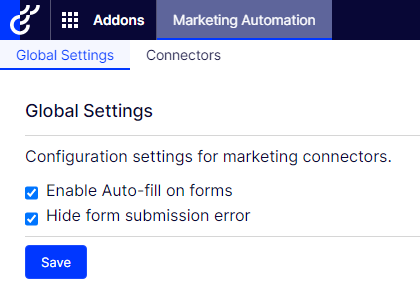
Open the Optimizely CMS top menu and select Admin > Config > Tool Settings > Marketing Connectors Global Settings to enable or disable auto-fill for forms and hide or show errors.
-
Enable auto-fill on forms – If someone uses that feature, you can let form fields be automatically filled or force the visitor to enter data manually.
-
Hide form submission error – By default, Optimizely hides form submission errors (enabled); the error does not show but is recorded in the logs, and the form submission is stored in the database. If you disable this check box, a field appears in which you can enter a message to get displayed after the text Failed to submit, such as Failed to submit, Something went wrong, please try again. However, the form submission is not stored in the database when disabled.
System administrators should be aware of the Fetch data from Marketing Connectors scheduled job. It improves the performance of Marketing Automation connectors by fetching and caching databases and lists (wherever applicable) upon site initialization.
-
Updated 2 months ago