
Search engine optimization
Optimize your website's SEO in Optimizely CMS 13. Learn about content quality, keywords, meta descriptions, A/B testing, responsive design, and analytics for better search engine ranking.
Search Engine Optimization (SEO) helps you understand your website visitors and optimize your site to match their needs. Effective SEO increases your search engine ranking on platforms such as Google and Bing. See Search configuration for information about configuring the search providers for your site.
This article provides a checklist for editors in Optimizely Content Management System (CMS) to improve site ranking. Google ranking algorithms use hundreds of criteria that change without notice.
Developers and administrators handle the following SEO tasks:
- Configuring Google Analytics and Google Search Console
- Creating a responsive design
- Configuring templates with relevant and consistent SEO properties
- Configuring canonical links
- Optimizing site speed
Editors and content marketers handle the following SEO tasks:
- Creating quality content and clear navigation
- Researching keywords
- Adding meta descriptions and title tags
- Running A/B tests and fixing broken links
- Analyzing site search and site traffic data
Prepare your content and navigation
High-quality, original content and clear navigation keep visitors on your site and encourage return visits. Engaged visitors also generate backlinks (links from other sites to yours), which improve your search engine ranking.
Write for your visitors and prioritize quality content. Create content that stays relevant over time. Google algorithms emphasize content quality and user experience over individual keywords. Focus on relevant, searchable content, clear navigation, internal linking, videos, and site speed.
Use compelling language and make your point early. Do not save your selling points until the end.
Internal and external linking and backlinking
Linking strategies improve your site ranking and help visitors find content across your site and related external resources.
An administrator should verify that your site uses canonical URLs. A canonical link specifies the preferred version of a web page. This helps when subdomains contain identical or similar pages. The canonical link tells the search engine which page to prioritize. Define the canonical link in the HTML head tag.
At the hosting level on Optimizely Digital Experience Platform (DXP), an apex domain redirect sends visitors from your bare domain (for example, example.com) to the canonical www hostname with a single 301 redirect, which consolidates link equity on one host.
Use a friendly, short URL that describes the page content. The URL does not have to match the page title. Set the URL manually if the automated option does not fit.
Create simple campaign addresses. For example, use www.example.com/summer-sale instead of www.example.com/product_campaigns/en/content/competitions/summer-sale.
Keywords
Keywords are the words visitors use when searching for your site. Use the same words in your content that visitors use in their searches. Keyword research (analyzing which terms people use to find your content) is essential for effective SEO.
NoteKeywords here are not the same as the
Keywordattribute in the HTML head section. Search engines no longer use the HTMLKeywordattribute, so it has no effect on SEO.
Understanding your target audience is equally important. Identify who your visitors are, what information they seek, when they search, and why. These insights help you select the most valuable keywords.
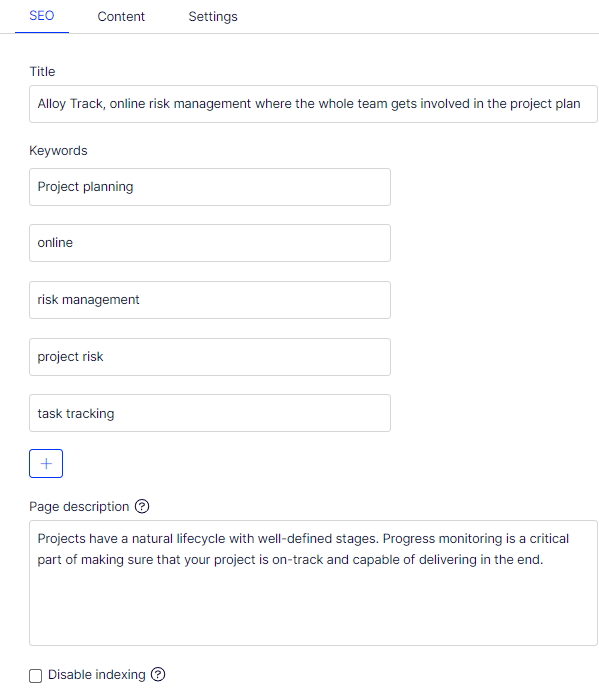
Define and use a few keywords for each page. Avoid keyword stuffing (overusing keywords), which search engines such as Google penalize.
Use your keywords consistently and track them to verify they match current search trends.
Meta elements – descriptions and titles
Meta elements provide information about the page in the HTML head area. They describe the content, author, and last update date. Search engines use meta elements (especially the title and description) and display them in search results.
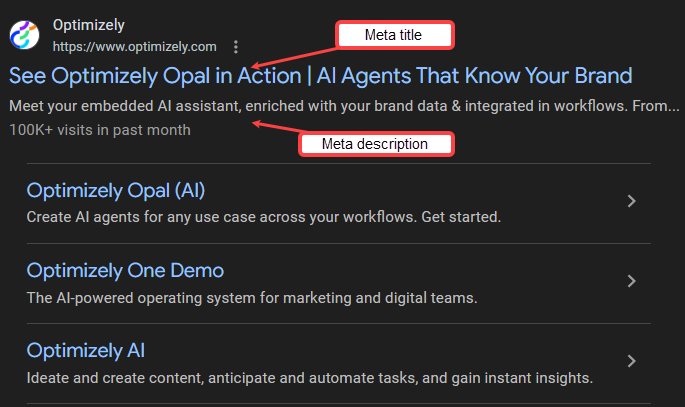
The meta title specifies the title of a web page. Search engines display it as a clickable link in results. The meta title affects usability, SEO, and social sharing.
A meta description summarizes the page and displays beneath the title in search results.
Write short, concise meta titles and descriptions that include your keywords. Meta descriptions do not directly affect site ranking. A compelling meta description increases the likelihood that visitors click the link.
Search engines display your meta description when they find it relevant to the search term. They display other page content instead when they consider it more relevant.
Test your content
Verify that your content reaches visitors and drives conversions after publishing. A/B tests let you compare two versions of a content item. The test reveals which version achieves the best results, such as longest page visits, most link clicks, or highest purchases.
Check for broken links to verify visitors find the content they expect. CMS provides a link status report for this purpose.
Optimize and fine-tune
SEO requires ongoing analysis and adjustment. Review your search statistics regularly and refine your content and site structure to maintain and improve your ranking.
Schema.org markup
Schema.org markup enhances how search engines display your pages in results. Adding schema.org markup creates rich snippets that show contact information, event details, product ratings, or videos alongside standard results. Rich snippets do not directly affect Google ranking but encourage visitors to click your links.
See Get started with schema.org using Microdata for information on schema.org markup.
Responsive design
Responsive design ensures your site displays well across all devices, improving user experience and SEO ranking.
Website developers handle most responsive design work. As an editor, plan your content and site structure for visitors with small screens. Preview your site on different devices with the preview tool. On smaller screens, content takes priority over images.
Automate your SEO with add-ons
SEO automation tools help editors organize meta tags, manage keywords, monitor SEO impact, estimate search traffic, and improve content without specialist expertise.
SEO automation tools provide the following benefits:
- Beginner-friendly interfaces
- Integration with Optimizely and tools such as Google Analytics
- Guidance for creating quality content and avoiding outdated SEO practices
Find SEO add-ons on Optimizely Apps. For example, Siteimprove Website Optimizer scans your website for errors when you publish a page.
Images
Optimizing images balances visual quality with page loading speed to maintain user experience and SEO ranking.
High-resolution images improve the visual experience but increase loading time, especially on smaller devices. Slower loading negatively affects user experience and SEO ranking. Have your website developer configure the environment to serve appropriate image quality for each screen size. Automated image delivery removes the need to manage image sizes manually.
Write descriptive alt (alternative text) attributes for your images. Search engines use alt attribute text to determine image content. Keep alt text short and descriptive. Use your main keywords when they fit the context. Avoid keyword stuffing.
Use alt attributes with clear image descriptions and descriptive file names. These factors affect your SEO ranking.
The alt attribute primarily serves as an accessibility tool. Its main purpose is describing images for visually impaired users.
Website analytics
Analytics tools help you understand site performance and optimize your content strategy based on visitor data.
Google Analytics helps you interpret site data such as page views, audience behavior (for example, returning visitors), and conversion goals. The following Google tools also support SEO analysis:
- Google Search Console – Measures your site search traffic and performance.
- Google Tag Manager – Tracks the return on investment of your advertising.
- Google Ads – Lets you purchase advertising space in Google.
Google Search Console includes a Disavow backlinks tool. Unnatural links pointing to your website affect your SEO ranking. Use this tool to tell Google to disregard those links.
Google My Business
Google My Business helps small local businesses manage their display in Google search results and on Google Maps. The tool is free but requires face-to-face interactions with customers. Online-only companies are not eligible.
ImportantDo not duplicate content, overuse keywords or ads, or purchase links from link farms.
Updated about 2 months ago