
Search configuration
CMS administrators and developers can configure Optimizely CMS search providers. Customize global search results by enabling or disabling default providers like blocks, files, and pages.
Search configuration determines which content types appear in CMS global search results. Administrators tune the providers so editors find blocks, files, and pages without irrelevant results.
Go to Settings > Tools > Search Configuration.
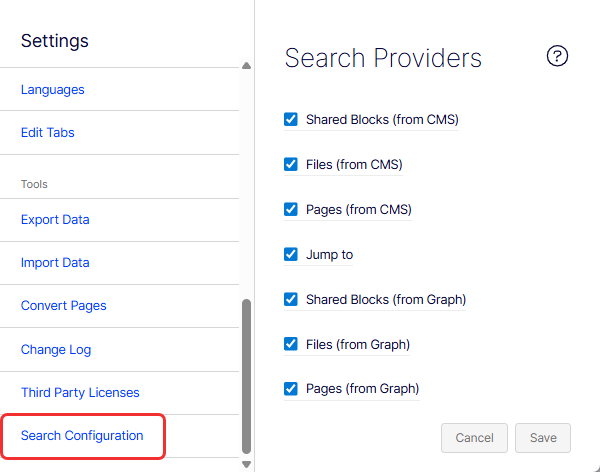
CMS uses Optimizely Graph as its default internal search engine. Disable a provider to exclude that content type from the results the global search bar returns. Content remains accessible through the content tree. The following providers are available by default:
- Shared Blocks (from CMS) – Searches for CMS shared blocks.
- Files (from CMS) – Searches for CMS documents.
- Pages (from CMS) – Searches for CMS pages (including page content).
- Jump to – Returns menu items defined by IMenuProvider.
- Shared Blocks (from Graph) – Searches for shared blocks from Optimizely Graph.
- Files (from Graph) – Searches for documents from Optimizely Graph.
- Pages (from Graph) – Searches for pages from Optimizely Graph.
Settings take effect immediately after you save.
See also Add search providers.
NoteOptimizely Search & Navigation is not compatible with CMS 13.
Updated 2 months ago