
Extend the Tasks panel with custom queries
Describes how to extend the task panel that is part of the Optimizely Content Management System (CMS) user interface.
Add custom queries to the Tasks panel so editors can filter and find content that matches your workflow. The panel includes predefined queries such as Draft, Rejected, and Recently Changed, and supports custom queries alongside them.
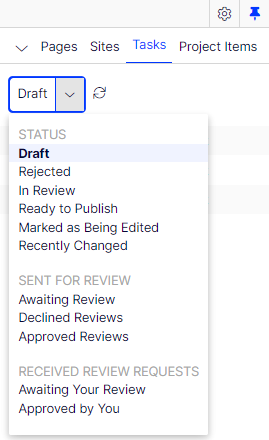
To add a query, implement IContentQuery or inherit from a base class that includes this interface (ContentQueryBase, ContentActivitiesQueryBase).
public class CustomQuery : ContentQueryBase {
  // …
}
Register the query in the IOC container under the IContentQuery type using the ServiceConfiguration attribute.
[ServiceConfiguration(typeof(IContentQuery))]
public class CustomQuery : ContentQueryBase {
  // …
}
Implement the following properties:
Name– Unique name for the query.DisplayName– Label displayed in the drop-down list. Used for grouping queries.SortOrder– Position of the query in the list.VersionSpecific– Determines whether query results are version-specific when comparing links.PluginAreas– Set toKnownContentQueryPlugInArea.EditorTasksto make the query visible in the tasks list.
public override IEnumerable<string> PlugInAreas => new string[] { KnownContentQueryPlugInArea.EditorTasks };Implement a custom query
Build a query that surfaces content matching criteria specific to your editorial process. The following example displays pages manually marked as being edited permanently.
The IInUseNotificationRepository interface provides access to in-use notifications. The GetContent method filters for manually added entries.
[ServiceConfiguration(typeof (IContentQuery))]
public class MarkAsEditedQuery: ContentQueryBase {
  private readonly IContentRepository contentRepository;
  private readonly IInUseNotificationRepository inUseNotificationRepository;

  public MarkAsEditedQuery(IContentQueryHelper queryHelper, IContentRepository contentRepository,
    IInUseNotificationRepository inUseNotificationRepository): base(contentRepository, queryHelper) {
    this.contentRepository = contentRepository;
    this.inUseNotificationRepository = inUseNotificationRepository;
  }
  public override string Name => "markedAsEdit";
  public override string DisplayName => "Marked as edit";
  public override IEnumerable<string> PlugInAreas => new string[] {
    KnownContentQueryPlugInArea.EditorTasks
  };
  public override int SortOrder => 105;
  public override bool VersionSpecific => false;
  protected override IEnumerable<IContent> GetContent(ContentQueryParameters parameters) {
    return inUseNotificationRepository.GetAllInUseNotifications()
      .Where(n => n.AddedManually)
      .Select(c => contentRepository.Get<IContent>(c.ContentGuid));
  }
}
After running the application, the query appears under the OTHERS category in the Tasks menu.
To place it under an existing category such as STATUS, add a generic type to ContentQueryBase or implement the generic IContentQuery interface.
public class MarkAsEditedQuery : ContentQueryBase<TasksStatusQueryCategory>
// or
public class MarkAsEditedQuery : ContentQueryBase, IContentQuery<TasksStatusQueryCategory>
Create custom query categories
Group related queries under a custom category to keep the Tasks panel organized. A category is a class that implements IContentQueryCategory and is registered in the IOC container under the IContentQueryCategory type using the ServiceConfiguration attribute.
[ServiceConfiguration(typeof(IContentQueryCategory), Lifecycle = ServiceInstanceScope.Singleton)]
public class AlloyQueryCategory : IContentQueryCategory {
  public string DisplayName => "Alloy tasks";
  public int SortOrder => 100;
}
The class must implement DisplayName (the visible name or a localization key) and SortOrder (the position when sorting categories). Reference AlloyQueryCategory instead of TasksStatusQueryCategory in your query's generic type.
Updated 3 months ago