
ContentType attribute
Describes the ContentType attribute, used in Optimizely to define a set of properties needed when creating content types such as pages and blocks.
Configurable properties
The ContentType attribute is required for content types. It is located in the EPiServer.DataAnnotations namespace and has the following configurable properties.
| Property | Description | Default value |
|---|---|---|
AvailableInEditMode | Defines whether content of this type is creatable in edit view. | true |
Description | Text that describes the function of the ContentType. | NULL |
DisplayName | The name shown in edit view for this ContentType. | NULL |
Order | The sort order used to determine the position of the ContentType in listings. | 100 |
GUID | Identifier for the ContentType. Matches the code definition to an existing definition in the database. | Guid.Empty |
GroupName | Name for grouping content types when displaying them for selection in edit view. | NULL |
Access
The optional Access attribute defines which users, roles, and audiences have access rights to create content of a specific type in the UI. Filtering based on this attribute is applied after ordinary access rights on content.
NoteIf the
Accessattribute is not present, any user (who has edit access) creates content of the specific type.
| Property | Description | Behavior if not specified |
|---|---|---|
Users, Roles, VisitorGroups | Defines which users, roles, and audiences have access rights. | No user has access to ContentType. |
Access | Defines the level of access to grant. | Content types support access level Create only. |
AvailableContentTypesAttribute
Use AvailableContentTypesAttribute to set which content types are available under a content instance. It has the following configurable properties.
| Property | Description | Default value |
|---|---|---|
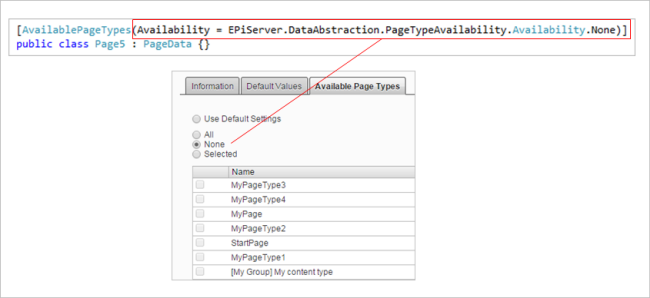
Availability | Defines whether all or no content types are available. If set to none, other settings on the attribute are ignored. | Availability.All |
Include | A type array of typed content to specify which content types are available under a content instance of the type with the attribute. | Type[0] |
Exclude | A type array of typed content to specify which content types are not available under a content instance of the type with the attribute. | Type[0] |
IncludeOn | States that the content with this attribute is available under the typed content in the type array. | Type[0] |
ExcludeOn | States that the content with this attribute is not available under any of the typed content in the type array. | Type[0] |
The types given on Include, Exclude, IncludeOn, and ExcludeOn are typed content directly, or the type of an interface or a base class. Registered types that are assignable to the specified type are included at registration. For example, if an interface is specified in an Include list, then typed pages that implement the interface are included.
Include differs from IncludeOn in the following ways:
Includeexcludes typed content except that which is specified.IncludeOndoes not exclude any content type for types that have all content types available.
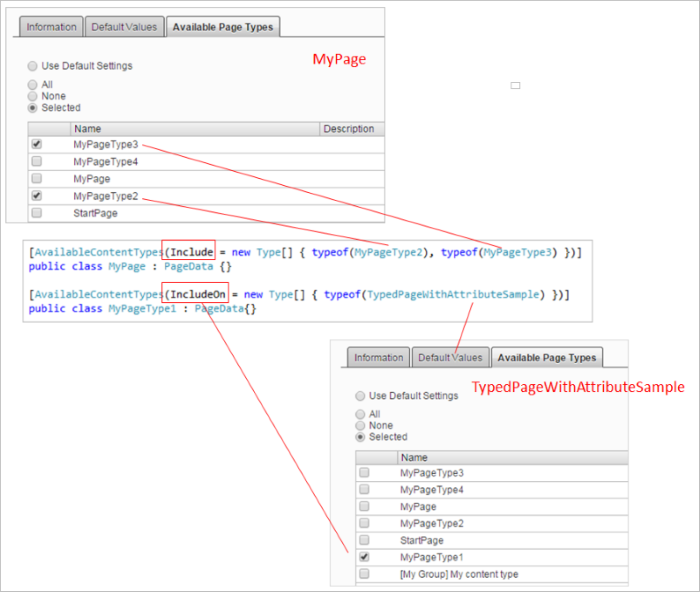
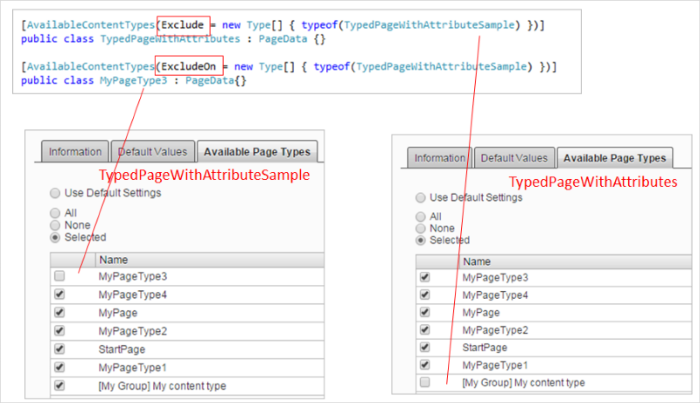
Exclude differs from ExcludeOn in the following ways:
Exclude– If types are not registered inInclude, then registered page types are available except the types in theExcludespecifications.ExcludeOn– If types are registered inInclude, then those types are available except the types in theExcludeOnspecifications.
The following image shows how Availability is mapped to settings in the admin view.
ImageUrl
Use the ImageUrl attribute to set the icon for content types. The icon is visible in the UI when creating content.
| Property | Description | Default value |
|---|---|---|
Path | The path to the icon to use for the page type. | NULL |
Updated 2 months ago