
PropertyList
Describes how to define an editable list of objects.
ImportantThis topic describes unsupported functionality for complex types in Optimizely Content Management System (CMS) that the implementing developer is responsible for validating to ensure that it works for the item types you want, because supporting complex types as list items brings a whole set of unknowns. Using
PropertyList<T>together with complex types requires additional custom functionality to fully ensure data consistency, portability and functionality. This includes, but is not limited to UI, Settings, Export/Import, Permanent link handling and default values.
Use ContentArea and Blocks for lists of complex objects. Blocks provide a much more controlled object structure for complex types. Define your list model item as a block like:
[ContentType(AvailableInEditMode = false, GUID = "38d57768-e09e-4da9-90df-54c73c61b270")]
public class ContactBlock : BlockData {
  //block properties
}
The block type then works in lists on other content models:
public virtual IList<ContactBlock> Contacts { get; set; }
PropertyList defines an editable list of objects. A Content model implements a property of type IList<T> where T is a class with property definitions.
public virtual IList<CustomItem> List{
  get;
  set;
}
Example – list of locations
Implement a list of locations using PropertyList with a custom model and editor descriptor.
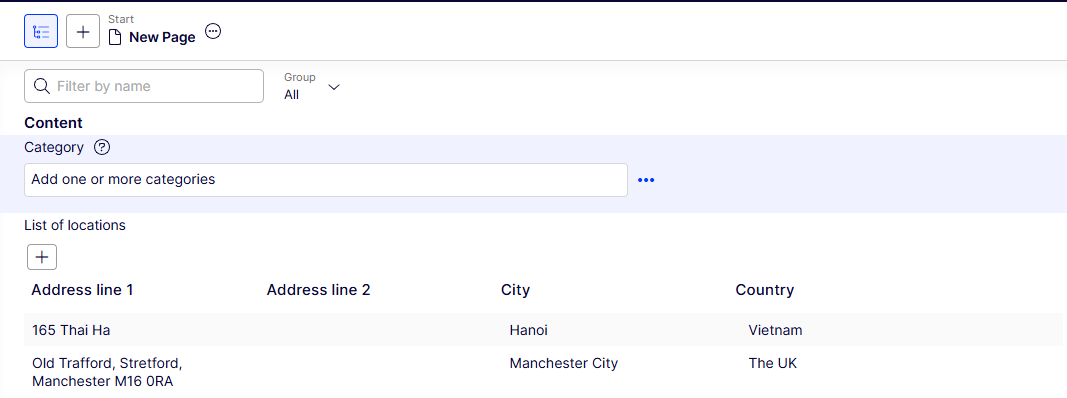
PropertyList opens a dialog window for editing items.
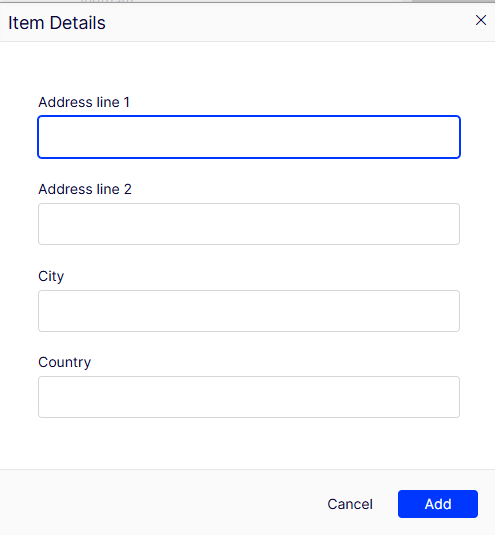
The list contains items with string properties:
- address line1
- address line 2
- city
- country
- First, define the
Locationmodel class. It will represent the property item.NoteAll custom class properties should be
virtualand have publicget,setmethods.using System.ComponentModel.DataAnnotations; namespace Site.Models.Pages { public class Location { [Display(Name = "Address line 1")] public virtual string AddressLine1 { get; set; } [Display(Name = "Address line 2")] public virtual string AddressLine2 { get; set; } public virtual string City { get; set; } public virtual string Country { get; set; } } } - Register the property definition using a custom property class
LocationsPropertythat sets the generic type to theLocationitem class:using EPiServer.DataAnnotations; namespace Site.Models.Pages { [PropertyDefinitionType] public class LocationsProperty : PropertyList<Location> { } } - Add the list of locations to the page:
using System.ComponentModel.DataAnnotations;
using EPiServer.Core;
using EPiServer.DataAnnotations;
using EPiServer.Cms.Shell.UI.ObjectEditing.EditorDescriptors;
using EPiServer.Shell.ObjectEditing;
using System.Collections.Generic;

namespace Site.Models.Pages {
  /// <summary>
  /// Page with PropertyListDefinition
  /// </summary>
  [ContentType(GUID = "2CDDC73C-83AC-4F35-BA9D-50F285723A96")]
  public class TestPage: PageData {
    [Display(Name = "List of locations")]
    [EditorDescriptor(EditorDescriptorType = typeof (CollectionEditorDescriptor<Location>))]
    public virtual IList<Location> Locations {
      get;
      set;
    }
  }
}
Localize item properties
Translate list item properties the same way as Content properties. Use the DisplayAttribute and language files to localize property labels. See Localize the user interface.
Updated 2 months ago