
Deployment scenarios
Describes common deployment scenarios.
Optimizely Content Management System (CMS) supports four deployment topologies: single-site single-server, multi-site single-server, multi-site multi-server, and cloud. Choose the topology that matches your infrastructure, security, and performance requirements. Each topology can run on-premises or in the cloud.
Use the following guide to pick a topology:
- Single-site single-server – Development environments and small production sites with one site and no horizontal scale.
- Multi-site single-server – Multiple low-traffic sites that share infrastructure on a single server.
- Multi-site multi-server – High-traffic sites that need horizontal scale across two or more web servers.
- Cloud – Elastic scale, managed infrastructure, and shared SQL Database, BLOB storage, and Service Bus.
Single site, single server
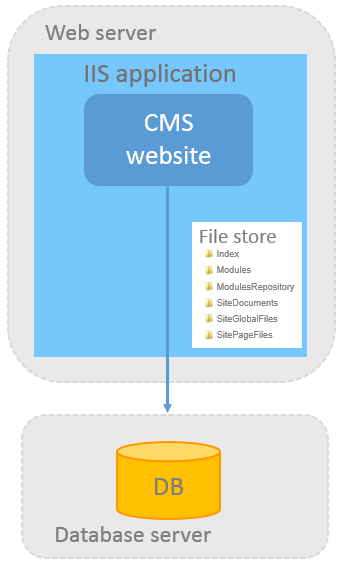
The standard CMS installation consists of one CMS site, one web server, one IIS instance, one file store, and one database. Choose this topology when you run a single site and do not need horizontal scale.
Choose between attaching the site to an existing SQL Server instance or letting the installer create a new database alongside a file store folder on the web server.
Multi-site, single server
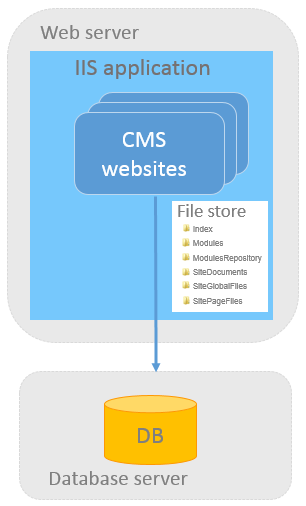
In the multi-site single-server topology, one CMS instance hosts multiple websites that share one database and one file store. Configure IIS to respond to multiple host names so the single IIS application serves each website.
If you configure the IIS application to respond to any host name, you can launch sites from the CMS admin view > Config > Manage Websites without additional configuration. Each site needs only a start page and a URL, which CMS stores in the database. CMS provisions sites automatically.
Multi-site, multi-server
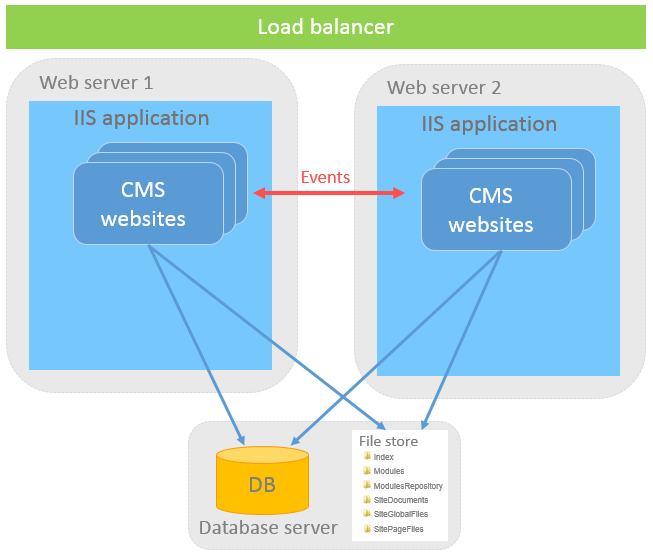
In the multi-site multi-server topology, two or more web servers run IIS behind a load balancer and share one database and one file store. Launch and provision sites from the CMS admin view > Config > Manage Websites the same way as in the single-server topology.
Load-balance CMS across multiple servers using the Optimizely event management system. When an event occurs on one server (for example, a cache invalidation notification), that server forwards the event so the other servers update their local state.
Cloud website
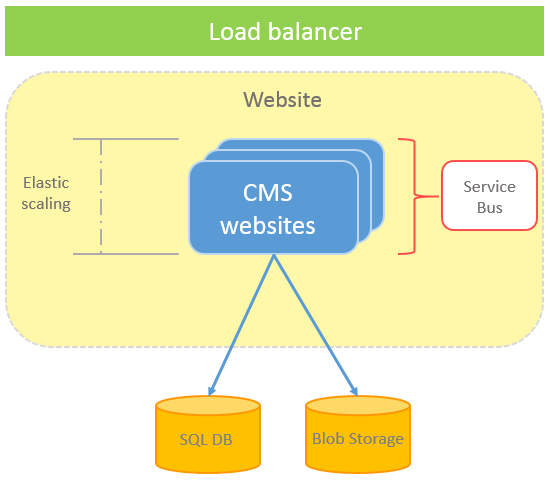
Deploy multiple CMS websites to a cloud environment with multiple instances. The CMS sites share one SQL database and one BLOB storage account for binary file data. A load balancer fronts the instances, and a Service Bus distributes events between them.
NoteCloud deployment requires that each application and module be designed for cloud use.
Updated 3 months ago