
Content templates
Describes the concept of content templates used for rendering content in Optimizely.
Templates let you apply multiple rendering options for any content and have the system decide when to use which template.
See Render content for information about rendering in CMS.
NoteThe examples in this topic are based on ASP.NET Core.
MVC controllers and views
Models, controllers, and views in MVC separate data, business logic, and presentation. The controller contains the business logic, handles URL requests, and selects the view, a visual data model presentation. In MVC, the controller is the class registered to support specific page types and serves as the template. The template defines which content types it renders in a specific context.
Create a controller and a view
To add a template controller, create an MVC controller in your project's Controllers folder. Your controller should inherit from EPiServer.Web.Mvc.ContentController<T> (or optionally EPiServer.Web.Mvc.PageController<T> for PageData instances), where T is your content model. This controller is called when an instance of the content type is routed if chosen as the renderer for the content instance.
To add the corresponding view for the controller, create a subfolder under Views and add an item of type View. Follow the standard naming conventions in MVC for your model, controllers, and views.
A page controller base class lets multiple pages reuse logic, which holds logic for a logout action, and inherits from PageController. Add a view model to include more than page objects in the views. (View model is not used in these examples to keep them simpler.)
To render properties, use tag helpers in MVC, for example, epi-property, which renders property values based on their property type.
The following example uses the content types created in Content types. The controller displays the Article page type, inheriting from PageControllerBase.
namespace Alloy.Mvc._1.Controllers;

public class StartPageController : PageControllerBase<StartPage>
{
    public IActionResult Index(StartPage currentPage)
    {
        var model = PageViewModel.Create(currentPage);

        // Check if it is the StartPage or just a page of the StartPage type.
        if (ContentReference.StartPage.CompareToIgnoreWorkID(currentPage.ContentLink))
        {
            // Connect the view models logotype property to the start page's to make it editable
            var editHints = ViewData.GetEditHints<PageViewModel<StartPage>, StartPage>();
            editHints.AddConnection(m => m.Layout.Logotype, p => p.SiteLogotype);
            editHints.AddConnection(m => m.Layout.ProductPages, p => p.ProductPageLinks);
            editHints.AddConnection(m => m.Layout.CompanyInformationPages, p => p.CompanyInformationPageLinks);
            editHints.AddConnection(m => m.Layout.NewsPages, p => p.NewsPageLinks);
            editHints.AddConnection(m => m.Layout.CustomerZonePages, p => p.CustomerZonePageLinks);
        }

        return View(model);
    }
}
The following example shows the page controller base, inheriting from PageController, and with SitePageData as generic type.
namespace Alloy.Mvc._1.Controllers;

/// <summary>
/// All controllers that renders pages should inherit from this class so that we can
/// apply action filters, such as for output caching site wide, should we want to.
/// </summary>
public abstract class PageControllerBase<T> : PageController<T>, IModifyLayout
    where T : SitePageData
{
    protected readonly Injected<UISignInManager> UISignInManager;

    /// <summary>
    /// Signs out the current user and redirects to the Index action of the same controller.
    /// </summary>
    /// <remarks>
    /// There's a log out link in the footer which should redirect the user to the same page.
    /// As we don't have a specific user/account/login controller but rely on the login URL for
    /// forms authentication for login functionality we add an action for logging out to all
    /// controllers inheriting from this class.
    /// </remarks>
    public async Task<IActionResult> Logout()
    {
        await UISignInManager.Service.SignOutAsync();
        return Redirect(HttpContext.RequestServices.GetService<UrlResolver>().GetUrl(PageContext.ContentLink, PageContext.LanguageID));
    }

    public virtual void ModifyLayout(LayoutModel layoutModel)
    {
        if (PageContext.Content is SitePageData page)
        {
            layoutModel.HideHeader = page.HideSiteHeader;
            layoutModel.HideFooter = page.HideSiteFooter;
        }
    }
}
The following example shows the corresponding rendering view for displaying the Article page.
<div class="start">
    <div epi-property="@Model.CurrentPage.MainContentArea" class="row">
        <div epi-property-item class="block" epi-on-item-rendered="OnItemRendered" />
    </div>
</div>
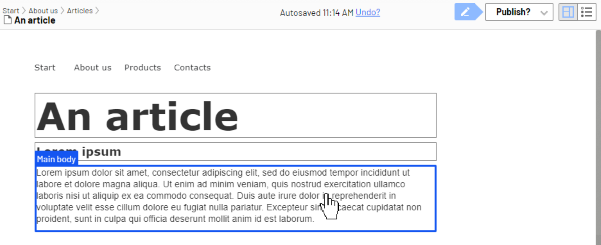
With the added rendering using Html.PropertyFor, edit the property in the On-page editing page.
Create a Razor page
Razor Pages provide an alternative to controllers and views for rendering content requests.
Using controllers and views to render requests is an alternative to using Razor Pages. A Razor Page consists of two different files (similar to a controller and a view): one Razor Page file with extension .cshtml and a corresponding page model file with extension .cshtml.cs. This separates the logic of a page from its presentation.
To add a template as a Razor Page, create a Razor Page in the Pages folder in your project. Your page model should inherit from EPiServer.Web.Mvc.RazorPageModel<T>, where T is your content model. This Razor Page is called when an instance of the content type is routed to, if chosen as the renderer for the content instance.
To render properties, use HTML helpers in MVC, for example, epi-property, which renders property values based on their property type. HTML helpers are described more below.
The following example uses the content types created in section Content types. The Razor Page displays the Article page type, where page model inherits from RazorPageModel<ArticlePage>.
namespace OptiAlloy.Models.Pages;

/// <summary>
/// Used primarily for publishing news articles on the website
/// </summary>
[ContentType(
    GroupName = Globals.GroupNames.News,
    GUID = "AEECADF2-3E89-4117-ADEB-F8D43565D2F4")]
[ImageUrl(Globals.StaticGraphicsFolderPath + "page-type-thumbnail-article.png")]
public class ArticlePage : StandardPage
{
    public override void SetDefaultValues(ContentType contentType)
    {
        base.SetDefaultValues(contentType);

        VisibleInMenu = false;
    }
}

namespace Alloy.Mvc._1.Models.ViewModels;

public class PageViewModel<T>(T currentPage) : IPageViewModel<T> where T : SitePageData
{
    public T CurrentPage { get; private set; } = currentPage;

    public LayoutModel Layout { get; set; }

    public IContent Section { get; set; }
}

public static class PageViewModel
{
    /// <summary>
    /// Returns a PageViewModel of type <typeparam name="T"/>.
    /// </summary>
    /// <remarks>
    /// Convenience method for creating PageViewModels without having to specify the type as methods can use type inference while constructors cannot.
    /// </remarks>
    public static PageViewModel<T> Create<T>(T page)
        where T : SitePageData => new(page);
}
The following example shows the corresponding rendering view for displaying the Article page.
@inherits Alloy.Mvc._1.Views.AlloyPageBase<PageViewModel<Alloy.Mvc._1.Models.Pages.StartPage>>

<div class="start">
    <div epi-property="@Model.CurrentPage.MainContentArea" class="row">
        <div epi-property-item class="block" epi-on-item-rendered="OnItemRendered" />
    </div>
</div>
Block components and views
Block components and views control how blocks are rendered on the front end.
In MVC, the rendering of blocks is done by using view components or views and associated templates, similar to the way pages are rendered. Use a block component if some logic needs to be applied when the block is rendered. Otherwise, use a partial view.
- Create a view component that inherits from
EPiServer.Web.Mvc.BlockComponent<TBlockData>orEPiServer.Web.Mvc.AsyncBlockComponent<TBlockData>, where TBlockData is your block type. The system calls this view component for the block type if it is chosen as the renderer of the current block instance.EPiServer.Web.Mvc.BlockComponent<TBlockData>has an implementation of the methodInvoke, which calls a partial view according to the MVC conventions that apply to view components. - Create a partial view without a view component, naming the view the same as the block type. If the view is chosen as the renderer of the block type, the view is called with the block instance directly, without controller involvement. Render blocks with this approach.
Create a block component
To add a template for a block as a view component, create a ViewComponent in the Components folder in your project. Your component model should inherit from EPiServer.Web.Mvc.BlockComponent<TBlockData> or EPiServer.Web.Mvc.AsyncBlockComponent<TBlockData>.
To add the corresponding view for the view component, create a view following the convention /Views/Shared/Components/{View Component Name}/Default.cshtml.
The following example shows the view component for a block:
namespace AlloyTemplates.Components {
  public class PageListBlockViewComponent: BlockComponent<PageListBlock> {
    private readonly IContentLoader _contentLoader;
    public PageListBlockViewComponent(IContentLoader contentLoader) {
      _contentLoader = contentLoader;
    }

    protected override IViewComponentResult InvokeComponent(PageListBlock currentBlock) {
      var model = new PageListModel(currentBlock) {
        Pages = _contentLoader.GetChildren<PageData>(currentBlock.Root, new LoaderOptions(), 0, currentBlock.Count)
      };

      return View(model);
    }
  }
}
The following example shows the view for the PageListBlock view component:
@using OptiAlloy.Business.Rendering
@model PageListModel
@inject IThemeService ThemeService

@{
    var isAside = ViewData["Aside"] != null && (bool)ViewData["Aside"];
}

<h2 epi-property="@Model.Heading">@Model.Heading</h2>

@foreach (var page in Model.Pages)
{
    var themeClasses = page is ICategorizable categorizable ? ThemeService.GetThemeCssClassNames(categorizable) : Array.Empty<string>();

    if (isAside)
    {
        <div class="listResult @string.Join(" ", themeClasses)">
            <h4>@(page.Name)</h4>

            @if (Model.ShowPublishDate && page.StartPublish.HasValue)
            {
                <p class="small date">@Html.DisplayFor(x => page.StartPublish)</p>
            }

            @if (Model.ShowIntroduction && page is SitePageData teaserPage)
            {
                <p>@teaserPage.TeaserText</p>
            }

            <a href="@Url.PageLinkUrl(page)" class="btn btn-primary">Read more</a>
        </div>
    }
    else
    {
        <div class="archive-item mb-3 @string.Join(" ", themeClasses)">
            <a href="@Url.PageLinkUrl(page)">
                <div class="row">
                    <div class="col-4">
                        @if (page is SitePageData sitePage && sitePage.PageImage != null)
                        {
                            <img epi-property="@sitePage.PageImage" alt="@sitePage.Name" />
                        }
                        else
                        {
                            <div class="placeholder"></div>
                        }
                    </div>
                    <div class="col-8 col-xl-6">
                        <h3>@(page.Name)</h3>
                        @if (Model.ShowPublishDate && page.StartPublish.HasValue)
                        {
                            <p class="small date">@Html.DisplayFor(x => page.StartPublish)</p>
                        }
                        @if (Model.ShowIntroduction && page is SitePageData teaserPage)
                        {
                            <p>@(teaserPage.TeaserText ?? teaserPage.MetaDescription)</p>
                        }
                    </div>
                </div>
            </a>
        </div>
    }
}
Create a partial view
In Visual Studio, add a partial view with the same name as your block type and, based on your block model class, to the Views/Shared folder of your project.
The following example shows the partial view for the TeaserBlock block type, displaying a heading and an image.
@model MyOptimizelySite.Models.Blocks.TeaserBlock

  <div>
    <h2 epi-property="@Model.Heading"></h2>
    <img epi-property="@Model.Image" />
  </div>
Partial templates
Partial templates extend content rendering beyond blocks, letting pages and other content types display in content areas.
Content types other than blocks (for example, pages) also have associated partial templates (view components or partial views). These are used if the content item is added to a ContentArea. As for block templates, partial templates for other content types are also view components or partial views. If view components are used, then the base class should be EPiServer.Web.Mvc.PartialContentComponent<TContentData> or EPiServer.Web.Mvc.AsyncPartialContentComponent<TContentData>.
Endpoint templates
Endpoint templates let you map content rendering to ASP.NET Core endpoints, giving you full control over request handling for specific content types.
In addition to MVC controllers and Razor Pages, you also add a template mapping to an endpoint. For example, content media requests in CMS are handled through an endpoint template. Custom-content endpoints that serve content need to add a ContentActionDescriptor to the endpoint metadata. Also add the policies for CmsPolicyNames.Read and CmsPolicyNames.Preview to ensure access rights are checked.
The following example shows a custom endpoint template for PDF files that adds a header to the response.
[TemplateDescriptor(Inherited = true, TemplateTypeCategory = TemplateTypeCategories.HttpHandler)]
public class PdfEndpoint: Endpoint, IRenderTemplate<PdfFile> {
  private readonly static ContentActionDescriptor _mediaContentActionDescriptor = new ContentActionDescriptor {
    Inherited = true, ModelType = typeof (PdfFile)
  };
  private static readonly AuthorizeAttribute _authorizeAttribute = new AuthorizeAttribute(CmsPolicyNames.Read);
  private static readonly AuthorizeAttribute _previewAttribute = new AuthorizeAttribute(CmsPolicyNames.Preview);

  public PdfEndpoint(IBlobHttpHandler blobHttpHandler): base(context => ProcessRequest(blobHttpHandler, context),
    new EndpointMetadataCollection(_mediaContentActionDescriptor, _authorizeAttribute, _previewAttribute), nameof(PdfEndpoint)) {}

  private static Task ProcessRequest(IBlobHttpHandler blobHttpHandler, HttpContext context) {
    context.Response.Headers.Add("Content-Disposition", "attachment");
    return blobHttpHandler.Invoke(context);
  }
}
The example above sets a header for a media request. Even though custom endpoints for media are supported, in many cases, it is easier to extend the default media handling by registering an implementation of IStaticFilePreProcessor.
The following example shows a custom pre-processor that adds a header to the response for PDF requests.
public class PdfStaticFilePreProcessor: IStaticFilePreProcessor {
  //The built-in pre processor that handles MediaOptions has order 0, run after that
  public int Order => 10;

  public void PrepareResponse(StaticFileResponseContext staticFileResponseContext) {
    if (staticFileResponseContext.Context.Response.ContentType == "application/pdf") {
      staticFileResponseContext.Context.Response.Headers.Add("Content-Disposition", "attachment");
    }
  }
}
The static file pre-processor is registered using MediaOptions, like:
services.Configure<MediaOptions>(o => o.AddPreProcessor<PdfStaticFilePreProcessor>());Model binding
Model binding automatically connects routed content to controller parameters and page models, reducing boilerplate code.
If an MVC controller has a parameter that is a content instance, then CMS automatically binds the routed content to the parameter. See the Action method on ArticleController above. For Razor Pages, the routed content is bound to the property RazorPageModel<T>.CurrentContent. See usage in ArticleModel above. For view components, the current content is passed as arguments for arguments named currentContent or currentBlock.
HTML helpers
HTML helpers provide Optimizely-specific rendering capabilities as an alternative to Html.PropertyFor.
There are helpers for rendering links, content areas, translations, and navigation. These HTML helpers are called through Html.DisplayFor, but they are also available directly.
Tag helpers
Tag helpers offer an HTML-attribute-based alternative to Html.PropertyFor for rendering Optimizely content properties.
There are helpers for rendering links, content areas, translations, and navigation. These HTML helpers are called through Html.DisplayFor, but they are also available directly.
Templates
Templates define how content is rendered. The template (controller, partial view, and so on) selected to render a content instance depends on the specific context. Use the TemplateDescriptor attribute to add metadata and define default templates, and tags to define which template to use. Based on this information, and any defined display channels and display options settings, the TemplateResolver decides which template to use in a specific context. If you are using partial views and no view component for partial templates, the TemplateDescriptor is not applicable. Instead, implement the IViewTemplateModelRegistrator interface to register templates. See Render content and the CMS sample site for examples.
Shared blocks folders
Shared blocks folders organize reusable block instances into a structured hierarchy for editorial access control.
As previously mentioned, shared blocks are stored, loaded, and versioned individually as an entity in the database. Shared blocks are structured using folders, and a folder is an instance of EPiServer.Core.ContentFolder. Content folders do not have associated rendering and therefore no visual appearance on the website.
A folder in the shared blocks structure has other folders or shared blocks as children, and a shared block cannot have any children.
Set editorial access on folders to specify which folders are available for an editor. The global folder root EPiServer.Web.SiteDefinition.Current.GlobalAssetsRoot is the root folder for shared blocks available for sites in an enterprise scenario. There is a site-specific folder EPiServer.Web.SiteDefinition.Current.SiteAssetsRoot, containing the folder structure for shared blocks. GlobalBlocksRoot and SiteBlocksRoot typically point to the same folder in a single-site scenario.
Updated 2 months ago