
Structure the website
Learn to structure your website effectively with Optimizely CMS 13. Organize content, define navigation, and optimize site hierarchy for better user experience.
Optimizely Content Management System (CMS) organizes website content in a page tree structure, accessible in edit view from Pages. The root page sits at the top, with one or more start pages beneath it. The page structure determines the navigation menus by default. Limit the submenu structure to three levels to keep navigation manageable.
Move a page
Drag and drop a page to move it, or select Cut from the context menu and then select Paste on the destination page. Keyboard commands also work: CTRL+X to cut (Mac: CMD+X) and CTRL+V to paste (Mac: CMD+V).
NoteWhen you move a page, CMS redirects internal links to the new location. External links pointing to the moved page break.
Copy a page
Hold Ctrl (Windows) or Option (Mac) and drag a page to copy it. Alternatively, select Copy from the context menu, then select Paste on the destination page. Keyboard commands: Ctrl+C (Windows) or Cmd+C (Mac) to copy, and Ctrl+V (Windows) or Cmd+V (Mac) to paste.
CMS copies subpages and associated media files in local page folders. Links point to the new copy. Settings such as dynamic properties and categories transfer with the copied page.
NoteWhen you copy and paste a page under the same node, the Name in URL property of the copied page is typically named Name in URL1, which you need to change after copying.
Remove content
CMS moves removed folders, pages, blocks, and media files to the trash. They are not publicly available on the website. Update any links to removed content. Removing a page also removes all underlying pages. See Delete and restore content.
Sort page order in menus
Control the display order of pages in navigation menus by configuring sort order on each branch. By default, CMS places the most recently created page at the top of the tree structure (for example, in news listings). Other sort options include alphabetical order and sort index.
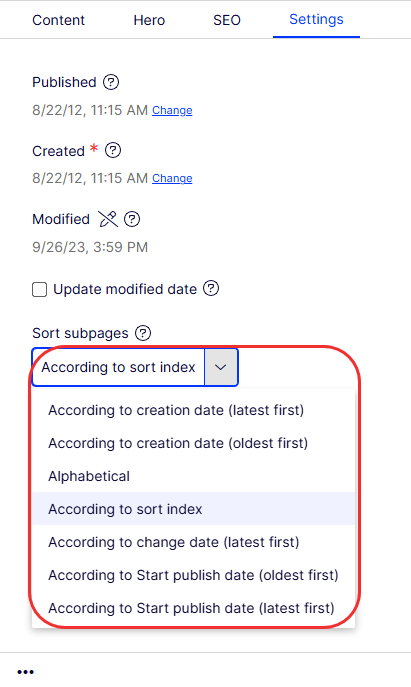
Set the sort order on the parent page of a branch. Subpages inherit the setting.
- Select the parent page of the branch where you want to configure sorting.
- Open the page for editing and select the Settings tab.
- Select sorting criteria from Sort subpages.
- Publish the page to apply the changes.
Sort according to the sort index
Select the According to sort index option on the parent page to control the exact order of child pages. Assign each child page a unique sort index number. CMS sorts pages in ascending order, with the lowest number at the top.
Drag a page and drop it at the desired position to reorder it. Drag-and-drop sorting applies only to branches that use the sort index.
- If you move a page into a branch that does not use sort index sorting, CMS prompts you to apply the sort index as the sort order for that branch. Click OK to confirm. CMS recalculates the sort index to match the new position.
- If you drop a page under a different parent page that uses sort index sorting, CMS moves, copies, and sorts the page. The page remains where you dropped it.
NoteThe pages you move are saved again, meaning you must have publishing rights to use drag and drop for sorting. You also must have publishing rights for the page branch with a sort index to which you move a page.
Sort according to sort index manually
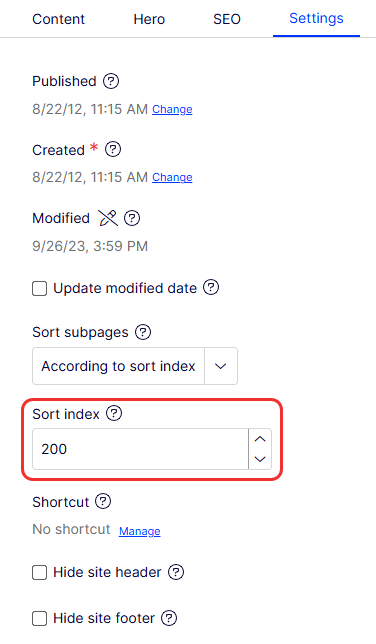
To set the sort index manually, open a child page for editing, select the Settings tab, and change the number in the Sort index field. The sort index number must be an integer. Use multiples of 10 or 100 so you can insert pages between existing ones. Publish the page to apply the change.
Updated 2 months ago