
Deploy CMS 13
Describes services and setup options to deploy and scale Optimizely Content Management System (CMS) sites. It is intended for hosting professionals and partner developers who configure and deploy CMS sites in different infrastructure environments.
Optimizely Content Management System (CMS) 13 is built on ASP.NET Core, so you can deploy it on Linux and macOS as well as Windows.
Deploy CMS sites to distributed infrastructure with failover protection for availability and scalability. CMS is multi-tenant: a single IIS application can host multiple websites that share a database. Sites can share content, and you can launch websites from the CMS admin view.
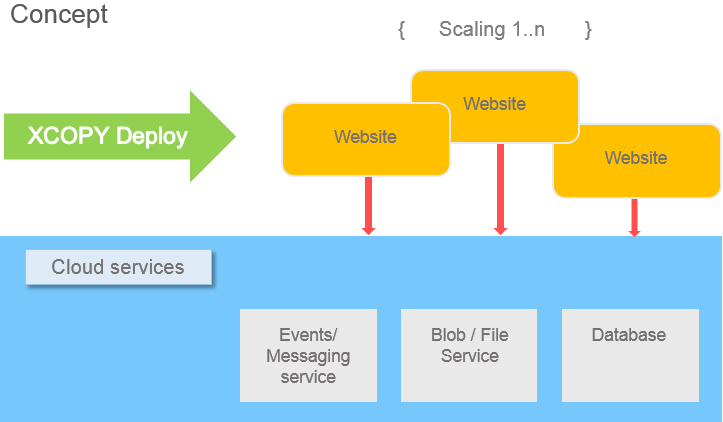
Maintain one installation and deploy it to multiple servers that host the websites. Elastic scaling lets you add and remove servers on demand to scale capacity up or down. CMS provides services that simplify cloud deployment, including event management and BLOB storage providers.
Multi-site configuration and deployment scenarios
A multi-site configuration is one in which websites in CMS share a file structure on the web server and a database for storage. Sites in a multi-site configuration can share content assets such as media files and blocks. Each site can also keep site-specific folders for content that does not belong on the shared sites.
The Media tab displays the following folders:
- For all sites
- For this site
- For this page
Because CMS is multi-tenant, you can:
- Run your websites on the same IIS application or the same server, as long as you configure IIS to respond to multiple host names.
- Launch sites from the CMS admin view without additional configuration if the IIS site or server is configured to respond to any host name.
- Remove sites when they are no longer needed, which reduces the infrastructure cost of unused sites.
- Isolate sites on separate IIS applications or servers when you have specific security or performance requirements. In that case, configure the site outside Optimizely.
Deploy using XCOPY
Install CMS through XCOPY deployment by copying application files. XCOPY-style file transfer simplifies deployment and maintenance because it does not create registry entries or register shared components. Azure Web Sites is one example of XCOPY-style hosting: the platform provides a directory and does not allow an installation procedure.
The XCOPY architecture in CMS also avoids storing machine-specific or site-specific information in configuration files, so you can use a shared folder across multiple servers. In a shared development environment with source control, developers can keep configuration files checked in and still build a site that you can duplicate in a multi-site deployment. Because CMS is built on ASP.NET Core, you can produce the XCOPY files using standard .NET publish commands.
See also the following deployment scenarios.
Cloud providers
Event providers
The event management system distributes events between applications on the same server and across Optimizely sites on separate servers in a load-balanced environment. Optimizely uses a provider-based design: use the included event provider or implement a custom one. See Event management.
BLOB providers
The Optimizely platform supports BLOB (binary large object) storage of assets through a provider-based configuration. The BLOB provider stores the media binary data (for example, in cloud storage), while CMS stores the metadata in the database. Use the included BLOB provider for media files or implement a custom one. See BLOB storage and providers.
Database
When you use cloud services, the database can be an on-premises SQL database, an Amazon RDS instance, or an Azure SQL Database. You define the site database during deployment; see Install database schema.
License file
The license file lists the servers and sites covered by your license. Optimizely supports several licensing options. You can run Optimizely without a license file in IIS Express during local development or in a local Linux Docker container. A license file is required when you deploy the solution to a server.
NoteMirroring applies to CMS 10 and 11 only and is not supported on Optimizely Digital Experience Platform (DXP) or other cloud deployments. Mirroring is a legacy feature that Optimizely will remove in a future release.
Updated about 2 months ago