
Configure the DAM asset picker for CMS 13
Manage asset types and select a DAM instance to enable asset tracking and embedding features
Configure the Digital Asset Management (DAM) integration to manage asset types, track asset usage, and deliver DAM content through Optimizely Graph in CMS 13.
Contact Support to integrate Optimizely DAM and Optimizely Graph with CMS 13. For details, see Enable Graph service to sync DAM and CMS. After the integration is complete, manage available asset types through the Optimizely DAM Features page. Select Activate this feature for each asset type, then click Save.
Configure DAM
Install and register the DAM integration package to enable DAM features in your CMS 13 project.
- Add the following NuGet package to your project:
EPiServer.Cms.DamIntegration.UI - Register the DAM UI service in
Startup.cs:services.AddDamUI(); - Add the following import to
Views/_ViewImports.cshtmlto enable DAM HTML helpers such asRenderTagWithMetadata(...):@using EPiServer.Cms.DamIntegration.UI.Helpers - Add the following configuration to
appsettings.json. Find your SSO ID under Settings > Organization > General in Content Marketing Platform (CMP)."Optimizely": { "Cms": { "DamUI": { "Endpoint": "https://cmp.optimizely.com", "SsoId": "YOUR_SSO_ID", "NavigationUrl": "https://cmp.optimizely.com/cloud/library" } }, "Cmp": { "Client": { "TokenUrl": "https://accounts.cmp.optimizely.com/o/oauth2/v1/token", "ApiUrl": "https://api.cmp.optimizely.com/v3/", "ClientId": "YOUR_CLIENT_ID", "ClientSecret": "YOUR_CLIENT_SECRET" } } } - Apply the
UIHint.Imagehint toContentReferenceproperties that reference DAM assets:[UIHint(UIHint.Image)] public virtual ContentReference Image { get; set; }
Select a DAM instance
Link your CMS to a DAM instance to track asset usage and embed the DAM library in the CMS editor. Selecting a DAM instance enables the following features:
- Asset tracking – Tracks which assets from CMP are used in CMS. This information is visible in the Asset usage view in CMP.
- Embeddable DAM – Adds a DAM option to the CMS Edit menu for inserting assets from Optimizely DAM.
To select a DAM instance:
-
Go to Settings > Optimizely DAM Features.
-
Select a DAM instance from the Instance drop-down list in the Select DAM Instance section.
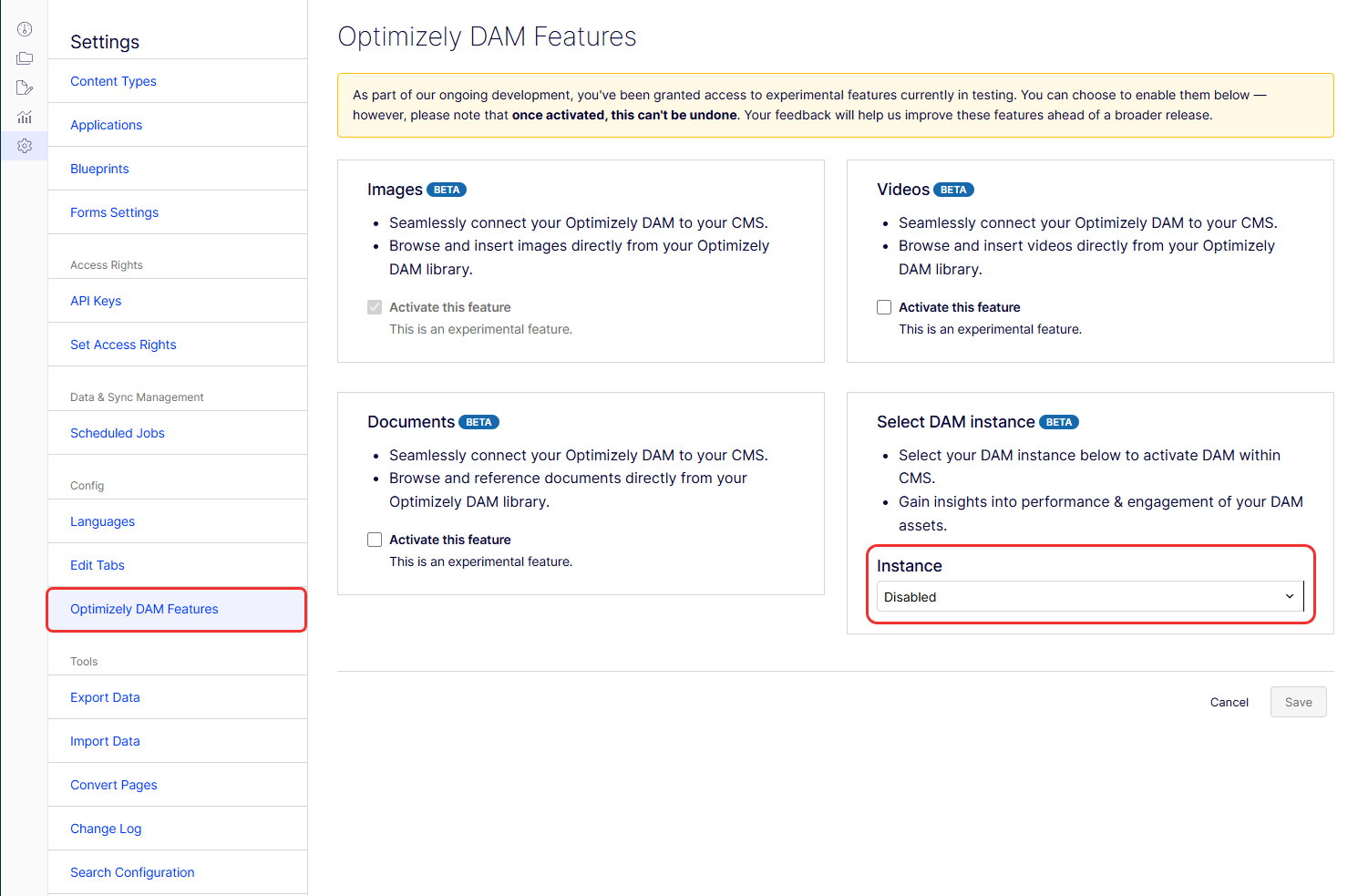
-
Click Save.
Deliver DAM assets to the front end
Optimizely Graph delivers CMS 13 content and DAM assets to your front-end application. The integration uses External Sources to index DAM assets into the Optimizely Graph instance connected to your CMS. Optimizely Graph queries for CMS content return DAM asset data in the same response, eliminating additional lookups.
Query example of CMS and DAM content
The following query retrieves an Example content type page with three ContentReference properties: MainImage, Video, and Pdf. The query returns a combined result of CMS and DAM data.
Video and Pdf are ContentReference properties without a specified item type. MainImage has item type cmp_PublicImageAsset specified, so it does not require projection or casting in the query.
query PageWithAssetsQuery {
  Example(
    where: { _metadata: { key: { eq: "303ddcad1b7c4895a730abbb0730a677" } } }
  ) {
    items {
      _id
      Title
      MainImage {
        url {
          graph
        }
        item {
           Id
           Url
           Title
        }
      }
      Video {
        item {
          ... on cmp_PublicVideoAsset {
            Id
            Url
            Title
          }
        }
      }
      Pdf {
        item {
          ... on cmp_PublicRawFileAsset {
            Id
            Url
            Title
          }
        }
      }
    }
  }
}
The query returns the following response:
{
  "data": {
    "Example": {
      "items": [
        {
          "_id": "303ddcad-1b7c-4895-a730-abbb0730a677_en_Published",
          "Title": "This CMS is the page title",
          "MainImage": {
            "url": {
              "graph": "graph://cmp/cmp_PublicImageAsset/9e12db58114f11f09358feebe22be741"
            },
            "item": {
              "Id": "c010ae43a6d648319b8e8dd97efe7948",
              "Url": "https://images1.cmp.optimizely.com/Zz1jMDEwYWU0My1hNmQ2LTQ4MzEtOWI4ZS04ZGQ5N2VmZTc5NDg=",
              "Title": "Example DAM image asset"
            }
          },
          "Video": {
            "item": {
              "Id": "e59ca3d8308740d5960e8f0ef2663a14",
              "Url": "https://fehcwm.files.cmp.optimizely.com/download/e59ca3d8308740d5960e8f0ef2663a14",
              "Title": "Example DAM video asset"
            }
          },
          "Other": {
            "item": {
              "Id": "5ace995264a94742a577f17ef76ea64d",
              "Url": "https://fehcwm.files.cmp.optimizely.com/download/5ace995264a94742a577f17ef76ea64d",
              "Title": "Example DAM Pdf asset"
            }
          }
        }
      ]
    }
  },
  "extensions": {
    "correlationId": "94d8440bb95b1a2c",
    "cost": 75,
    "costSummary": [
      "Example(75) = limit(20) + fields(3) + basicFilter(1)*2 + links(1)*50"
    ]
  }
}
Export and import across instances
When you transfer content between CMS instances, DAM asset references do not transfer.
ImportantExporting content that uses DAM assets from one CMS instance and importing it into another is not supported.
Migrate from CMS 12 DAM integration
A migration package converts CMS 12 DAM integrations to the CMS 13 format. The initial release supports ContentReference and IList<ContentReference> properties.
Updated 2 months ago