
Migrate apps to ASP.NET Core
Describes how to migrate apps (add-ons) to ASP.NET Core.
Migrate your CMS apps to ASP.NET Core to take advantage of cross-platform hosting, improved performance, and the ASP.NET Core middleware pipeline.
Microsoft has the following guidelines for migrating to ASP.NET Core: Overview of porting from .NET Framework to ASP.NET Core.
If your app contains views, configure the assembly for precompiled views by changing the SDK type for the project to Razor as:
<Project Sdk="Microsoft.NET.Sdk.Razor">Also add the following property to the .csproj file:
<AddRazorSupportForMvc>true</AddRazorSupportForMvc>Views locations
Store your app's views in the correct folder to avoid collisions with the host website's view locations.
To avoid collisions in view locations with the partner website, store the views for the app under a custom folder in the project. If not specified, the default convention is that views are stored under a top folder <AddonName>.Views, like the following:
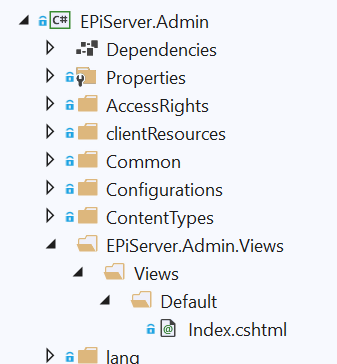
Specify viewFolder in module.config:
<module viewFolder="CmsUIViews" ...In that case, the views in the project should look like this:
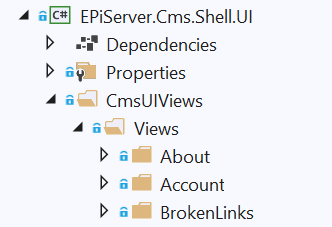
Precompiled views
Distribute precompiled views in an assembly to avoid runtime compilation dependencies and reduce conflicts with other apps.
A shell module or app can have views that are distributed as content together with the module or app, and then at runtime, the views are located through an IFileProvider (previously VirtualPathProvider). Views located and compiled at runtime are still supported, but the application must enable runtime compilation. The modules or app should precompile the views and distribute them in an assembly (typically named <addon>.Views.dll) instead.
To avoid the risk of view conflicts with applications or other apps, Optimizely Content Management System (CMS) 13 adds, by default, a view location expander that searches for views in the location <moduleName>.Views/Views. The viewFolder attribute in module.config provides an alternative location.
Access rights
Control access to your app's endpoints by configuring authorization policies in module.config.
Previously, shell modules were protected by a configuration for the shell location in web.config (typically path /EPiServer). Instead, each endpoint registered for a shell module is associated with a policy.
Specify the policy to use for the module through the authorizationPolicy attribute in module.config. If you do not specify a value for authorizationPolicy, a module's endpoints are registered with ShellModule.DefaultShellModulePolicy, which requires that the user is part of any of the following roles: WebEditors, WebAdmins, CmsAdmins, or Administrators.
JSON serialization
Control how your app serializes and deserializes JSON data to avoid conflicts with the host application's serializer configuration.
In an ASP.NET Core application, a global serializer is registered (by default from System.Text.Json, but you can configure it as NewtonSoft). Use the global serializer for model binding of posted data when you use the [FromBody] attribute and when data is returned using OK result, or automatic IActionResult conversion.
Do not rely on the global serializer for apps or modules, because the end application configures it differently (such as Pascal or camel-casing). Let each module register its preferred serializer.
If no configuration is needed, it can be specified in module.config using the moduleJsonSerializerType attribute.
- Enter the Net value to specify the built-in serializer in .NET core.
- Enter Newtonsoft to use
Newtonsoft.Json. - If the module or app requires a custom configuration, then it can set a None value and instead call the extension method (to
IServiceCollection),UseSystemTextJsonSerialization, orUseNewtonsoftSerialization.
The extension methods let the serializer have a custom configuration. Register a serializer per assembly or override per type.
Updated 2 months ago