
Use menu providers
Describes how to use menu providers that are organized in a tree according to their menu path.
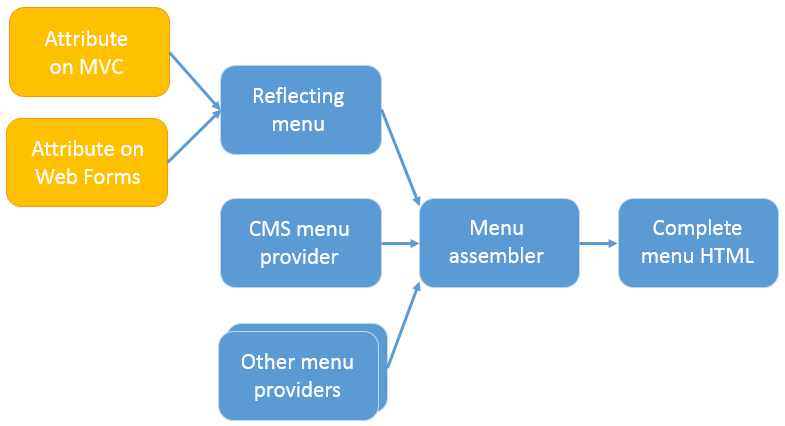
Menu providers give you full control over which items appear in the navigation and how they are localized and secured. A menu provider returns an enumeration of menu items organized in a tree according to their menu path. Content Management System (CMS) includes a built-in provider that reads [MenuItem] attributes and exposes them as menu items.
IMenuProvider
Extend the standard menu by implementing a menu provider as an alternative to the [MenuItem] attribute. A menu provider returns localized menu items and supports both sync and async retrieval. To create one, implement the IMenuProvider interface, decorate the class with [MenuProvider], and include it in a registered shell module.
The interface exposes two retrieval methods:
GetMenuItems()– ReturnsIEnumerable<MenuItem>. Suitable for simple providers.GetMenuItemsAsync(CancellationToken)– ReturnsIAsyncEnumerable<MenuItem>. Use when menu item construction requires async operations. The framework calls this method exclusively. The default implementation wrapsGetMenuItems()for backward compatibility.
NoteA menu provider must be part of a registered shell module. If the assembly containing the menu provider is not registered, the application throws errors such as
Unable to find module by assembly.
Add menu items
Define the structure and behavior of your menu by adding sections, drop-down lists, and URL links. Each menu item defines a path that determines its location in the menu hierarchy. For example, a URL menu item with path /global/cms/myMenu is placed in the CMS section (path /global/cms). To add siblings to CMS, place the item under /global instead, for example /global/mymodule.
The following item types are available:
- URL Menu Item – Links to a specified URL.
- Section Menu Item – Top-level menu sections that change the visible menu items.
- Drop-Down Menu Item – Drop-down list items designed for the action item area.
The following example adds a URL menu item to the CMS section:
[MenuProvider]
public class CmsMenuProvider : IMenuProvider
{
    public IEnumerable<MenuItem> GetMenuItems()
    {
        var menuItems = new List<MenuItem>();
        menuItems.Add(new UrlMenuItem("Another link to Admin",
            MenuPaths.Global + "/cms/cmsMenuItem",
            Paths.ToResource(GetType(), "default"))
        {
            SortIndex = SortIndex.First + 25,
            AuthorizationPolicy = CmsPolicyNames.CmsAdmin
        });

        return menuItems;
    }
}
Localize menu items with a menu provider
Return localized menu items directly from the provider to display translated text based on the editor's language.
Permissions with the menu provider
Restrict menu item visibility by setting AuthorizationPolicy on each item. The policy controls which authorization rule must pass for the item to appear. Alternatively, set the IsAvailable delegate to a method that checks access using the HttpContext parameter.
Flow of menu items
Menu items flow from providers into a hierarchical model rendered into HTML.
Configure NavigationOptions
Add menu items without writing C# code by configuring NavigationOptions in appSettings.json. The following sample creates a top-level menu section. The first menu item in a section is selected by default, so an endpoint must serve the view for that item. The view must use the shared CommonLayout.cshtml to render the navigation (see Upgrade global navigation menu).
{
  "EPiServer": {
    "CmsUI": {
      "Navigation": {
        "Items": [
          {
            "Text": "My module",
            "MenuItemType": "Section",
            "MenuPath": "/global/mysecureapp",
            "SortIndex": 300
          },
          {
            "Text": "Edit",
            "MenuItemType": "Link",
            "MenuPath": "/global/mysecureapp/edit",
            "Url": "/EPiServer/MySecureApp/MyNavigation/Edit",
            "SortIndex": 100
          },
          {
            "Text": "Admin",
            "MenuItemType": "Link",
            "MenuPath": "/global/mysecureapp/admin",
            "Url": "/EPiServer/MySecureApp/MyNavigation/Admin",
            "SortIndex": 200
          }
        ]
      }
    }
  }
}
The following sample renders the view for one of these menu items using the shared layout:
@{
    Layout = "/CmsUIViews/Views/Shared/CommonLayout.cshtml";
}

@section title
{
    <title>My module</title>
}

@section header
{
    <!-- Stylesheets go here -->
}

@section mainContent
{
    <div class="container">
        <h1>My module</h1>
        <div id="clientApp"></div>
    </div>
}
To place items within the Add-ons section instead, nest the menu path under /global/cms. An endpoint must monitor the route and serve the correct view.
{
  "EPiServer": {
    "CmsUI": {
      "Navigation": {
        "Items": [
          {
            "Text": "My module2",
            "MenuItemType": "Link",
            "MenuPath": "/global/cms/mysecureapp",
            "Url": "/CustomMenu"
          },
          {
            "Text": "Edit",
            "MenuItemType": "Link",
            "MenuPath": "/global/cms/mysecureapp/edit",
            "Url": "/CustomMenu/Edit",
            "SortIndex": 100
          },
          {
            "Text": "Admin",
            "MenuItemType": "Link",
            "MenuPath": "/global/cms/mysecureapp/admin",
            "Url": "/CustomMenu/Admin",
            "SortIndex": 200
          }
        ]
      }
    }
  }
}
Icons for add-ons
Menu items positioned under the Add-ons header do not support custom icons.
Updated 2 months ago