
Create custom audience criteria
Build custom audience criteria to define targeting conditions for visitor groups.
Custom audience criteria define targeting conditions beyond the predefined options in Optimizely CMS 13. Build criteria that evaluate visitor attributes specific to the business, such as purchase history, account type, or custom cookie values.
Each criterion defines a condition evaluated to determine whether a visitor belongs to a group. The visitor is a group member when sufficient audience criteria are fulfilled. The following example shows a Query string criterion fulfilled when the query string search has the value audiences:
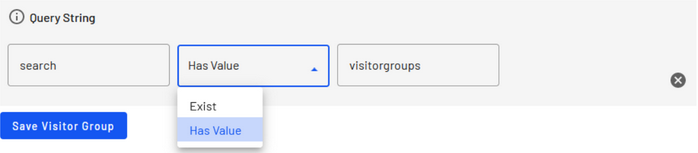
An audience criterion consists of at least two classes:
- A model class that stores and persists user input from the UI.
- A criterion class that evaluates the context and model data to determine whether the criteria are fulfilled.
PrerequisitesMake sure the project references the assemblies that contain the classes needed to create criteria and models.
Create a model class
The model class stores and persists user input from the UI, giving the criterion class access to the configuration. The model class must implement ICriterionModel because CMS persists instances to the Optimizely Dynamic Data Store (IDynamicData). Inherit from CriterionModelBase for standard implementations of both interfaces.
Override CriterionModelBase.Copy. For simple value-type properties, call base.ShallowCopy. For reference-type properties where each instance needs its own copy, extend the Copy override with deep-copy logic.
public class YourModelClass : CriterionModelBase {
  public override ICriterionModel Copy() { return base.ShallowCopy(); }
}
Add public properties to the class for each configuration you want in the UI. The editor generates a suitable input element for each property type.
public string MyString {
  get;
  set;
}
public int MyInt {
  get;
  set;
}
Control property rendering
The CriterionPropertyEditor attribute controls how each property renders in the criterion editor. Use PreText and AfterText to display strings around the input element, for example, "Ordered within" [element] "days". Use AdditionalPropsJson to send extra configuration to the element. The attribute also supports translation keys for labels, property ordering, default values, and ignore flags.
[CriterionPropertyEditor(
  PreTextTranslationKey = "/path/to/xml",
  AfterTextTranslationKey = "/path/to/xml",
  LabelTranslationKey = "/path/to/xml",
  Order = 1 DefaultValue = "0" AdditionalPropsJson = "{ \"type\" : \"time\" }")]
public string MyString {
  get;
  set;
}
To render a drop-down list with predefined options, set SelectionFactoryType on the CriterionPropertyEditor attribute. The SelectionFactoryType is a type that implements ISelectionFactory. The ISelectionFactory.GetSelectListItems method supplies the options for the drop-down list.
Use EnumSelectionFactory (included in CMS) to present Enum values in a drop-down list. Provide translations for the Enum values in the XML file in the _/lang_directory. For details, go to Localize the audience criterion.
[CriterionPropertyEditor(SelectionFactoryType = typeof (EnumSelectionFactory))]
public SomeEnum MyEnumSelector {
  get;
  set;
}
Default criterion editors
The default criterion editors provide input elements for common data types when no custom editor script exists. The default editor renders when no ScriptUrl is set in the VisitorGroupCriterion attribute. The following data types are supported:
| Data type | Editor |
|---|---|
System.String | Input with default type = text |
System.Int32 | Input with default type = number |
System.Single | Input with default type = number and step = 0.01 |
System.Boolean | Checkbox |
EPiServer.Personalization.VisitorGroups.Criteria.PageInfo | EPiServer Page Selector |
System.DateTime | Input with default type = date |
Customize the default criterion editors
The default editors are React components. CMS parses AdditionalPropsJson are parsed and passed as additional props to those components. The following additional properties are available from Optimizely CMS. Standard HTML input attributes also work as expected.
| Attribute | Type | Description |
|---|---|---|
textarea | boolean | Set to true to enable the textarea variant |
label | string | Label text that displays as the floating label or placeholder |
helperText | string | Helper text that displays under the input to describe the field |
Example
[CriterionPropertyEditor(AdditionalPropsJson = "{ \"textarea\" : \"true\",  \"value\" : \"my default text\"}")]
public string MyTextArea {
  get;
  set;
}

[CriterionPropertyEditor(AdditionalPropsJson = "{ \"label\" : \"My string label\",  \"helperText\" : \"This is my helper text.\"}")]
public string MyString {
  get;
  set;
}
Validate criterion configurations
Server-side validation ensures that criterion configurations are valid before CMS saves them. Add input validation to the properties by using the attribute classes in System.ComponentModel.DataAnnotations. The following validation rules are supported:
[Required][Range(double Minimum, double maximum)][StringLength(int maximumLength)][RegularExpression(string pattern)]
[Required]
[StringLength(10)]
public string MyString {
  get;
  set;
}
For custom server-side validation, implement the IValidateCriterionModel interface on the model. The IValidateCriterionModel.Validate method runs when an audience containing the criterion is saved.
public class YourModelClass: CriterionModelBase, IValidateCriterionModel {
  public string MyString {
    get;
    set;
  }
  public CriterionValidationResult Validate(VisitorGroup currentGroup) {
      if (MyString.Length > 5) {
        return new CriterionValidationResult(false, "MyString is too long!", "MyString");
      }
      return new CriterionValidationResult(true);
    }
    ...
}
Create a criterion class
The criterion class evaluates visitor context and model data to determine whether the criteria are fulfilled. This class connects to the model through CriterionBase<T>, which accepts an ICriterionModel type parameter. Override the CriterionBase.IsMatch method to implement the evaluation logic.
Decorate the criterion class with the VisitorGroupCriterion attribute to register it as a criterion. The attribute accepts the following configuration:
Category– The group name in the criteria picker UI where this criterion displays. Criteria with the sameCategoryvalue are grouped.Description– Text describing how the criterion works.DisplayName– A short name that identifies the criterion in menus and audiences.LanguagePath– The path in the XML language files for localized strings. For details, go to Localize the audience criterion.ScriptUrl– A URL to a JavaScript file loaded when this criterion is edited.
[VisitorGroupCriterion(
  Category = "My Criteria Category",
  Description = "How the criterion works",
  DisplayName = "Short Name",
  LanguagePath = "/xml/path/to/translations/",
  ScriptUrl = "javascript-that-should-be-loaded-for-the-UI.js")]
public class YourCriterionClass: CriterionBase<YourModelClass> {
  public override bool IsMatch(IPrincipal principal, HttpContextBase httpContext) {
    // Your evaluation code here.
    // The model class instance is available via the Model property.
  }
}
Subscribe to events
Event subscriptions let the criterion gather information about visitor activity before IsMatch runs. For example, the predefined Visited Page criterion tracks visited pages in the current session. Override the Subscribe method to attach event handlers. The following events are available:
EndRequestStartRequestStartSessionVisitedPage
When overriding Subscribe to attach event handlers, also override Unsubscribe to detach them.
public override void Subscribe(ICriterionEvents criterionEvents) {
  criterionEvents.StartRequest += criterionEvents_StartRequest;
}
public override void Unsubscribe(ICriterionEvents criterionEvents) {
  criterionEvents.StartRequest -= criterionEvents_StartRequest;
}
void criterionEvents_StartRequest(object sender, CriterionEventArgs e) {
  // Handle the event
}
Updated 2 months ago