
Optimizely Languages
Describes Optimizely Languages, which provides easy access to a single interface for managing multiple languages and translations of content, with a built-in feature for managing automated translations.
Optimizely Languages provides a single interface for managing multilingual content. Use it to export and import XLIFF files for translation and to configure automated translation services.
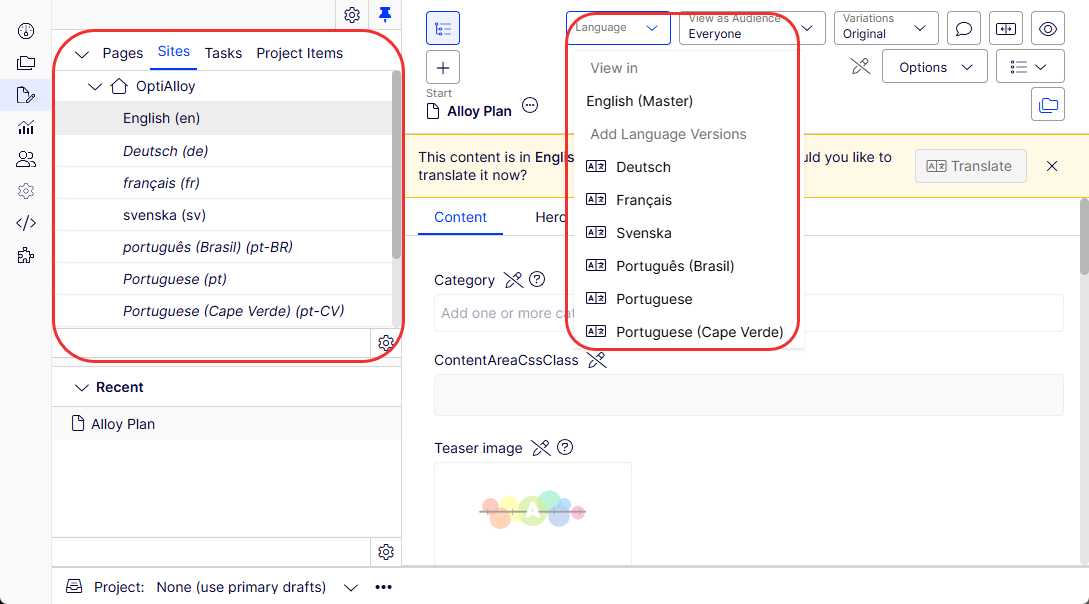
Export and import XLIFF files to send to in-house translators or localization agencies.
ITranslationPackageExporter and ITranslationPackageImporter are interfaces used for the import and export of translation packages to a project. The default implementations are XLIFFTranslationPackageImporter and XLIFFTranslationPackageExporter.
Requirements
- No additional license fee.
- An Optimizely Content Management System (CMS) 13 or Optimizely Customized Commerce installation.
- See Apps platform compatibility for package and version information.
Install
- Versions 7.5 and higher are installed through NuGet.
- Version 7 is installed and updated through one-click installation.
Documentation
Configure auto-translation
Connect Optimizely Languages to a machine translation service to auto-translate content without manual effort.
Connect Optimizely Languages to a machine translation service to auto-translate content without manual effort.
This section describes how to configure an auto-translation service for the Optimizely Languages app. Optimizely Languages is used as its translation provider, Microsoft Translator, part of the Microsoft Cognitive Services collection of APIs, available in the Azure portal. The following steps show how to configure the auto-translate option.
Connect to the auto-translation service
- Subscribe to Azure, if you have not done so already.
- Configure the auto-translate component in Optimizely Languages.
- Go to admin view > Config > Tool Settings > Language Manager.
- Select Cognitive Service Translator in the Translator Provider.
- Enter your Microsoft subscription key (Key 1) in the Subscription Key box.
- Enter the Location value from the Azure subscription service in Subscription Region.
- Save your changes.
Translate content (new UI in 5.3.0)
From version 5.3.0, the TranslateOrCopyContentAreaChildrenBlockForTypes config in appsettings.json is no longer required. Optimizely provides this functionality in a more intuitive UI.
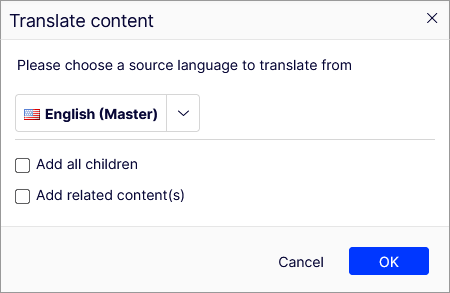
This UI includes the following options:
-
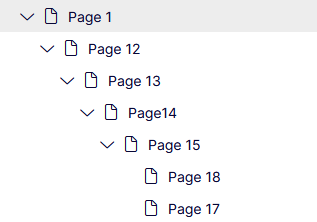
Add all children – When translating a parent page, translate all of its children and subpages. For example, selecting this option when translating page 1 translates all the pages in the following image.
-
Add related content – When translating a parent page, translate all the content inside
ContentArea, but also inContentReferenceandXhtmlString. This includesIlist<ContentReference>andIlist<XhtmlString>. -
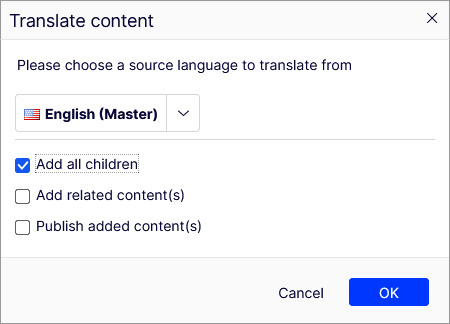
Publish added content – Only displays if you select either of the previous two options. Determine whether to publish the newly added content or retain it as a draft. The root content remains in draft status.
Customize the translation process
To implement a custom translation process, use the IChildrenContentLoader interface:
public interface IChildrenContentLoader {
    /// <summary>
    /// Get children from a parent/root content
    /// </summary>
    /// <param name="content">The parent or root content</param>
    /// <param name="languageId">Id of the source language</param>
    /// <param name="includeDescendents">Flag to indicate whether including descendants or not</param>
    /// <param name="includeRelatedContents">Flag to indicate whether including related content or not</param>
    /// <returns>List of content link that will get translated alongside root</returns>
    IEnumerable<ContentReference> GetChildrenContentsNeedToCopyOrTranslate(ContentReference content, string languageId, bool includeDescendents, bool includeRelatedContents);
}
NoteThe return content list does not include the root. Be sure to register your implementation in
Startup.cs.
Breaking changes for Languages version 2
This topic describes API changes in version 2 of Optimizely Languages.
Changed
Introduced methods in the ILanguageBranchManager interface and its implementation, LanguageBranchManager. Compared with old methods, the difference is that the method returns newly created content as an out parameter (createdContentLink):
bool CopyDataFromMasterBranch(ContentReference contentReference, string fromLanguageID,
  string toLanguageID, Func<object, object> transformOnCopyingValue,
  out ContentReference createdContentLink, bool autoPublish = false);

bool CreateLanguageBranch(ContentReference contentLink, string languageID,
  out ContentReference createdContentLink);

bool TranslateAndCopyDataFromMasterBranch(ContentReference contentReference,
  string fromLanguageID, string fromTwoLetterLanguageName, string toLanguageID,
  string toTwoLetterLanguageName, out ContentReference createdContentLink,
  bool autoPublish = false);
Marked as obsolete
The following functions in ILanguageBranchManager and its default implementation LanguageBranchManager are obsolete:
bool CopyDataFromMasterBranch(ContentReference contentReference, string fromLanguageID,
  string toLanguageID, Func<object, object> transformOnCopyingValue,
  bool autoPublish = false);

bool CreateLanguageBranch(ContentReference contentLink, string languageID);

bool TranslateAndCopyDataFromMasterBranch(ContentReference contentReference,
  string fromLanguageID, string fromTwoLetterLanguageName, string toLanguageID,
  string toTwoLetterLanguageName, bool autoPublish = false);
Configure Optimizely Languages to translate child blocks in a ContentArea attribute by adding the Optimizely Languages section in appsettings.json:
{
  "Episerver": {
    "CmsUI": {
      "LanguageManager": {
        "TranslateOrCopyContentAreaChildrenBlockForTypes": [
          "AlloyTemplates.Models.Pages.ExamplePage1",
          "AlloyTemplates.Models.Pages.ExamplePage2"
        ]
      }
    }
  }
}
The value in the array supports regex. Write a single "AlloyTemplates.Models.Pages.*" to enable this for content with the namespace AlloyTemplates.Models.Pages.
New dependencies
Languages 2.0 depends on the following packages: EPiServer.CMS.Core 9.8, EPiServer.CMS.UI 9.5.0
Updated 2 months ago