
Create an audience with MA connector profile criteria
Integrate web tracking with Optimizely's personalization engine. Connectors identify visitors via cookies, map fields, and create targeted audiences using profile criteria.
Each connector add-on integrates web tracking to Optimizely’s personalization engine by identifying a visitor with a cookie.
Cookies for each connector
- Acoustic (Silverpop) –
mai_trk_5539DF8F-C807-4EC7-B482-26600AAD9761_5539DF8F-C807-4EC7-B482-26600AAD9761 - Delivra –
mai_trk_29A61EBA-CEBF-4CC8-9742-15C9E54D1DEC_29A61EBA-CEBF-4CC8-9742-15C9E54D1DEC - Eloqua –
mai_trk_ee56c556-fc9c-406d-a882-601446ba2067_ee56c556-fc9c-406d-a882-601446ba2067 - HubSpot –
mai_trk_397c9163-c169-4f4c-9182-201e198e1fbf_397c9163-c169-4f4c-9182-201e198e1fbf - Marketo –
mai_trk_f6b213f8-c50b-4d24-841b-f0500bbd7162_f6b213f8-c50b-4d24-841b-f0500bbd7162 - Microsoft Dynamics CRM –
mai_trk_d6e4d762-247f-4c51-9abe-75f6fbd39969_d6e4d762-247f-4c51-9abe-75f6fbd39969 - Pardot –
mai_trk_92b2caa4-37b0-46db-b5ae-12e263565ad2_92b2caa4-37b0-46db-b5ae-12e263565ad2 - Salesforce –
mai_trk_9892c61b-82ff-45b7-90eb-C82a08f62d3b_9892c61b-82ff-45b7-90eb-C82a08f62d3b - Salesforce Marketing Cloud –
mai_trk_784c5a0c-ece4-4d18-ac8b-3ec6b828c422_784c5a0c-ece4-4d18-ac8b-3ec6b828c422
Each connector has its fields. When you set up criteria in an audience, the fields do not automatically populate with values. You must supply these yourself. Ensure that a field you create matches the field type from the connector provider.
For example, the ExactTarget Marital Status field has Single or Married values, so if you use Marital Status in audience criteria, you must specify Single or Married (and not anything else).
For another example, the Salesforce Salutation field has Mr., Mrs., Ms., Dr., and Prof. values, so if you use the Salutation field in audience criteria, you must specify among Mr., Mrs., Ms., Dr., and Prof. values (periods included, and not anything else).
You can create an audience by combining criteria such as a geographic location and job title. See Audiences for information about creating audiences.
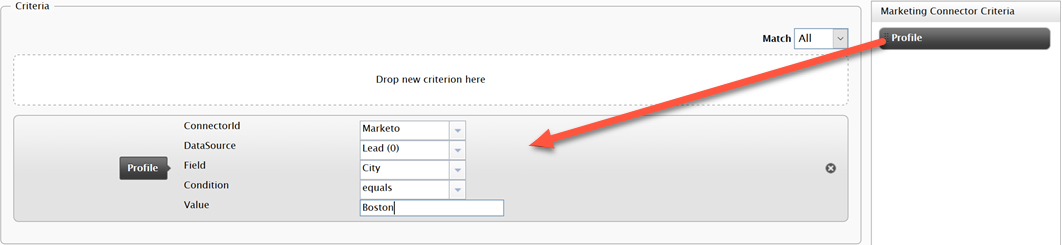
Create an audience using the Profile criteria in Optimizely Content Management System (CMS) > Audiences. In the following example, the desired audiences for the campaign or program have a profile containing Boston in the City column. When a contact with this value (City=Boston) submits a form, the contact information is added to the connector's database.
The architecture and namespace related to connector-based audience criteria changed in Connect for Marketing Automation version 5.0, so you have to reconfigure the Profile criteria after upgrading.
In version 5.0, you have to reconfigure the existing audiences from 4.0. When you edit an audience using the Profile criteria, the following error appears where the 4.0 Profile criteria was.

Dismiss this error message, then drag the Profile criteria back into the Criteria box.
Updated 2 months ago