
Related entries
Describes how to work with related entries (associations), and how to create custom relationship types (association groups) in Optimizely Commerce Connect.
Related entries (product associations) let you link catalog entries to one another, enabling merchandising patterns such as:
- Up-selling – Presents newer or better versions of the product. For example, display newer models in the same product line when displaying a television.
- Cross-selling – Shows related products. For example, show other shirts by the same designer when displaying a shirt.
- Accessories – Encourages the customer to add related or required accessories to a shopping cart. Examples include spare batteries, memory cards, or cables for electronics.
- Warranties – Allows dependent items, such as product warranties, to be sold with a product.
Associations can be displayed on category, product, shopping cart, checkout, or receipt pages. How association types are displayed is implementation-specific. The association groups available to a merchandiser in the Catalog UI should be set up to match your implementation.
How associations work
Related entries are represented by the EPiServer.Commerce.Catalog.Linking.Association class and administered using the EPiServer.Commerce.Catalog.Linking.IAssociationRepository service.
The Target property of the Association contains the ContentReference of the related entry. The class also has an EPiServer.Commerce.Catalog.Linking.AssociationGroup (defined by its Name property) describing a grouping of related entries, and an EPiServer.Commerce.Catalog.Linking.AssociationType (defined by its Id property) describing the type of relation.
These three properties, together with the Source ContentReference (the item that has the related item), uniquely define a related item — there cannot be two Association objects with all these values equal.
Get related entries for an entry
Call the GetAssociations method of IAssociationRepository with the ContentReference of an entry to get all its related entries, returned as Association instances.
public IEnumerable<Association> ListAssociations(ContentReference referenceToEntry)
{
    var associationRepository = ServiceLocator.Current.GetInstance<IAssociationRepository>();
    var associations = associationRepository.GetAssociations(referenceToEntry);
    return associations;
}
Add a related entry to an entry
Use the UpdateAssociations method or UpdateAssociation extension method of IAssociationRepository to add Association objects describing a new relation. Each association requires a Target ContentReference, a Source ContentReference, an AssociationGroup, and an AssociationType. The AssociationGroup class has a DefaultName property you can use as the group name, and the AssociationType class has a DefaultId property you can use as the type ID.
public void AddAssociation(ContentReference referenceToEntry, ContentReference referenceToRelatedEntry)
{
    var associationRepository = ServiceLocator.Current.GetInstance<IAssociationRepository>();
    var newAssociation = new Association
    {
        Group = new AssociationGroup
        {
            Name = "CrossSell",
            Description = "",
            SortOrder = 100
        },
        SortOrder = 100,
        Source = referenceToEntry,
        Target = referenceToRelatedEntry,
        Type = new AssociationType
        {
            Id = AssociationType.DefaultTypeId,
            Description = ""
        }
    };
    associationRepository.UpdateAssociation(newAssociation);
}
Remove a related entry from an entry
Call the RemoveAssociations method or RemoveAssociation extension method of IAssociationRepository with an Association object matching an existing relation. You can construct a matching object directly, or use GetAssociations to retrieve existing associations, filter to the one you want, and pass it to RemoveAssociation.
public void RemoveAssociation(ContentReference referenceToEntry, ContentReference referenceToRelatedEntry)
{
    var associationRepository = ServiceLocator.Current.GetInstance<IAssociationRepository>();
    // Define an association matching the one to remove, or use
    // GetAssociations to find the one you want to remove and pass that to
    // RemoveAssociation
    var relationToRemove = new Association
    {
        // Group with name is required to match the correct association
        Group = new AssociationGroup
        {
            Name = "CrossSell"
        },
        // Source is required here to match the correct association
        Source = referenceToEntry,
        Target = referenceToRelatedEntry,
        // Type with id is required to match the correct association
        Type = new AssociationType
        {
            Id = AssociationType.DefaultTypeId
        }
    };
    // Removes matching association, or no action if no match exists
    associationRepository.RemoveAssociation(relationToRemove);
}
Set up available association groups
When merchandisers edit related entries, they select the association type from a list of association groups. You can configure the groups available in the dropdown so they match what is used in the site implementation.
Populate the list by calling the following from the Initialize method of your InitializationModule.
public void AddAssociationGroup(InitializationEngine context)
{
    // Add predefined selection CrossSell
    // If it already exists nothing will be added
    var associationDefinitionRepository = context.Locate.Advanced.GetInstance<GroupDefinitionRepository<AssociationGroupDefinition>>();
    associationDefinitionRepository.Add(new AssociationGroupDefinition { Name = "CrossSell" });
}
Related entries are represented by the EPiServer.Commerce.Catalog.Linking.Association class and administered using the EPiServer.Commerce.Catalog.Linking.IAssociationRepository service.
The Target property of the Association contains the ContentReference of the related entry. The class also has a EPiServer.Commerce.Catalog.Linking.AssociationGroup (defined by its Nameproperty) describing a grouping of several related entries, and an EPiServer.Commerce.Catalog.Linking.AssociationType (defined by its Id property) describing the type of the relation.
These three properties, together with the Source ContentReference (the item that has the related item) together uniquely define a related item, that is, there can not be two Association objects with all these values equal.
public IEnumerable<Association> ListAssociations(ContentReference referenceToEntry)
{
  var associationRepository = ServiceLocator.Current.GetInstance<IAssociationRepository>();
  var associations = associationRepository.GetAssociations(referenceToEntry);
  return associations;
}
Get related entries for an entry
By calling the GetAssociations method of IAssociationRepository with the ContentReference of an entry, you get all the related entries. The related entries are returned as Association instances.
public IEnumerable<Association> ListAssociations(ContentReference referenceToEntry)
{
  var associationRepository = ServiceLocator.Current.GetInstance<IAssociationRepository>();
  var associations = associationRepository.GetAssociations(referenceToEntry);
  return associations;
}
Add a related entry to an entry
Use the UpdateAssociations method or UpdateAssociation extension method of IAssociationRepository to add Association objects to describe a new relation to an entry. The entry must have a Target ContentReference, a Source ContentReference, an AssociationGroup and an AssociationType. The AssociationGroup class has a DefaultName property you can use as name of the group, and the AssociationType class has a DefaultId property you can use as id of the type.
public void AddAssociation(ContentReference referenceToEntry, ContentReference referenceToRelatedEntry)
{
    var associationRepository = ServiceLocator.Current.GetInstance<IAssociationRepository>();

    var newAssociation = new Association
    {
        Group = new AssociationGroup
        {
            Name = "CrossSell",
            Description = "",
            SortOrder = 100
        },
        SortOrder = 100,
        Source = referenceToEntry,
        Target = referenceToRelatedEntry,
        Type = new AssociationType
        {
            Id = AssociationType.DefaultTypeId,
            Description = ""
        }
    };

    associationRepository.UpdateAssociation(newAssociation);
}
Remove a related entry from an entry
To remove a related item, call the RemoveAssociations method or the RemoveAssociation extension method of IAssociationRepository with an Association object matching an existing related item. You can construct a matching object, or use GetAssociations to get the existing Associations, to filter out the object you want to remove and pass it to RemoveAssociation.
public void RemoveAssociation(ContentReference referenceToEntry, ContentReference referenceToRelatedEntry)
{
    var associationRepository = ServiceLocator.Current.GetInstance<IAssociationRepository>();

    // Define an association matching the one to remove, or use
    // GetAssociations to find the one you want to remove and pass that to
    // RemoveAssociation
    var relationToRemove = new Association
    {
        // Group with name is required to match the correct association
        Group = new AssociationGroup
        {
            Name = "CrossSell"
        },
        // Source is required here to match the correct association
        Source = referenceToEntry,
        Target = referenceToRelatedEntry,
        // Type with id is required to match the correct association
        Type = new AssociationType
        {
            Id = AssociationType.DefaultTypeId
        }
    };

    // Removes matching Association, or no action if no match exists
    associationRepository.RemoveAssociation(relationToRemove);
}
Set up available association groups
When marketers are editing related entries, they can select the association type from a list of association groups. Developers can configure the groups available in the dropdown so they match what is used in the site implementation.
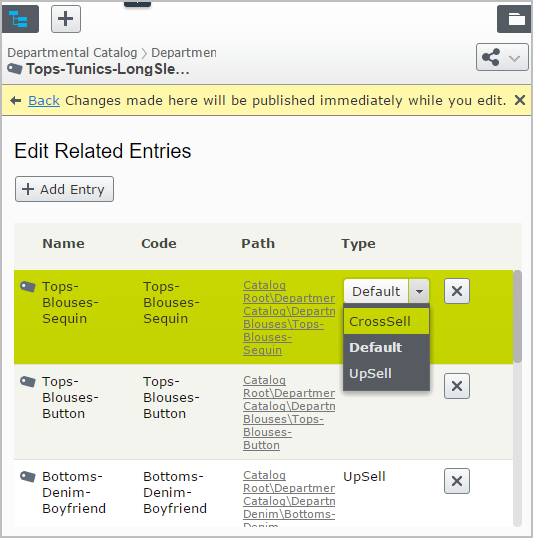
Populate the list by adding the code as illustrated in the example below. Call that from the Initialize method of your InitializationModule.
public void AddAssociationGroup(InitializationEngine context)
{
  // Add predefined selections CrossSell
  // If they already exist nothing will be added
  var associationDefinitionRepository = context.Locate.Advanced.GetInstance<GroupDefinitionRepository<AssociationGroupDefinition>>();
  associationDefinitionRepository.Add(new AssociationGroupDefinition { Name = "CrossSell" });
}
Updated 2 months ago