
Shipping packages
Create shipping packages with physical dimensions for rate calculation and fulfillment workflows.
Shipping packages define the physical container types your fulfillment operation uses. Registering package dimensions in advance lets your system calculate accurate shipping rates, estimate carrier costs, and automate box selection during order fulfillment. Common scenarios include:
- Carrier rate calculation – Many carriers charge based on dimensional weight rather than actual weight. Storing package dimensions ensures rate quotes reflect real-world costs rather than flat estimates.
- Automated box selection – When your system supports pack logic, predefined packages let it automatically select the best-fit container for a given set of items.
- Standardizing fulfillment – Defining your warehouse's actual box inventory as named packages reduces manual input errors during pick-and-pack operations.
- Multi-carrier optimization – Different carriers have size restrictions and surcharges. Having named packages with known dimensions makes it more straightforward to compare carrier options programmatically.
Go to Settings > Shipping Packages and click Create.
The Create Shipping Package form defines a named container type and its physical dimensions for use in shipping rate calculations and fulfillment workflows.
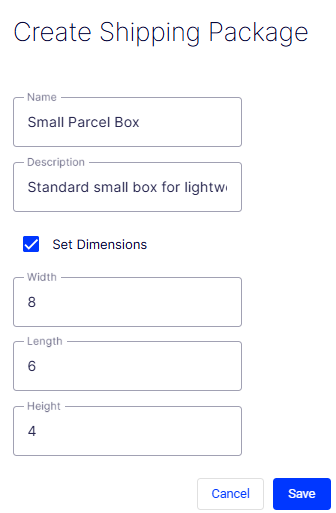
- Name – A required free-text field for the human-readable label of the package (for example, Small Parcel Box or Large Envelope). This name displays in fulfillment and shipping configuration pages where a package type must be selected.
- Description – An optional free-text field for additional context about the package, such as its intended use, material, or the product types it typically contains.
- Set Dimensions checkbox – When checked, enables the Width, Length, and Height fields so physical dimensions can be recorded. When unchecked, the dimension fields are visible but may be inactive. Check this when the package is used for dimensional weight calculations or carrier size validation.
- Width – A numeric field for the width of the package. Defaults to
0. The unit of measurement (for example, inches or centimeters) is determined by your system's global unit settings. - Length – A numeric field for the length of the package. Defaults to
0. - Height – A numeric field for the height of the package. Defaults to
0. - Cancel – Discards all entered data and exits the form without creating a package.
- Save – Submits the form and creates the shipping package. The button is disabled (grayed out) until the required Name field is filled in.
Updated 2 months ago
Did this page help you?