
Activate widgets
Describes how to activate widgets and website components used to present personalized product recommendations from Optimizely Commerce Connect.
Optimizely Product Recommendations defines two key concepts:
- Tracking types – Visitor actions that can be tracked. See Track and recommend.
- Widgets – Display recommendations based on tracking-type calculations. See Product Recommendations.
When an environment is set up, it has the following Commerce Connect-specific widgets. Widgets are configured for only a subset of the available tracking types — see TrackingTypes in the Commerce Connect APIs and libraries for the full list.
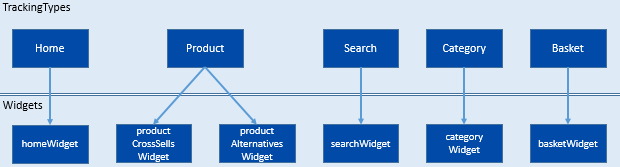
In a new environment, all widgets are inactive. Before you can track and receive recommendations, activate them with the WidgetService in EPiServer.Personalization.Commerce.
See SiteInitialization.cs in the Quicksilver sample site for a working example. The following snippet shows how to enumerate the widgets returned by WidgetService and activate each one:
var widgetService = context.Locate.Advanced.GetInstance<WidgetService>();
var response = widgetService.GetWidgets();

foreach (var widget in response.EpiPerPage.Pages.SelectMany(x => x.Widgets))
{
    widget.Active = true;
    widgetService.UpdateWidget(widget);
}
Updated 2 months ago