
Optimizely Commerce Connect developer overview
Describes the subsystems and data model for Optimizely Commerce Connect 15.
NoteOptimizely Commerce Connect 15 requires Optimizely Content Management System (CMS 13) and targets .NET 10.
Subsystems
Optimizely Commerce Connect is an ecommerce engine with several subsystems. The subsystems work together with Optimizely Content Management System (CMS) to create and display product content on the front-end website.
The following are the main subsystems of Commerce Connect:
- Catalogs – Define catalog schemas, import existing catalogs, and define price lists.
- Marketing and campaigns – Create campaigns, custom discounts and promotions, and define policies used for promotions.
- Orders – Manage orders, connect payment and shipment gateways, customize order workflows, and manage taxes.
- Customers – Create organization structures, set roles and permissions, and extend customer or organization objects.
- Markets – Define multiple markets for market-specific features.
Data model
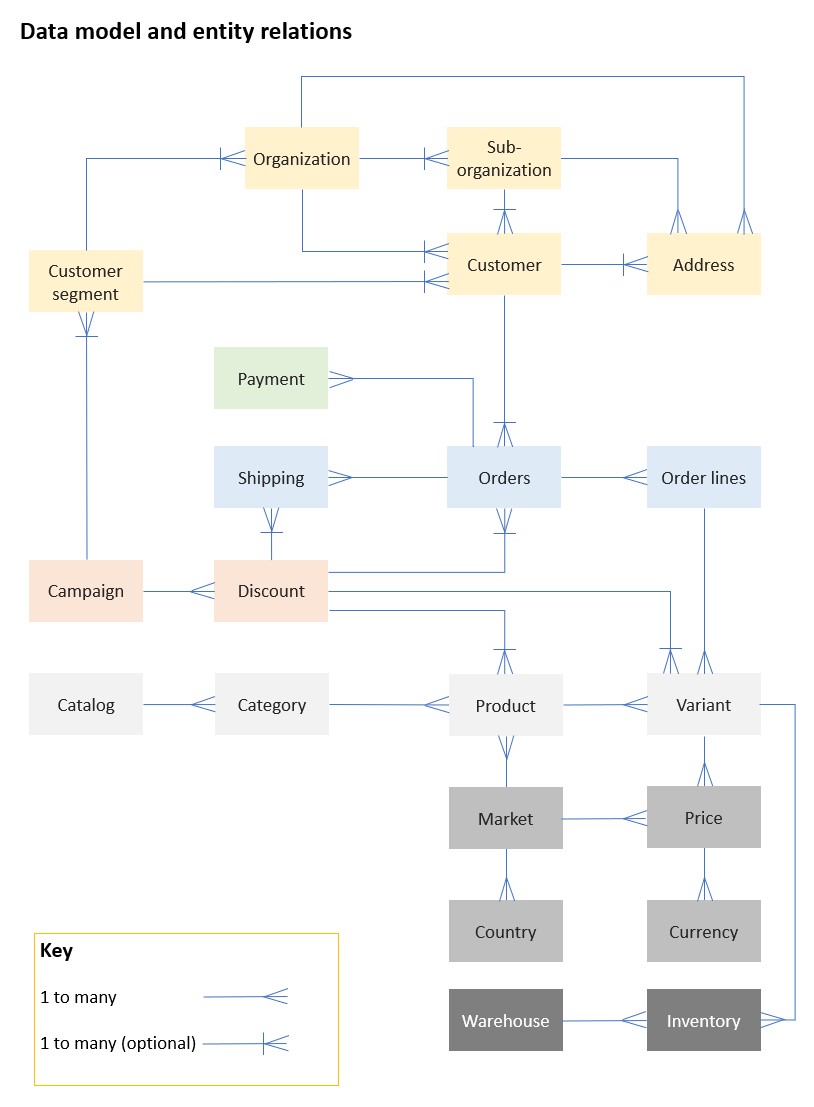
The following is a data model of the entities in Commerce Connect and their logical relationships. A 1 to many relationship means each instance of one entity has one or more related instances of another entity. For example, every order has at least one order line.
A 1 to many (optional) relationship means an instance can have related instances but does not require them. For example, customers and organizations have an optional 1 to many relationship. A customer can exist without an organization.
Updated 2 months ago