
URL segment and SEO URI
Describes how to configure URL segments and SEO URIs for catalog content in Optimizely Commerce Connect.
SEO URI
The SEO URI must be globally unique across all products, categories, and languages.
Name in URL
Use the Name in URL field (also known as URL or URI segment, or route segment) to build hierarchical URLs, such as example.com/en/catalog/category/subcategory/product. The same Name in URL can repeat across language branches because the language branch is part of the path or host. Name in URL has the following constraints:
- For products and variants, the Name in URL must be globally unique (within a language).
- For categories, the Name in URL must be unique within the same parent category.
Configure less strict validation of Name in URL
To loosen the Name in URL constraints for products and variants so that they match the constraint for categories, set the episerver:commerce.UseLessStrictEntryUriSegmentValidation app setting to true. See also the blog post Increased flexibility in Commerce Connect catalog URLs.
NoteCommerce Connect validates uniqueness when a product or variant is published. If you later move or link products or variants between categories, a conflict can occur where two items share the same hierarchical URL under the same parent. The behavior of the conflicting URL is undefined.
Detect conflicts in hierarchical URLs
The Find Catalog Uri Conflicts scheduled job scans the database for products, variants, and categories that share the same Name in URL under the same parent category. When the job finds conflicts, it logs them as warnings, writes them to the scheduled job log, and emails the recipients listed in the episerver:commerce.UriSegmentConflictsEmailRecipients app setting. Separate multiple email addresses with a semicolon (;).
Allowed characters in URL
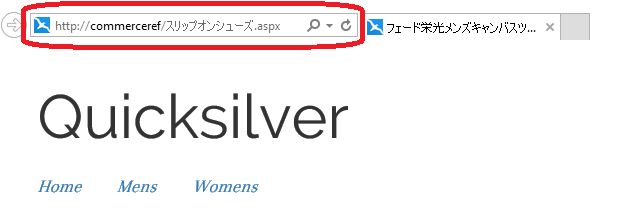
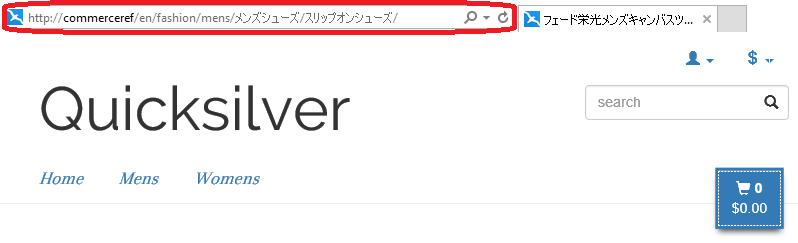
Use Unicode characters in a URL segment or an SEO URI for catalog content.
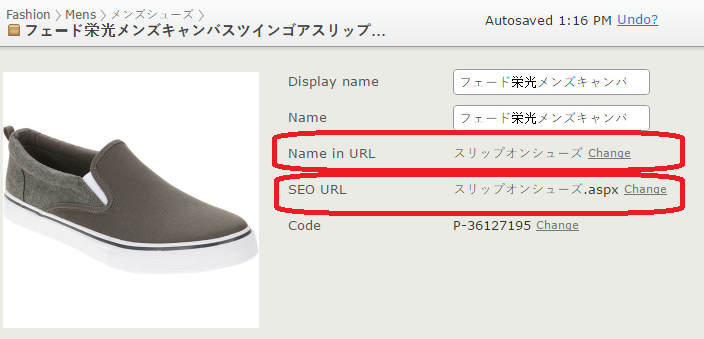
The front end also supports Unicode URLs.
Configure Unicode support
By default, Optimizely allows only the characters listed in RFC 1738:
- Alphabetic characters
- Numeric characters
- The following special characters:
- Dash (
-) - Underscore (
_) - Tilde (
~) - Period (
.) - Dollar sign (
$)
- Dash (
To configure Unicode support, see Internationalized resource identifiers.
Updated 2 months ago