
Configure Payment Service
Describes how to install and configure Payment Service in Optimizely Commerce Connect.
Payment Service is a Commerce Connect feature that integrates the Spreedly payment platform, letting you accept payments through any Spreedly-supported gateway from a single iFrame integration. Use Payment Service to add payment gateway providers to your ecommerce site.
Payment Service lets you:
- Use a payment platform without writing custom code.
- Access additional payment gateway options.
- Run multiple payment services on a single website.
For details about the iFrame integration, see the Spreedly documentation:
Payment Service options
| Name | Data type | Description | Required |
|---|---|---|---|
PaymentServiceIsEnabled | Boolean | Whether Payment Service is enabled. | No |
EnvironmentName | String | The Spreedly environment name. Provided by Spreedly when you create an environment. | No |
EnvironmentKey | String | The Spreedly environment key associated with EnvironmentName. | Yes |
GatewayToken | String | Token for the underlying Spreedly gateway that processes the transaction. | Yes |
ScaProviderKey | String | Strong Customer Authentication (SCA) provider key. Required when 3DS is enabled. | Yes, if 3DS is enabled |
ThreeDsIsEnabled | Boolean | Whether 3DS is enabled. | No |
ThreeDsTestMode | Boolean | Whether 3DS is in test mode. | No |
ThreeDsTestCallbackUrl | String | Callback URL used while testing 3DS. The URL must be reachable from the public internet — for example, by exposing localhost through webhook.site. | No |
PaymentServiceUrl | String | URL of the Payment Service endpoint. | Yes |
AuthenticationType | String | Authentication mode. Either HMAC or OBO (on behalf of). | Yes |
AppKey | String | Application key issued by Payment Service. | Yes |
SecretKey | String | Secret key issued by Payment Service. | Yes |
SigningSecret | String | Signing secret used to verify 3DS callbacks. | Yes, if 3DS is enabled |
InstanceIdentifier | String | Instance identifier required for OBO authentication. | Yes, if AuthenticationType is OBO |
Integrate Payment Service
For step-by-step setup instructions, see Configure Payment Service.
To compare your code to a working integration, download the example changed files (ChangedFiles.zip).
Files modified by the example integration
wwwroot/js/paymentservice.js(added) — Handles all checkout form events, with or without 3DS mode, using the Spreedly iFrame.wwwroot/js/Checkout.js(changed) — Improves handling for multiple payments on the checkout page.Views/Shared/Payment/_PaymentService.cshtml(added) — Renders the payment form for the end user. This view loadsPaymentService.js, which handles all checkout-form events; the Spreedly JavaScript API tokenizes credit-card numbers and CVVs, and hidden elements support 3DS mode.Views/Shared/PaymentServiceConfirmation.cshtml(added) — Renders the confirmation page after the user places an order.Features/Checkout/Controllers/CheckoutController.cs(changed) — Adds Payment Service handling to the checkout controller.Features/Checkout/Services/CheckoutService.cs(changed) — Adds Payment Service handling to the checkout service.Features/Checkout/ViewModels/PaymentServicePaymentViewModel.cs(added) — View model that maps a Payment Service payment for client-side handling.Infrastructure/SiteImport/ImportSiteContentStep.cs(changed) — Imports Payment Service during site import, as an alternative to adding it manually in Administration.lang/Quicksilver_EN.xml(changed) — Adds language keys for the Payment Service checkout form.
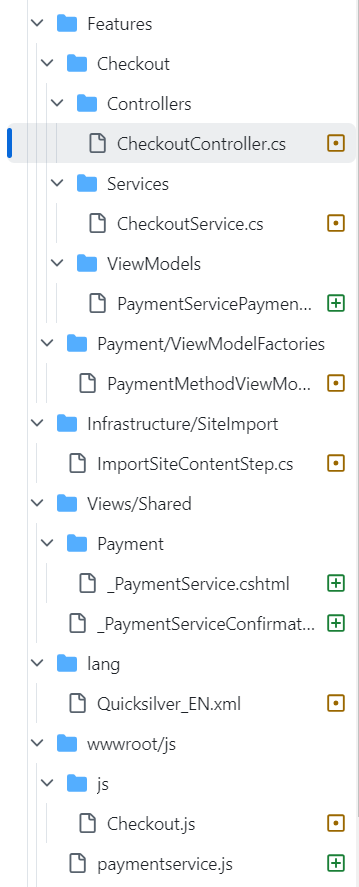
Code excerpts from the modified files
-
lang/Quicksilver_EN.xml<ProcessingPaymentFailure>Failed to process your payment.</ProcessingPaymentFailure> </Errors> <Methods> <PaymentService> <Labels> <CreditCardFirstName>First name:</CreditCardFirstName> <CreditCardLastName>Last name:</CreditCardLastName> <CreditCardNumber>Credit card number:</CreditCardNumber> <CreditCardSecurityCode>Security code:</CreditCardSecurityCode> <ExpirationMonth>Expiration month:</ExpirationMonth> <ExpirationYear>Expiration year:</ExpirationYear> </Labels> </PaymentService> <CashOnDelivery> <Description>You pay for your order when picking up your delivery at your local post office.</Description> </CashOnDelivery> </Methods> -
Features/Checkout/Controllers/CheckoutController.csif (paymentMethod.SystemKeyword.Equals("PaymentService", StringComparison.OrdinalIgnoreCase)) { var payment = Cart.GetFirstForm().Payments.FirstOrDefault() as PaymentServicePayment; if (payment != null && payment.Status.Equals(PaymentStatus.Pending.ToString(), StringComparison.OrdinalIgnoreCase)) { return BadRequest(new PaymentServicePaymentViewModel(payment, Cart)); } else { var message = string.Join(',', ModelState.SelectMany(x => x.Value.Errors.Select(y => y.ErrorMessage))); return BadRequest(message); } } -
Features/Checkout/Services/CheckoutService.csusing EPiServer.Commerce.Bolt; using EPiServer.Commerce.Order; using EPiServer.Commerce.Order.Payments.Tokenization; using EPiServer.Commerce.PaymentService; using EPiServer.Core; using EPiServer.Data; using EPiServer.Framework.Localization; // ... payment.Properties["additionalPaymentData"] = additionalPaymentData; if (payment is PaymentServicePayment paymentServicePayment) { if (additionalPaymentData.ContainsKey("token")) { paymentServicePayment.TransactionToken = additionalPaymentData["token"]; } if (additionalPaymentData.ContainsKey("browserInfo")) { paymentServicePayment.BrowserInfo = additionalPaymentData["browserInfo"]; } } if (payment is BoltPayment boltPayment) { if (additionalPaymentData.ContainsKey("token")) { // ... } } // ... { modelState.AddModelError("", _localizationService.GetString("/Checkout/Payment/Errors/ProcessingPaymentFailure") + ex.Message); } catch (Exception ex) { modelState.AddModelError("", _localizationService.GetString("/Checkout/Payment/Errors/ProcessingPaymentFailure") + ex.Message); } return null; -
Infrastructure/SiteImport/ImportSiteContentStep.cs// Earlier in file public class SomeClass { public void SomeMethod() { // ... other code ... "EPiServer.Commerce.Bolt.BoltPayment, EPiServer.Commerce.Bolt", "EPiServer.Commerce.Bolt.BoltGateway, EPiServer.Commerce.Bolt", false, 0, allMarkets, language, workingDto); AddPaymentMethod(Guid.NewGuid(), "PaymentService", "PaymentService", "PaymentService Payment methods implementation.", "EPiServer.Commerce.PaymentService.PaymentServicePayment, EPiServer.Commerce.PaymentService", "EPiServer.Commerce.PaymentService.PaymentServiceGateway, EPiServer.Commerce.PaymentService", false, 0, allMarkets, language, workingDto); } // closes SomeMethod() } // closes SomeClass
Updated 3 months ago