
Shopping flow
Explore the B2C shopping flow in Optimizely Commerce Connect, from cart creation and checkout to order processing, shipment, and returns.
The two most common types of ecommerce websites are:
- Business-to-Consumer (B2C) – Sells goods and services directly to consumers.
- Business-to-Business (B2B) – Builds strategic relationships with other businesses and simplifies supply and procurement processes.
Sites can have multiple roles, and a single site can provide several functions. Optimizely Commerce Connect is a B2C platform. It lets you integrate with external systems, including financial, customer relationship management, inventory, warehouse, and customer service systems.
A typical shopping flow involves interactions between a site visitor, Commerce Connect, and any integrated external system. Automate the shopping flow to require minimal manual attention. If needed, monitor, access, and handle a purchase order manually from Orders.
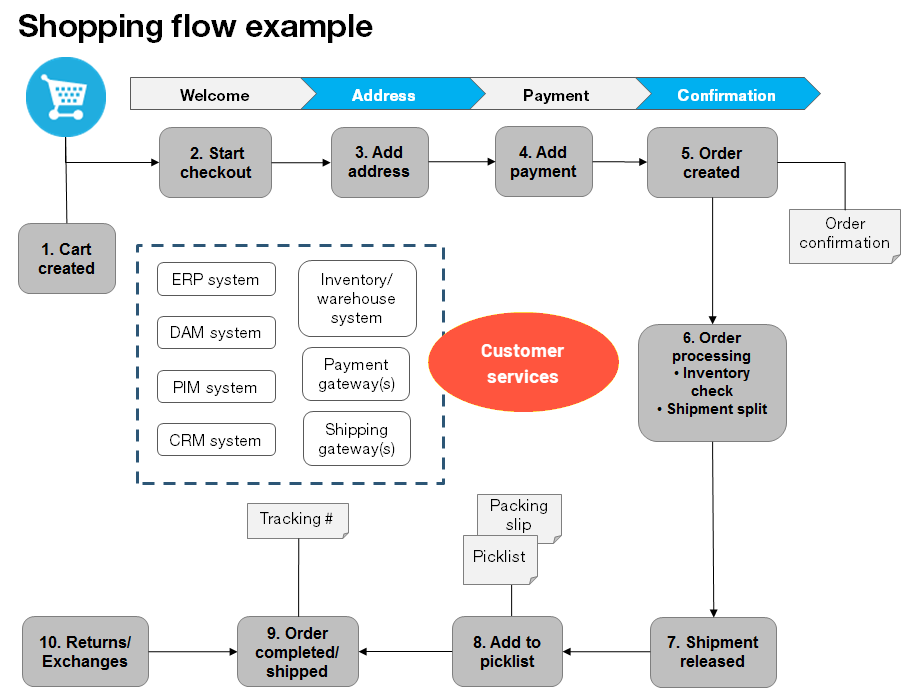
The following example shows the actions and tasks of a B2C shopping flow.
-
Cart created.
A customer does not need to register on the site to make a purchase. The order process starts when the visitor selects a product and adds it to a shopping cart. The system creates and saves a cart (basket), which you can view in Order Management > Carts. If the customer does not complete the checkout procedure, the cart remains in the system for a specified time.
If the customer returns to the website, they can continue shopping with the cart. The system checks inventory, pricing, warehouse availability, and discounts for products each time.
-
Checkout started.
The customer proceeds to checkout.
-
Address added.
The system needs the shipping address, billing address, and preferred type of delivery (First class, Express, and so on). An anonymous customer can add the address information manually. A registered customer who is logged in can populate the address information automatically. Configure the system to split shipments and ship to different addresses.
-
Payment added.
The system calculates the total, including purchase amount and shipping fee. The customer selects a payment method, such as credit card or PayPal, and the system registers and verifies the payment. Payment can happen instantly or after a specified time, depending on how the payment process is set. Configure the system to allow split payments.
-
Order created.
When the payment is settled, the system creates the purchase order and gives it a number. The customer confirms the purchase and receives an order confirmation. The shopping cart becomes a purchase order with an In Progress status in Order Management > Purchase Orders.
-
Order processed.
Order processing checks the warehouse and product inventory status then creates the shipment. The system may split the products into multiple shipments, depending on inventory status.
-
Shipment released.
When the shipment is verified and released, the purchase order displays in Order Management > Shipping/Receiving with the status Released for Shipping.
-
Picklist created.
Warehouse personnel use a picklist to create the physical shipping of the order's products and produce a packing slip that is attached to the package.
-
Order completed or shipped.
The system sets the order to Completed in Order Management > Purchase Orders and creates a shipment validation number with a tracking number. Enter the tracking number manually, or configure your carrier integration to populate it automatically. The tracking number connects the package with the shipping provider and tracks the package until the carrier delivers it.
-
Returns and exchanges.
Completed orders are subject to a return or exchange. Create returns automatically or manually by replacing the delivered product, issuing a payment refund, or both. The return displays in Order Management > Shipping/Receiving > Returns. The order status is set to Awaiting Exchange.
Replacing the item with a different product initiates the shipping procedure. If the return involves receiving a faulty product, the system initiates a procedure requiring a receiving receipt for the returned product.
Updated 2 months ago