
Create a starter project
Describes how to create an empty commerce project from which you can build your Optimizely Commerce Connect website.
For better control and understanding, start developing in an empty project. Install a sample site like Foundation to explore and use for inspiration. The Optimizely project templates provide a preconfigured website with Optimizely Commerce Connect and a Visual Studio project for development.
Create the project
See Configure a development environment to install the Optimizely templates and command-line tool. When done, run the following commands (check command-line options for more configuration options):
dotnet new epi-commerce-empty --name ProjectName
cd projectname
dotnet-episerver create-cms-database ProjectName.csproj -S . -E
dotnet-episerver create-commerce-database ProjectName.csproj -S . -E --reuse-cms-user
dotnet-episerver add-admin-user ProjectName.csproj -u username -p password -e [email protected] -c EcfSqlConnection
Project structure
The project creation process completes these actions:
- Installs main components through NuGet packages (
EPiServer.Commerce). - Creates the database.
- Updates configuration files, such as
appSettings.json, with connection strings. - Installs the Optimizely user interface components and places them under the URL
/episerver.
When finalized, you have a project folder structure containing:
-
Properties – Launch settings for the development server.
-
Infrastructure – Site components.
-
modules – Package modules.
-
wwwroot – Client resources.
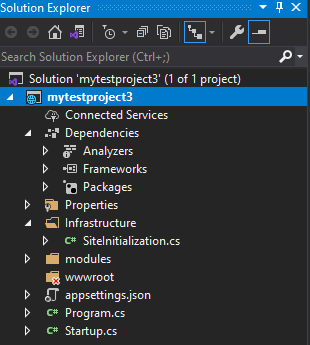
The initialization system ensures the catalog structure is added under the site's root level. Contents of mytestproject3:
using EPiServer.Commerce.Routing;
using EPiServer.Framework;
using EPiServer.Framework.Initialization;

namespace mytestproject3.Infrastructure
{
    [InitializableModule]
    [ModuleDependency(typeof(EPiServer.Commerce.Initialization.InitializationModule))]
    public class SiteInitialization : IInitializableModule
    {
        public void Initialize(InitializationEngine context)
        {
            CatalogRouteHelper.MapDefaultHierarchialRouter(false);
        }

        public void Preload(string[] parameters) { }

        public void Uninitialize(InitializationEngine context)
        {
        }
    }
}
Update to the latest version
See Install CMS 13 to add the latest updates to a Commerce Connect site.
Implementation recommendations
The following recommendations are based on common scenarios and input from implementation projects. Most projects, especially first-time projects done by development teams with limited Commerce experience, should follow these guidelines to avoid mistakes, technical debt, and performance and scalability issues.
Before making any exceptions, ensure you have a solid understanding of the underlying framework. Deviating from recommended practices may create more work than necessary and make future upgrades more difficult. See the Optimizely Commerce Connect system overview to learn more.
Plan the project carefully
Commerce Connect projects often take longer than originally estimated because of pricing complexity, external integrations, and shipping and payment providers. Allow enough time for planning and design, and start small. For first-time complex projects, do a proof-of-concept first with a complete order process in place.
Document code changes
When altering workflows or other downloadable code added to your solution, comment and document the code. Well-documented code maintained in separate modules makes future system upgrades much easier.
Spend time on catalog design
Start early with catalog modeling because it can be complex and often requires more design than originally realized. Let the website catalog hierarchy guide your catalog structure, and limit the number of variants or SKUs associated with each product to avoid performance implications. See Catalogs.
Use the search API
The search API is useful, especially for category landing pages and large catalog structures. It ensures better website performance, offloads database search and retrieval procedures, and provides paging and facets functionality. See Graph search provider.
Set search options correctly
The meta-field or model field search options are often misunderstood and misused. Two typical examples are:
Tokenize– Often overused, even for fields that do not need to be searchable.IncludeValuesInSearchResults– Overuse adds unnecessary bulk to the search index.
Turn on catalog caching
Have a clear strategy for caching. Turn catalog caching on, or implement your own solution. Consider this especially for pricing and for warehouse and inventory updates. See Caching for Commerce Connect.
Understand StoreHelper and CartHelper
Store helpers are useful, but you must understand how they work before using them. These can be modified to suit your needs, for instance, by adding caching and other logic. Notable limitations include:
StoreHelperhas no pricing caching — this needs to be added. UseReadOnlyPricingLoaderinstead for ownership of business logic.CartHelperdoes not let a variant or SKU be added multiple times as multiple line items. Download the code and make it your own.
Use the payment and shipment provider models
When implementing payment processing and shipping rate calculation, use the provider model. This makes them available in Commerce Connect and includes storage for configuration settings. See Payments.
Avoid database modifications
Editing or deleting database tables and stored procedures can break functionality and prevent future upgrades.
Minimize use of MetaImage
The MetaImage metafield stores images in the database, which is inefficient for larger, high-traffic websites. It is also not accessible outside of an entry. For smaller, low-traffic sites, it works acceptably.
Avoid excessive content loading
Avoid patterns like using GetDescendents to load everything recursively and then filtering the results. In complex solutions, individual content loads may each look reasonable, but when combined, looped, and repeatedly requested under load with a large content set, performance problems emerge.
To address excessive loading:
- Analyze what content is loaded and where, and use caching of aggregates where appropriate.
- Use Optimizely Search & Navigation or another search index.
- Consider restructuring content models or content structure.
No single recipe exists for avoiding excessive content loading, and you should not optimize prematurely. Profile the application along central routes and code paths even without evidence of performance problems — finding a fix that improves performance by 30% is worthwhile even if the application runs acceptably in production.
Updated 2 months ago