
Meta class data
The Meta Class Data page lets you view, filter by field value, and add data entries to meta classes such as Gift Card.
Business Foundation extends the attributes of the Customer Management system to give you more flexibility with the displayed and collected fields and attributes. Business Foundation works with the metadata engine for no-code customization of the data model, letting you define objects and relations between them for the Customer Management system. For more information, see Business Foundation in the Developer section.
Specify the fields you want to display and work with system fields. For example, create a Gift Card field to track how much money a customer has on a gift card.
The Meta Class Data page lists data records associated with a specific meta class. Use this page to view, filter, and add data entries for a meta class such as Gift Card.
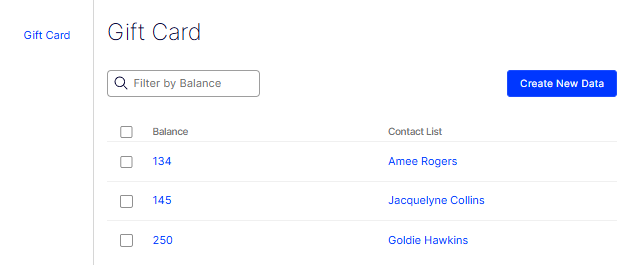
The Gift Card page displays all existing records in a table with the following columns:
- Balance – The numeric value assigned to the gift card.
- Contact List – The contact associated with the gift card.
To narrow the list, enter a value in the Filter by Balance text field. For example, enter 134 to find the gift card with that balance. Select the checkbox next to a record to select it for bulk actions.
To add a record, click Create New Data. The Add New Data window opens.
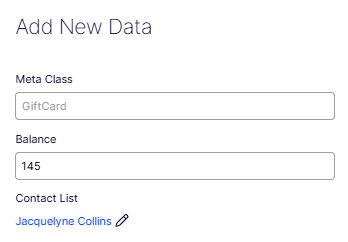
Complete the following fields:
- Meta Class – The meta class the record belongs to. This value is set automatically. For example, GiftCard.
- Balance – The numeric value for the gift card. For example, enter 145.
- Contact List – The contact linked to this gift card. Click the edit icon next to the current contact to change the selection. For example, Jacquelyne Collins.
Click Save to create the record, or click Cancel to close the window without saving.
Updated 2 months ago