
Event-driven catalog indexing
Describes the event-driven catalog indexing in Optimizely Commerce Connect and how to verify the state of the indexing processor.
The event-driven model for indexing the catalog ensures that changes to catalog data are automatically updated in the search index. The Indexing Processor State section is at Commerce > Settings > Catalog Indexing.
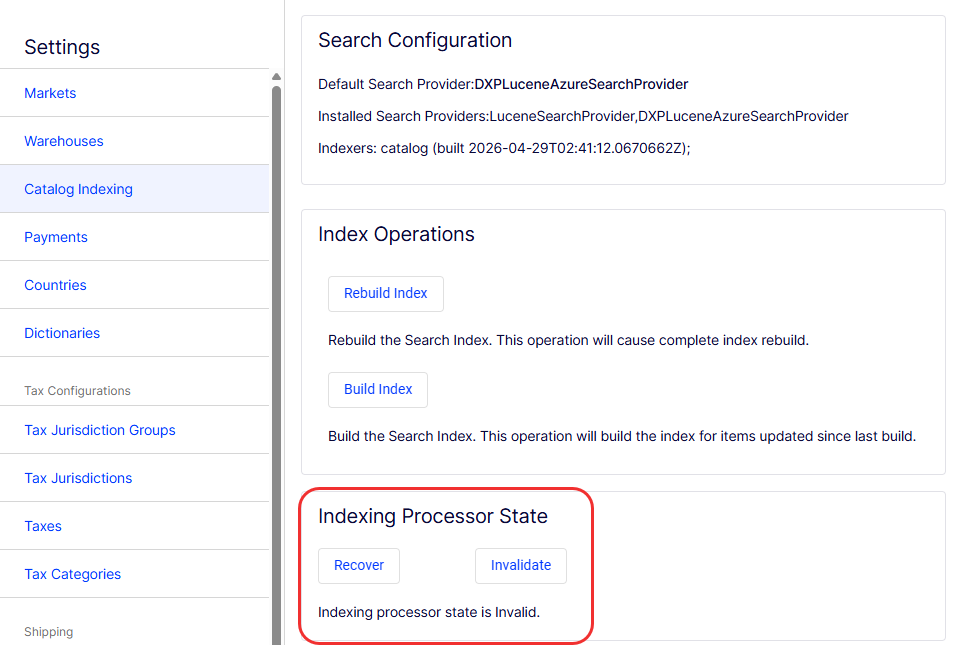
Recover and Invalidate manage the system that handles event-driven indexing.
- Recover – Rebuild the full search index. When recovery is complete, the state changes to
validand changes are automatically pushed into the index. Recover is disabled if the queue state isvalid. - Invalidate – Clean out the queue and start over. If the queue state is
invalid, selecting Invalidate resets the state, and selecting Recover rebuilds the search index. If the state is recovering, the page displays a completion percentage of the recovery operation, retrieved from the search provider.
The status indicator displays the state of a queue of catalog entries that need to be reindexed. If the state is invalid, the system cannot distinguish between actual catalog data and the search index.
When the state is valid again, the handler displays the number of items in the queue — that is, the number of catalog entries that need to be indexed. This number can grow after a catalog import because changed catalog entries are reindexed in the background. In most cases, the number is small.
Disable event-driven catalog indexing
To disable event-driven catalog indexing, add the following to appSettings.
- .NET Framework
<add key="episerver:DisableCatalogEventDrivenIndexing" value="true" />- .NET Core
{
  "Commerce": {
    "CatalogOptions": {
      "DisableCatalogEventDrivenIndexing": "true"
    }
  }
}
Updated 20 days ago