
Shipping jurisdictions
Create shipping jurisdictions and define their geographic boundaries for shipping rules and rates.
Shipping jurisdictions define the geographic boundaries, such as countries, regions, or postcode ranges, that your shipping rules and rates apply to. Manage jurisdictions here before grouping them or attaching them to shipping configurations. Common scenarios include:
- Country-level coverage – Define a top-level jurisdiction for an entire country (for example, United States) when a single shipping rule applies nationwide.
- Postcode-level precision – Create individual postcode or postcode-range jurisdictions (for example, UK postcode areas such as GBR-AB, GBR-BA) when rates or carriers differ by delivery area within a country.
- City, district, and county targeting – Use the city, district, and county fields to scope a jurisdiction more narrowly than a postcode range where local delivery rules require it.
- Large catalog management – With pagination support, the list scales to hundreds of jurisdiction records, making it practical to maintain granular geographic coverage (this screenshot shows one of 33 pages).
Go to Settings > Shipping Jurisdictions.
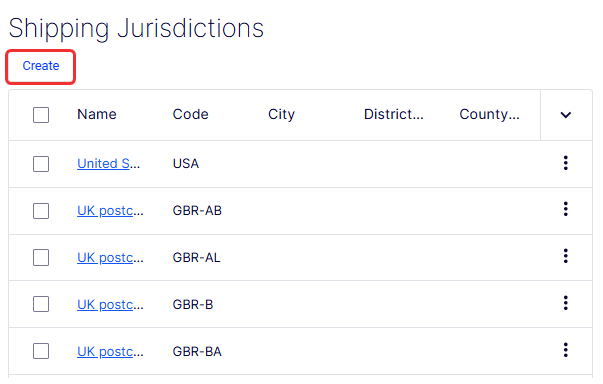
The Name column displays the name of each jurisdiction as a clickable link (for example, United States, UK postcode - ...). Clicking the name opens the record for viewing or editing. Names that exceed the column width are truncated with an ellipsis. Also access Edit and Delete from the More (...) menu.
- Edit – Opens the selected jurisdiction in an editable form.
- Delete – Permanently removes the jurisdiction. Use with caution, because deleting a jurisdiction referenced by an active shipping jurisdiction group or rule may affect shipping calculations.
A drop-down list controls how many rows display per page. Currently set to 10. The window includes Previous and Next buttons, individual page number links (1, 2, 3 … 33), and a current page indicator showing 1 of 33 pages.
The Create Shipping Jurisdiction form defines a single geographic jurisdiction and the boundaries within which it applies. Each jurisdiction you create can then be added to a shipping jurisdiction group or referenced directly in shipping rules and rate configurations.
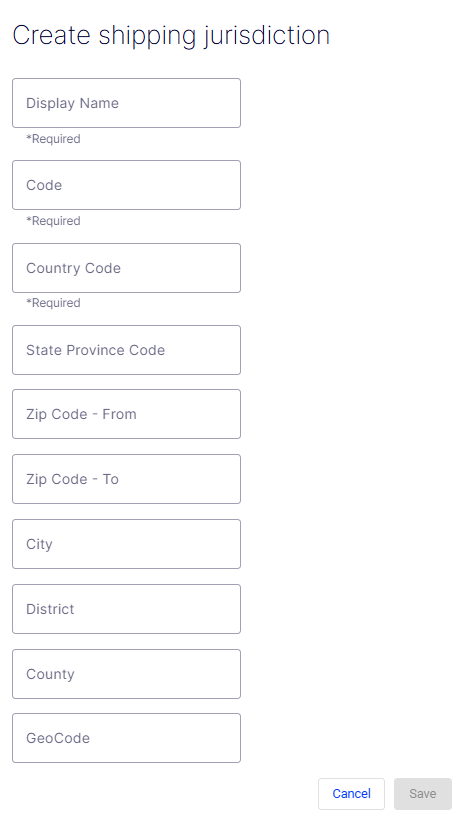
- Display Name – A required free-text field for the human-readable label of the jurisdiction (for example, UK Postcode - AB or United States). This name displays throughout the UI wherever the jurisdiction is referenced.
- Code – A required free-text field for the unique programmatic identifier used in API calls and integrations. It should be concise and free of spaces (for example,
GBR-AB,USA). - Country Code – A required field specifying the country to which this jurisdiction belongs. Use standard ISO 3166-1 alpha-2 codes (for example,
US,GB,CA). - State Province Code – An optional field for the state or province within the specified country. Use standard abbreviations (for example,
CAfor California,TXfor Texas). - Zip Code - From – An optional field defining the start of a postcode or zip code range. Use together with Zip Code - To to restrict the jurisdiction to a specific postal band.
- Zip Code - To – An optional field defining the end of a postcode or zip code range. Leave blank if the jurisdiction applies to an entire state, province, or country.
- City – An optional field to restrict the jurisdiction to a specific city within the state or province.
- District – An optional field for a named delivery district that does not correspond to a standard city or county boundary (for example, a metro delivery zone or special economic area).
- County – An optional field to restrict the jurisdiction to a specific county within the state or province.
- GeoCode – An optional field for an external geographic identifier used by third-party shipping or mapping services to match this jurisdiction to their internal records for accurate rate lookups.
- Cancel – Discards all entered data and exits the form without creating a jurisdiction.
- Save – Submits the form and creates the shipping jurisdiction. The button is disabled (grayed out) until all required fields, Display Name, Code, and Country Code, are filled in.
Updated 2 months ago