
Order system overview
Describes the order management APIs in Optimizely Commerce Connect and provides an overview of components used when working with orders.
Order system overview
Optimizely Commerce Connect organizes carts, purchase orders, and subscription plans through a shared abstraction layer built around IOrderGroup. This article explains the interfaces, services, and calculators a developer uses to create, load, modify, and price orders. Use it as a reference when building checkout flows, custom processors, or extensions to the order pipeline.
Prerequisites
Before reading this article, make sure you are familiar with:
- C# interfaces and dependency injection.
- The Commerce Connect catalog system and how line items reference catalog entries.
- The
EPiServer.Commerce.Ordernamespace, which contains the abstraction interfaces referenced throughout this article.
Use abstraction interfaces consistently
Avoid casting between concrete Order classes (such as OrderGroup and OrderForm) and abstraction interfaces (such as IOrderGroup and IOrderForm). Use a single API from the moment you load a cart or purchase order until you save it. Staying with one API where possible avoids hidden problems caused by casting.
Order objects
The diagram represents the Optimizely Commerce Connect order object model. It shows the abstraction layer built around IOrderGroup and the related interfaces for carts, purchase orders, payment plans, line items, shipments, payments, and addresses.
Use the diagram to find where each property lives. For example, coupon codes belong to IOrderForm, not IOrderGroup. Payment totals belong to IOrderForm, not IOrderGroup. For more details, see Order manipulation.
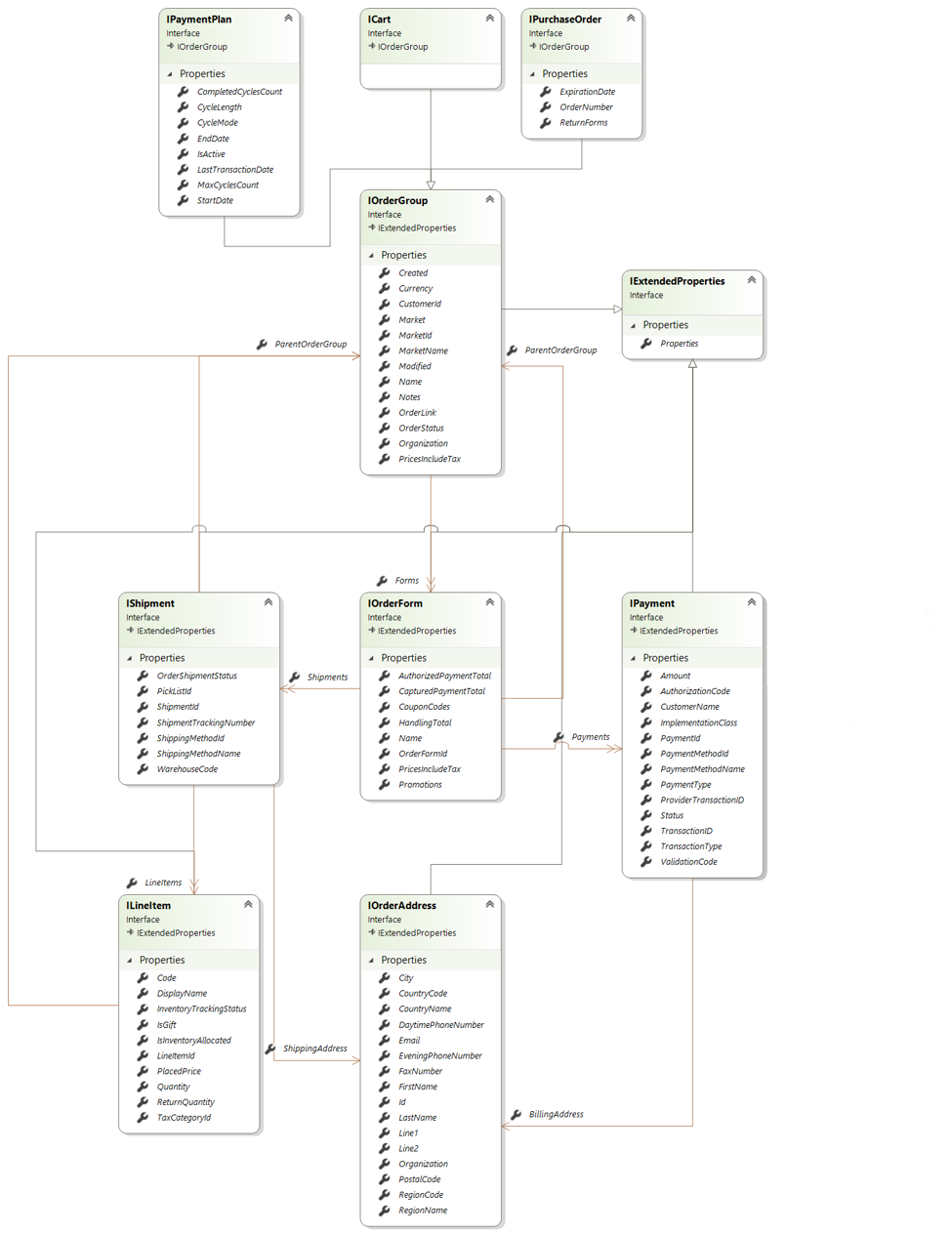
Three top-level interfaces implement IOrderGroup:
ICart– an in-progress cart.IPurchaseOrder– a completed or placed order. AddsOrderNumber,ExpirationDate, andReturnForms.IPaymentPlan– a recurring or subscription order template. Adds cycle metadata:CycleLength,CycleMode,MaxCyclesCount,StartDate,EndDate,IsActive, and so on.
A cart, a placed order, and a subscription plan share the same underlying structure (IOrderGroup). Commerce Connect code can therefore operate on any of them generically.
IOrderGroup — central abstraction
IOrderGroup — central abstractionIOrderGroup holds the cross-cutting properties every order-like object needs: Created, Modified, Currency, Market, MarketId, MarketName, CustomerId, OrderStatus, OrderLink, Organization, PricesIncludeTax, Notes, and Name. IOrderGroup inherits from IExtendedProperties, which is the Commerce Connect mechanism for attaching custom fields without subclassing.
Composition under IOrderGroup
IOrderGroupIOrderForm(relation:Forms) – an order group contains one or more order forms. Holds totals (AuthorizedPaymentTotal,CapturedPaymentTotal,HandlingTotal),CouponCodes, andPromotions.IShipment(relation:ShipmentsfromIOrderForm) – shipping details:ShippingMethodId,ShipmentTrackingNumber,WarehouseCode,OrderShipmentStatus, andPickListId. Has aParentOrderGroupback-reference.ILineItem(relation:LineItemsfromIShipment) – the products:Code,Quantity,PlacedPrice,DisplayName,IsGift, inventory flags, andTaxCategoryId. Line items belong to shipments, not directly to the form, which is how Commerce Connect models split shipments.IPayment(relation:PaymentsfromIOrderForm) – payment records:Amount,PaymentType,Status,TransactionID,AuthorizationCode, and so on.IPaymentalso has aParentOrderGroupback-reference.ICreditCardPaymentextendsIPaymentwith card-specific fields:CardType,CreditCardNumber,ExpirationMonth,ExpirationYear,CreditCardSecurityCode, andProviderPaymentId.
IOrderAddress– referenced twice: asShippingAddressfromILineItemand asBillingAddressfromIPayment. Standard postal fields plus contact information.
Order processing mental model
IOrderGroup (Cart, PurchaseOrder, or PaymentPlan)
└── IOrderForm
    ├── IShipment
    │   ├── ILineItem ──> IOrderAddress (ShippingAddress)
    │   └── ILineItem ──> IOrderAddress (ShippingAddress)
    └── IPayment ──> IOrderAddress (BillingAddress)
        └── ICreditCardPayment (specialization)
Two key takeaways from the diagram:
- Shipping is per line item, billing is per payment. Different line items can ship to different addresses, and different payments can bill to different addresses. The model supports split shipments and split-tender payments.
- Every interface inherits
IExtendedProperties. Every order, form, shipment, line item, payment, and address can carry custom metadata. This pattern is how Commerce Connect extensibility works without breaking the schema.
Order manipulation
This diagram represents the service-layer API for working with order groups in Commerce Connect. The order objects diagram describes the structure of an order. The order manipulation diagram describes how to create, load, modify, and save one. For more details, see Order manipulation.
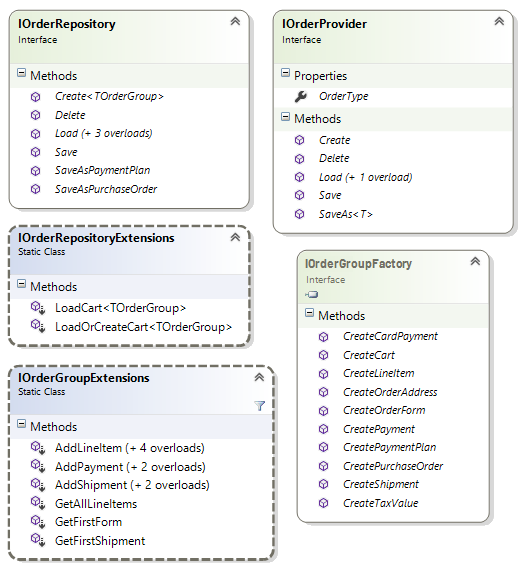
The diagram presents three patterns that work together: a factory for construction, a repository for persistence, and a provider for the pluggable backend. Extension methods sit on top to make common cases readable.
IOrderGroupFactory – constructor surface
IOrderGroupFactory – constructor surfaceEvery type in the order model is an interface, including ICart, ILineItem, and IShipment. You cannot create instances directly. Use the factory to obtain instances:
CreateCart,CreatePurchaseOrder,CreatePaymentPlan– top-level order groups.CreateOrderForm,CreateShipment,CreateLineItem– the parts that compose an order.CreatePayment,CreateCardPayment– payment records (note the dedicated card-payment factory method).CreateOrderAddress,CreateTaxValue– the value-style objects.
Always create order objects through IOrderGroupFactory. Do not instantiate them directly. The factory returns the correct concrete type registered in the inversion of control (IoC) container, which keeps your code decoupled from the storage implementation.
IOrderRepository – persistence surface
IOrderRepository – persistence surfaceThe repository is the main API for moving order groups in and out of storage:
Create<TOrderGroup>– allocate a new order group of a specific type.Load (+3 overloads)– fetch by ID, by customer, by criteria, and so on.Save– persist changes.Delete– remove.SaveAsPurchaseOrder,SaveAsPaymentPlan– conversion methods that promote a cart into a placed order or a recurring subscription. The conversion consumes the cart and produces a new order group of the target type, which mirrors real-world checkout and subscription flows.
IOrderProvider – pluggable backend
IOrderProvider – pluggable backendIOrderProvider is a lower-level abstraction that exposes the methods Create, Load, Save, Delete, and SaveAs<T>, plus an OrderType property. This interface is the seam where Commerce Connect plugs in storage implementations. Most application code should not call IOrderProvider directly. Call IOrderRepository and let it route to the right provider based on OrderType.
IOrderRepositoryExtensions – repository helpers
IOrderRepositoryExtensions – repository helpersLoadCart<TOrderGroup>– load a customer's cart by name.LoadOrCreateCart<TOrderGroup>– the most common method in checkout code. Returns the existing cart or creates a new one in a single call.
IOrderGroupExtensions – order-group helpers
IOrderGroupExtensions – order-group helpersConvenience operations on an IOrderGroup instance hide the form and shipment plumbing:
AddLineItem (+4 overloads)– adds a line item without forcing the caller to traverseOrderFormandIShipment.AddPayment (+2 overloads)– attaches a payment to the first order form.AddShipment (+2 overloads)– attaches a shipment to the first order form.GetAllLineItems– flattens line items across all shipments and forms.GetFirstForm,GetFirstShipment– shortcuts for the common single-form, single-shipment case.
These extensions exist because the data model nests IOrderForm, IShipment, and ILineItem. They short-circuit the traversal for the common single-form, single-shipment case.
Order manipulation mental model
            ┌─────────────────────┐        ┌──────────────────────────┐
            │  IOrderGroupFactory │        │     IOrderRepository     │
            │   (build objects)   │        │    (persist objects)     │
            └──────────┬──────────┘        └────────────┬─────────────┘
                       │                                │
                       │     creates       saves/loads  │
                       ▼                                ▼
                  ┌────────────────────────────────────────────┐
                  │  ICart, IPurchaseOrder, or IPaymentPlan    │
                  │  (the IOrderGroup graph from the order     │
                  │   objects diagram: forms, shipments,       │
                  │   line items, payments, and addresses)     │
                  └────────────────────────────────────────────┘
                                       ▲
                                       │ routes to a backend
                                       ▼
                            ┌──────────────────────┐
                            │    IOrderProvider    │
                            │  (storage plug-in)   │
                            └──────────────────────┘

  Convenience layer:
    IOrderRepositoryExtensions   ->  LoadOrCreateCart, LoadCart
    IOrderGroupExtensions        ->  AddLineItem, AddPayment, AddShipment, and so on.
Note
Cart-to-order conversion is a first-class operation, not a state change –
SaveAsPurchaseOrderandSaveAsPaymentPlanexist onIOrderRepositorybecause the model treats checkout and subscription creation as transformations between order-group types, not as status flips on the cart.Extension methods are part of the public API. Use them in examples – The
IOrderGroupExtensionshelpers, such asAddLineItemandGetFirstShipment, are the idiomatic way to manipulate orders in Commerce Connect code. The following two samples are equivalent, but the second reads more cleanly:// Verbose form, exposes implementation detail var items = cart.Forms.First().Shipments.First().LineItems; // Idiomatic form, uses the extension methods var items = cart.GetAllLineItems();Lead with the extensions in any tutorial.
Order processing
This diagram represents the business-logic and processing layer of IOrderGroupExtensions. It contains the orchestration methods that run commerce rules against the order, such as validating items, applying discounts, updating prices, adjusting inventory, and processing payments. The methods in the order manipulation diagram, such as AddLineItem, only modify object structure. The diagram shows how Commerce Connect breaks complex order operations into single-responsibility processor interfaces. For more details, see Order processing.
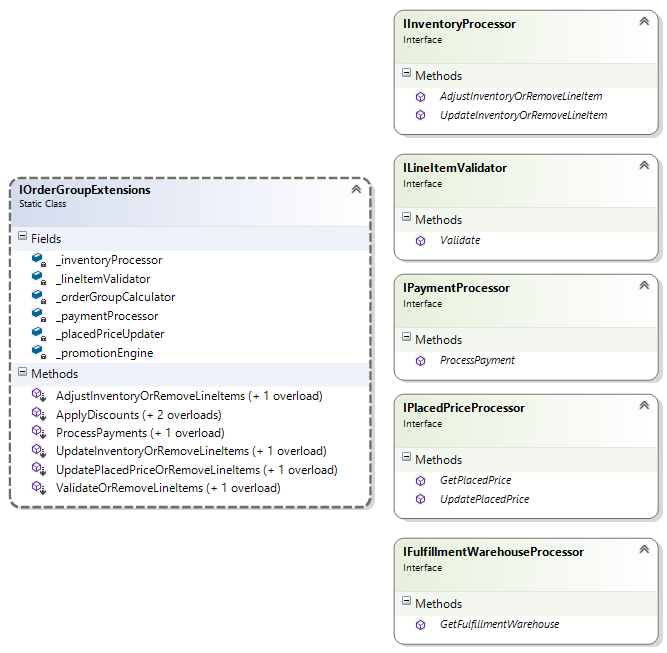
Pattern: extension methods delegate to injected processors
IOrderGroupExtensions is a static class, but its fields show it depends on six injected services. The following table maps each IOrderGroupExtensions method to the processor it delegates to:
IOrderGroupExtensions method | Delegates to |
|---|---|
ValidateOrRemoveLineItems | ILineItemValidator |
UpdateInventoryOrRemoveLineItems and AdjustInventoryOrRemoveLineItems | IInventoryProcessor |
UpdatePlacedPriceOrRemoveLineItems | IPlacedPriceProcessor |
ApplyDiscounts | _promotionEngine (interface not shown in this diagram) |
ProcessPayments | IPaymentProcessor |
| (totals) | _orderGroupCalculator (interface not shown in this diagram) |
IFulfillmentWarehouseProcessor also appears in the diagram. It is not bound to a field in this view, but it belongs to the same processor family and is used during shipment and fulfillment routing.
What each processor owns
ILineItemValidator–Validate. Decides whether a line item is still allowed in the order based on catalog availability, market eligibility, and custom rules.IInventoryProcessor–AdjustInventoryOrRemoveLineItem,UpdateInventoryOrRemoveLineItem. Reserves and releases stock and reconciles line item quantities against what is available.IPlacedPriceProcessor–GetPlacedPrice,UpdatePlacedPrice. Re-resolves the price for a line item from the current pricing store. The placed price is the price captured on the line item when the line is placed. The processor refreshes stale carts.IPaymentProcessor–ProcessPayment. Runs the configured payment gateway flow against anIPayment.IFulfillmentWarehouseProcessor–GetFulfillmentWarehouse. Picks the warehouse a shipment ships from.
Two fields do not have a corresponding box in the diagram:
_promotionEngine– the discount and coupon evaluator.ApplyDiscountsinvokes it._orderGroupCalculator– computes totals such as subtotal, tax, handling, and order total. The static class does not expose it directly, but the extensions use it internally when re-pricing.
Read the method names literally
Notice the recurring …OrRemoveLineItems suffix:
ValidateOrRemoveLineItemsUpdateInventoryOrRemoveLineItemsAdjustInventoryOrRemoveLineItemsUpdatePlacedPriceOrRemoveLineItems
This is a deliberate Commerce Connect convention: these methods are destructive. The contract is to reconcile the order against the current reality. If a line item cannot be reconciled, the method drops it. Examples of what triggers removal:
ValidateOrRemoveLineItemsremoves the line item when the catalog entry no longer exists or is no longer available in the market.UpdateInventoryOrRemoveLineItemsreduces or drops the line when inventory drops below the requested quantity.UpdatePlacedPriceOrRemoveLineItemsdrops the line when the pricing system cannot return a price for the SKU.
CautionThese methods can silently shrink a cart. When you call these methods at checkout, you tell Commerce Connect to keep the valid lines and discard the rest. The behavior is usually correct, but callers who need to show the user what was dropped must compare line items before and after the call.
Relationship to the previous diagrams
   IOrderGroupFactory ─── creates objects
                               │
                               ▼
   ICart, IPurchaseOrder, or IPaymentPlan        (order objects diagram)
                               │
              ┌────────────────┴───────────────────┐
              ▼                                    ▼
   IOrderGroupExtensions                IOrderGroupExtensions
   (structural helpers)                 (workflow and processing,
   AddLineItem, AddPayment,              shown in this diagram)
   GetFirstShipment, and so on           ApplyDiscounts,
                                         ProcessPayments,
                                         ValidateOrRemoveLineItems, and so on
                                                   │
                                                   ▼
                       ┌──────────────────────────────────────────────┐
                       │  Single-responsibility processors            │
                       │  IInventoryProcessor, ILineItemValidator,    │
                       │  IPlacedPriceProcessor, IPaymentProcessor,   │
                       │  IFulfillmentWarehouseProcessor,             │
                       │  (promotion engine, order calculator)        │
                       └──────────────────────────────────────────────┘
                                                   │
                                                   ▼
                                      IOrderRepository ─ persists results
Note
- Each processor is a swappable extension point – The diagram lists what is customizable in the order pipeline. To use custom inventory rules, replace
IInventoryProcessor. To use custom validation, replaceILineItemValidator. The extension methods onIOrderGroupExtensionspick up the replacement through dependency injection (DI), so you do not need to rewrite the orchestration.- Typical checkout call order – Call
ValidateOrRemoveLineItems, thenUpdatePlacedPriceOrRemoveLineItems, thenUpdateInventoryOrRemoveLineItems, thenApplyDiscounts, then recalculate totals, thenProcessPayments. Each step assumes the previous step has run, which is why they are separate methods rather than a singleCheckout()method. Anyone who writes a custom checkout flow must follow this sequence.
Order calculations
This diagram represents the calculator layer, which is the read-only math API for orders. At every level of the order graph (group, form, line item, and shipment), a calculator interface defines the totals contract. A paired static extension class exposes the calculations as fluent methods on the data interfaces.
Calculators only compute. They report the current value of an order without changing anything. The processors in the order processing diagram mutate the order; calculators do not. For more details, see Calculate orders.
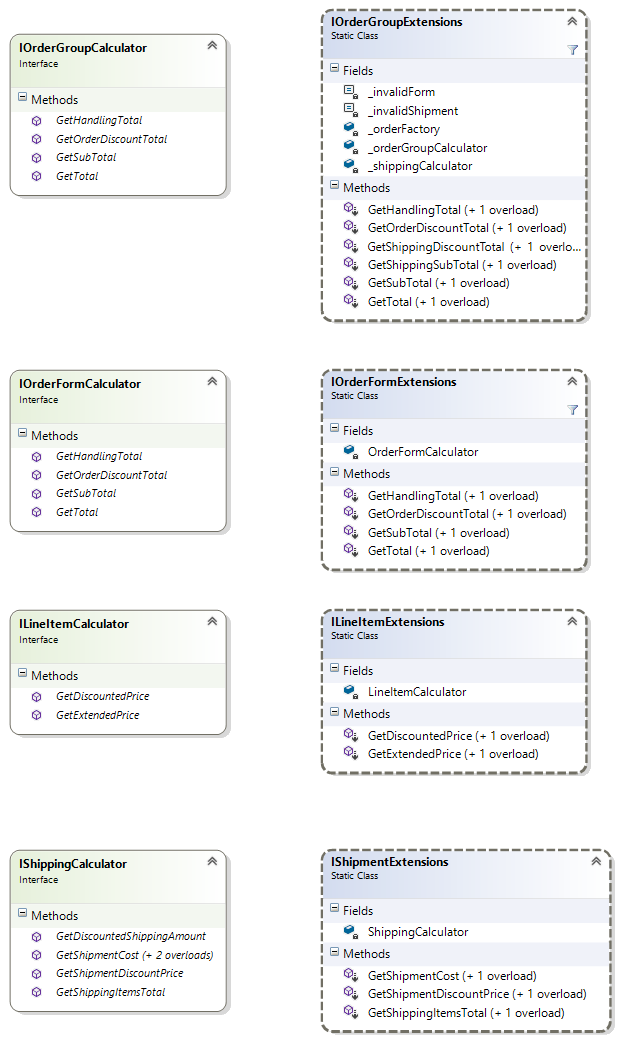
Four parallel pairs
| Level | Calculator interface | Extension class |
|---|---|---|
| Order group (cart, PO, or plan) | IOrderGroupCalculator | IOrderGroupExtensions |
| Order form | IOrderFormCalculator | IOrderFormExtensions |
| Line item | ILineItemCalculator | ILineItemExtensions |
| Shipment | IShippingCalculator | IShipmentExtensions |
Each extension class holds a single private field that references its calculator and wraps it. Callers write cart.GetTotal() instead of _orderGroupCalculator.GetTotal(cart). The two calls are equivalent, but the extension form is more readable.
IOrderGroupCalculator
IOrderGroupCalculatorGetSubTotal– sum of line-item extended prices, before order-level discounts.GetHandlingTotal– handling fees aggregated across forms.GetOrderDiscountTotal– order-level promotion discounts.GetTotal– the grand total: subtotal plus tax, shipping, and handling, less discounts.
IOrderFormCalculator
IOrderFormCalculatorThe same four methods (GetSubTotal, GetHandlingTotal, GetOrderDiscountTotal, and GetTotal) scoped to a single IOrderForm. The order-group calculator iterates forms and asks the form calculator.
ILineItemCalculator
ILineItemCalculatorGetExtendedPrice–PlacedPricemultiplied byQuantity.GetDiscountedPrice– the same value after line-level discounts are applied.
IShippingCalculator
IShippingCalculatorGetShipmentCost (+2 overloads)– returns the shipping rate for a shipment.GetShipmentDiscountPrice– returns the shipping discount for a single shipment.GetDiscountedShippingAmount– returns the discounted shipping cost.GetShippingItemsTotal– returns the subtotal of items on the shipment, used to drive shipping rate calculations that depend on shipment value.
Additional methods on IOrderGroupExtensions
IOrderGroupExtensionsThe static extensions mostly mirror the calculator they wrap, with a few differences worth noting.
This section presents the third view of IOrderGroupExtensions in this article. The previous sections covered its structural helpers and its workflow methods. This view adds the following members:
GetShippingDiscountTotal,GetShippingSubTotal– shipping-related rollups that are not onIOrderGroupCalculatordirectly. The fields hint at why:_shippingCalculatoris also injected, and the extension stitches both calculators together so callers can ask the order group for shipping totals without knowing which calculator computes them._invalidForm,_invalidShipment, and_orderFactoryfields – sentinels and a factory for handling degenerate cases such as an order group with no form, or an order form with no shipment. The extensions return well-formed empty totals instead of throwing exceptions.
IOrderFormExtensions, ILineItemExtensions, and IShipmentExtensions
IOrderFormExtensions, ILineItemExtensions, and IShipmentExtensionsThese extensions are thin pass-throughs to their respective calculators. They are convenience wrappers over the corresponding IXxxCalculator interface, with the same semantics and a fluent style.
Calculations are bottom-up
   ILineItemCalculator           extended and discounted price per line
            │
            ▼  summed by
   IOrderFormCalculator          form-level subtotal, handling, and order discount
            │
            ▼  summed by
   IOrderGroupCalculator         group-level totals
            │
            │  sibling input
            ▼
   IShippingCalculator           shipment costs and shipping discounts
            │
            └── combined into the order group's GetTotal
The shipping calculator is a sibling of the line-item, form, and group calculators rather than a child. Shipping math has its own model (rates, methods, and warehouses) and is folded into the order total at the top.
Note
- Calculators are read-only and idempotent – Calling
cart.GetTotal()twice returns the same number and does not mutate the cart. This contrasts with the processor layer (ProcessPayments,ApplyDiscounts, and the…OrRemoveLineItemsmethods), which can change the order. To recompute totals after a price change, run the relevant processor first, then call the calculator. The calculator does not refresh stale data.- Each calculator is a swappable extension point – To customize totals math (custom rounding, market-specific subtotal rules, or B2B negotiated pricing), replace the corresponding
IXxxCalculatorin the IoC container. The extension methods pick up the replacement, so the customization flows throughcart.GetTotal()at every call site.IOrderGroupExtensionsis one static class with three responsibilities
- Structural helpers from the order manipulation diagram.
- Workflow and processing from the order processing diagram.
- Totals from the order calculations diagram.
Updated 2 months ago