
Catalog Indexing
Build or rebuild a catalog search index to keep product search results current.
Catalog indexing controls how your product catalog is indexed for search. Keeping the index current ensures that customers find accurate, up-to-date results when searching your storefront, and that admin catalog searches reflect the latest product data. Common scenarios include:
- Initial setup – After configuring your catalog for the first time, run a full index rebuild to make all products searchable.
- Post-import updates – After a large product import or bulk update, rebuild or build the index to ensure changed items are reflected in search results.
- Incremental updates – Use the Build Index operation for routine maintenance after smaller catalog changes, because it is faster than a full rebuild.
- Index recovery – If the indexing processor enters an invalid state because of an error or interrupted operation, use the Recover action to restore normal processing without a full rebuild.
Go to Settings > Catalog Indexing.
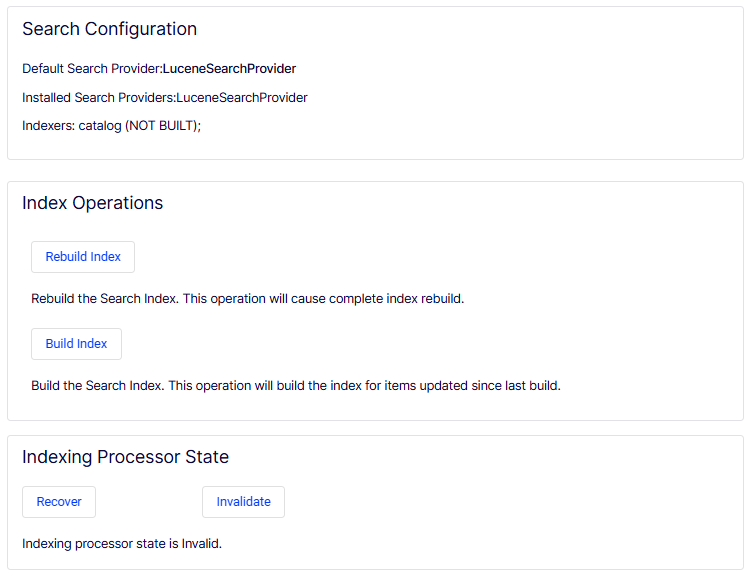
The Catalog Indexing page is comprised of the following sections:
- Search Configuration – Displays read-only information about the current search setup.
- Default Search Provider – The search provider currently active for storefront and admin catalog searches. In this screenshot, the provider is LuceneSearchProvider.
- Installed Search Providers – Lists all search providers available in the system. In this screenshot, LuceneSearchProvider is the only installed provider.
- Indexers – Lists the registered indexers and their current build status. In this screenshot, the catalog indexer is shown with a status of NOT BUILT, meaning the index has not yet been built and catalog search results are not available until an index operation runs.
- Index Operations – Provides controls for building and rebuilding the catalog search index.
- Rebuild Index – Click to trigger a complete index rebuild from scratch. All existing index data is discarded and rebuilt from the current catalog. Use this when the index is corrupted, out of sync, or has never been built. This operation may take significant time on large catalogs and can impact search availability during the rebuild.
- Build Index – Click to trigger an incremental index build that processes only items updated since the last build. Use this for routine updates after smaller catalog changes. This operation is faster than a full rebuild and has less impact on search availability.
- Indexing Processor State – Displays the current state of the background indexing processor and provides controls to manage it.
- Recover – Click to attempt restoring the indexing processor to a healthy running state. Use this when the processor has entered an invalid state because of an error or interrupted indexing operation.
- Invalidate – Click to manually force the indexing processor into an invalid state. This is typically used for troubleshooting or to force a recovery cycle.
- Status message – Displays the current processor state. In this screenshot, the status reads Indexing processor state is Invalid, indicating the processor needs to be recovered before indexing operations complete successfully.
Updated 2 months ago
Did this page help you?