
Catalog content
Describes how to work with catalog content based on the IContent interface in Optimizely Customized Commerce.
Access catalog content as IContent
Optimizely Commerce Connect provides a content provider that can serve any catalog content as IContent. That means you can use an IContentRepository to work with the content as you do in the Optimizely Content Management System (CMS).
The following example creates a new SKU:
public ContentReference CreateNewSku(ContentReference linkToParentNode)
{
    var contentRepository = ServiceLocator.Current.GetInstance<IContentRepository>();
    // Create a new instance of CatalogContentTypeSample that will be a child to the specified parentNode.
    var newSku = contentRepository.GetDefault<CatalogContentTypeSample>(linkToParentNode);
    // Set some required properties.
    newSku.Code = "MyNewCode";
    newSku.SeoUri = "NewSku.aspx";
    // Set the description.
    newSku.Description = "This new SKU is great";
    // Publish the new content and return its ContentReference.
    return contentRepository.Save(newSku, SaveAction.Publish, AccessLevel.NoAccess);
}
For information about displaying Commerce Connect content, see Render catalog content.
Content model
Connect a content type to the meta-class to get the full feature set. Do that by creating a model class that inherits from the appropriate type in the EPiServer.Commerce.Catalog.ContentTypes namespace and decorating it with the CatalogContentTypeAttribute attribute.
The following example shows how to define a content type connected to a meta-class:
using EPiServer.Commerce.Catalog.ContentTypes;
using EPiServer.Commerce.Catalog.DataAnnotations;
using EPiServer.Core;
using EPiServer.DataAnnotations;

namespace CodeSamples.EPiServer.Commerce.Catalog.Provider
  {
    [CatalogContentType(
      GUID = "7B6B3E60-BFD8-4AD6-BA94-C9728F727988",
      MetaClassName = "CatalogContentTypeSample",
      DisplayName = "Content Type Sample",
      Description = "A customize for variation content"
    )]
    public class CatalogContentTypeSample : VariationContent
      {
        [CultureSpecific]
        [Tokenize]
        [Encrypted]
        [UseInComparison]
        [IncludeValuesInSearchResults]
        [IncludeInDefaultSearch]
        [SortableInSearchResults]
        public virtual string Description { get; set; }

        public virtual int Size { get; set; }

        [DecimalSettings(18, 0)]
        public virtual decimal Discount { get; set; }
      }
  }
The following types are available when you create Commerce Connect models.
VariationContent– A type for variant/SKU models.ProductContent– A type for product models.BundleContent– A type for bundle models.PackageContent– A type for package models.NodeContent– A type for category/node models.CatalogContent– A type for catalog models.
You should not inherit from the following types because they exist only to show various states in the system:
EntryContentBase– A base type forVariationContent,ProductContent,BundleContent,PackageContent, andDynamicPackageContent.NodeContentBase– A base type forNodeContentandCatalogContent.RootContent– The virtual root in Optimizely's hierarchical representation of Commerce Connect content.
During synchronization, specific CLR types generate meta-fields of a specific MetaDataPlus type. You can modify the default mapping by using the BackingTypeAttribute. The following table shows mappings for all supported types.
Maps for all supported types (CLR – MetaDataPlus)
Byte–Integer(SmallInt,TinyInt, andIntare also supported)Int16–Integer(SmallInt,TinyInt, andIntare also supported)Int32–Integer(SmallInt,TinyInt, andIntare also supported)Int64–Integer(SmallInt,TinyInt, andIntare also supported)Double–FloatSingle–FloatFloat–FloatDecimal–DecimalString–LongString(ShortStringandTextare also supported)Boolean–BooleanDateTime–DateTime(DateandSmallDateTimeare also supported)Url–UrlXhtmlString–LongHtmlStringContentReference–ShortStringPageReference–ShortString
Commerce Connect-specific attributes
Any attribute you can use in the CMS can also be used in Commerce Connect content type models. You can decorate your model with the following Commerce Connect-specific attributes:
CatalogContentTypeAttribute– To connect the content type to an existing meta-class, use theCatalogContentTypeAttribute. Connect them by defining the name of the meta-class that should be connected to the content type.
The following example shows how to use CatalogContentTypeAttribute:
using EPiServer.Commerce.Catalog.ContentTypes;
using EPiServer.Commerce.Catalog.DataAnnotations;

namespace CodeSamples.EPiServer.Commerce.Catalog.Provider
  {
    [CatalogContentType(MetaClassName = "WineSKU")]
    public class CatalogContentTypeAttributeSample : VariationContent
      {
      }
}EncryptedAttribute– Use to declare a property to enable Use Encryption. This encrypts the value when stored in MetaDataPlus.UseInComparisonAttribute– Use an attribute to declare a property to be used for comparison.IncludeInDefaultSearchAttribute– Use to declare a property to include the value in default search results. This will be used by the search provider system.IncludeValuesInSearchResultsAttribute– Use to declare a property to be included in search results. This will be used by the search provider system.SortableInSearchResultsAttribute– Use to declare a property to be flagged as index sortable. This will be used by the search provider system.TokenizeAttribute– Use to declare a property to be tokenized (word breaking).DecimalSettingsAttribute– Use to declare a property to have precision and scale.
Commerce Connect-specific types
The types you can represent in MetaDataPlus are not directly mapped to a CLR type. Properties that are backed by meta-fields of these MetaDataPlus types need to be specified beyond return type. The following table lists such MetaDataPlus types and additional requirements.
NoteThe use of Commerce Connect-specific types is not supported within blocks.
MetaDataPlus Type | CLR Type | Additional Requirements |
|---|---|---|
|
| Decorated with |
|
| Decorated with |
|
| Decorated with |
NoteTo define a property that maps to a
StringDictionarymetafield, use this example:[BackingType(typeof(PropertyStringDictionary))] public virtual IDictionary<string, string> StringDict { get; set; }
To change the values of that StringDictionary metafield, update the property as a normal dictionary. Example: content.StringDict = new Dictionary<string, string>() {{ "abc", "xyz" }, {"hello", "world"}};
See also StringDictionary support for catalog content blog post.
Limits in synchronization
The synchronization of catalog models works the same way as with content types in the CMS, except the data is backed in MetaDataPlus. However, there are some limitations due to technical differences. The following are not done automatically. They require manual steps:
- Change a property type – Causes an exception.
- Rename a model class – Unless specified by the
CatalogContentTypeAttribute, adds a meta-class, but the old one is left in the system. - Rename a property – Adds a meta field, but the old one is left in the system.
- Remove a property.
Different properties with the same name must have identical definitions. For example, you cannot have a property called Description on two different classes and make it culture-specific on one, but not the other. This is because, in MetaDataPlus, meta fields are shared across meta classes. Hence, they can only have one definition. See Synchronization.
List properties
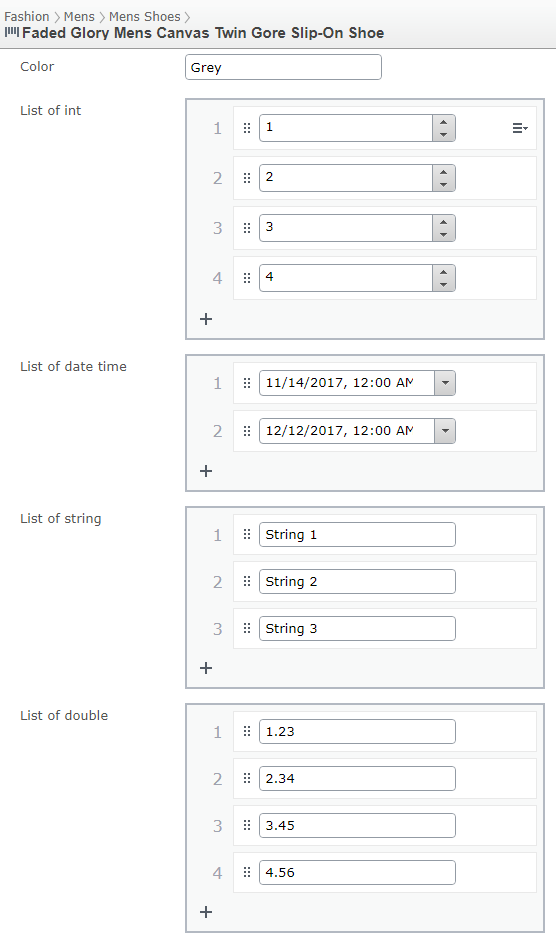
Beginning with CMS 11, Commerce Connect has a PropertyValueList that lets editors input multiple primitive values. Available types are:
IntStringDoubleDateTime
You can add a list as a property in your model:
[BackingType(typeof(PropertyIntegerList))]
[Display(Name = "List of int", Order = 5)]
public virtual IList<int> IntList { get; set; }

[BackingType(typeof(PropertyDateTimeList))]
[Display(Name = "List of date time", Order = 8)]
public virtual IList<DateTime> DateTimeList { get; set; }

[BackingType(typeof(PropertyStringList))]
[Display(Name = "List of string", Order = 6)]
public virtual IList<string> StringList { get; set; }

[BackingType(typeof(PropertyDoubleList))]
[Display(Name = "List of double", Order = 7)]
public virtual IList<double> DoubleList { get; set; }
The following image shows an example of the property list in a catalog content model:
Updated 2 months ago