
Lowest price over time
How to implement showing the lowest price over time in Optimizely Commerce Connect.
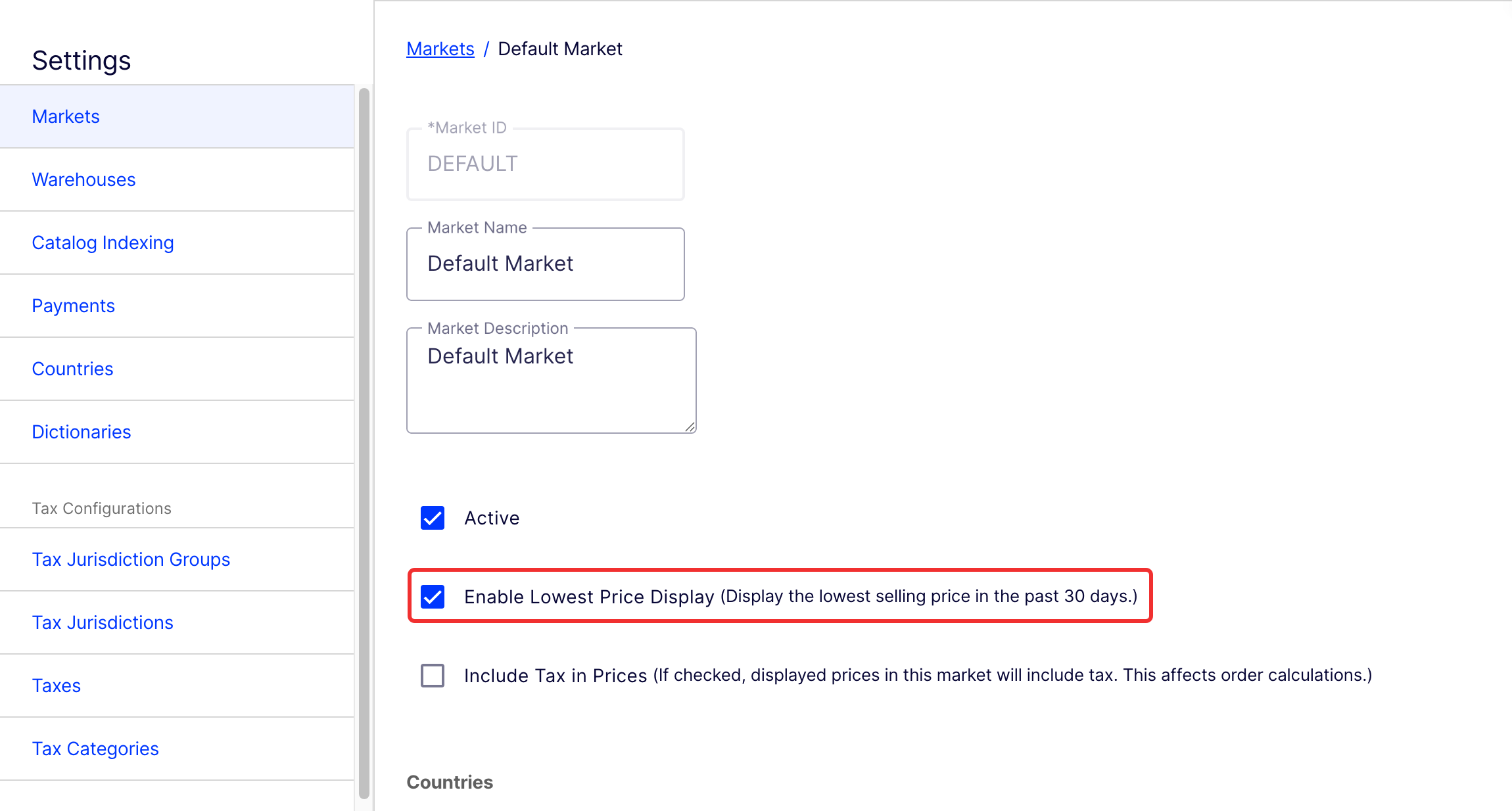
In Optimizely Commerce Connect, you can let users see the lowest price of products over a specified number of days on the website. Administrators can enable this feature for each market and set the time period in days, with a default of 30 days.
NoteWhen you activate the feature, the lowest price counts from the day you activated it. This means Commerce Connect may not reflect the actual lowest price in the past 30 days. To apply it the first time, you should manually configure the lowest price with the APIs. After 30 days, the system will automatically display the correct lowest price.
This only applies for products you have discounted in the past 30 days.
Market settings
Go to Settings > Markets and select the checkbox for Enable Lowest Price Display.
Options class
Administrators can use the options class to specify the time period, in days, for tracking the lowest price. The default is 30 days.
[Options(ConfigurationSection = ConfigurationSectionConstants.Commerce)]
public class LowestPriceOptions
{
    public int DaysAgo { get; set; } = 30;
}
You can configure this setting in the appsettings.json file.
"Commerce": {
  "LowestPriceOptions": {
    "DaysAgo": 30
  },
}
APIs
Commerce Connect has an interface to manage the market settings for enabling this feature.
public interface ILowestPriceMarket
{
    bool IsLowestPriceEnabled { get; set; }
}
Markets must implement this interface to use the feature, as shown in the following code sample:
public class MarketImpl : IMarket, ILowestPriceMarket { }Commerce Connect has another interface for saving, retrieving, or deleting the lowest price.
public interface ILowestPriceService
{
    IEnumerable<ILowestPriceValue> List(IEnumerable<string> catalogEntryCodes, string siteId);
    void Save(IEnumerable<ILowestPriceValue> lowestPriceValues);
    void DeleteOldPrices(string siteId, int daysAgo);
}
Get a list of lowest prices
The List() method retrieves the lowest prices for a list of entries using entry codes and a site ID. The following code sample demonstrates how to call this API:
var market = _currentMarket.GetCurrentMarket();
if (market is ILowestPriceMarket lowestPriceMarket && lowestPriceMarket.IsLowestPriceEnabled)
{
    return _lowestPriceService.List(new[] { entryCode1, entryCode2, entryCode3 }, siteId);
}
Save the lowest price
The Save() method stores the lowest price for a list of entries using entry codes. The following code sample calls this API:
var market = _currentMarket.GetCurrentMarket();
if (market is ILowestPriceMarket lowestPriceMarket && lowestPriceMarket.IsLowestPriceEnabled)
{
    var lowestPrice1 = new LowestPriceValue
    {
        CatalogEntryCode = "Entry_1",
        AppliedDate = DateTime.UtcNow,
        MarketId = market.MarketId,
        Currency = market.DefaultCurrency,
        SiteId = "site id",
        LowestPrice = new Money(10, market.DefaultCurrency)
    };

    var lowestPrice2 = new LowestPriceValue
    {
        CatalogEntryCode = "Entry_2",
        AppliedDate = DateTime.UtcNow,
        MarketId = market.MarketId,
        Currency = market.DefaultCurrency,
        SiteId = "site id",
        LowestPrice = new Money(12, market.DefaultCurrency),
    };

    _lowestPriceService.Save(new[] { lowestPrice1, lowestPrice2 });
}
Delete old lowest prices
The DeleteOldPrices() method removes the lowest prices for entries older than a specified number of days.
var market = _currentMarket.GetCurrentMarket();
if (market is ILowestPriceMarket lowestPriceMarket && lowestPriceMarket.IsLowestPriceEnabled)
{
    _lowestPriceService.DeleteOldPrices(siteId, daysAgo);
}
Updated 2 months ago