
Dictionaries
Dictionaries define fixed value sets for dropdown and multi-select properties, ensuring data consistency across your product catalog.
Dictionaries define the fixed sets of values available for selection in drop-down list or multi-select properties across your catalog. Instead of allowing free-text entry, dictionary-backed properties constrain input to a predefined list, ensuring data consistency across all products that share the same property. Common scenarios include:
- Standardized attribute lists – Maintain a single source of truth for attributes like available sizes or colors so that all products referencing the same property use identical values.
- Faceted search and filtering – Consistent dictionary values ensure that storefront filters and search facets work correctly, because variations in spelling or formatting would cause items to appear under separate facet entries.
- Bulk catalog management – When a size or color is introduced across a product line, adding it once to the dictionary makes it immediately available to every property that references that dictionary.
- Data validation – Restricting a property to dictionary values prevents invalid or inconsistent entries during product creation and import.
Go to Settings > Dictionaries. The Dictionary Property Values page lists all dictionaries defined in your system, the values each one contains, and the catalog entry types that use them.
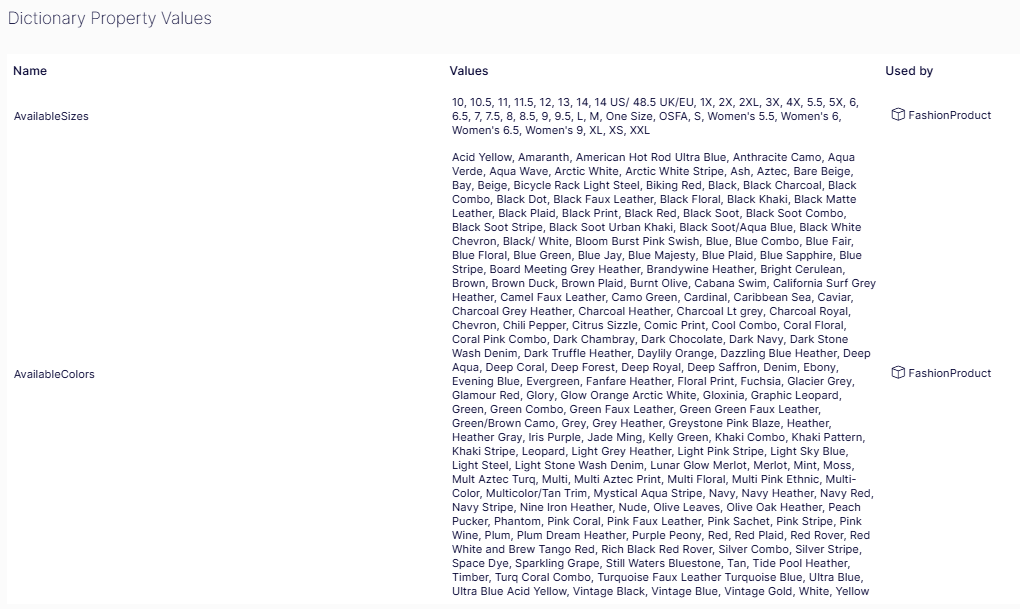
- Name column – Displays the programmatic identifier of the dictionary property (for example,
AvailableSizes,AvailableColors). This name corresponds to the property defined on the meta class that references this dictionary. - Values column – Lists every value currently defined in the dictionary as a comma-separated sequence. For example,
AvailableSizescontains standard US and international sizes such as S, M, L, XL, 1X, 2XL, and shoe sizes ranging from 5.5 to 14.AvailableColorscontains the full range of color names available for selection on a product, such as Black, Navy, Coral Floral, and Vintage Gold. Click into a dictionary to add, edit, or remove individual values. - Used by column – Identifies which catalog entry type or meta class references each dictionary (for example, FashionProduct). This helps you understand the downstream impact before modifying the values in a dictionary.
Add or delete dictionary values
Click a dictionary item. The Values window displays.
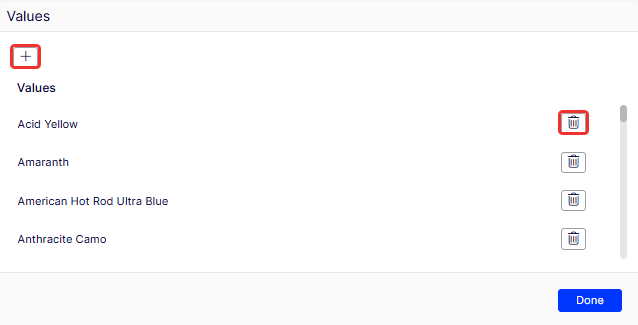
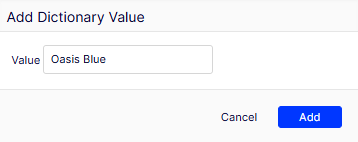
To add a value, click Add (+). The Add Dictionary Value window displays.
To delete a value, click the corresponding Delete (trash can) icon.
Updated 2 months ago