
Shipping methods
Describes shipping methods, which manage the rules that determine shipping cost and display that information on the front-end site during checkout. The shipping cost is added to the total purchase price.
A shipping method maps a customer-facing name (such as Ground Shipping) to a back-end shipping provider (such as UPS). Back-end administrators see and configure the mapping in Commerce Connect; storefront customers see only the friendly name. When a customer picks Ground Shipping, the UPS provider calculates the rate.
This article shows how to add shipping methods in Commerce Connect Admin, and how to retrieve and store the selected shipping method from custom checkout code.
For details on creating gateways and providers, see Shipping gateways and providers.
Classes in this topic are available in the following namespace:
Mediachase.Commerce.Orders.Dto
Add a shipping method
Go to Settings > Shipping Methods to see the shipping methods available for the selected language.
Click Create to add a shipping method, then fill out the details: name, friendly name, description, provider, language, base price, currency, active, and default.
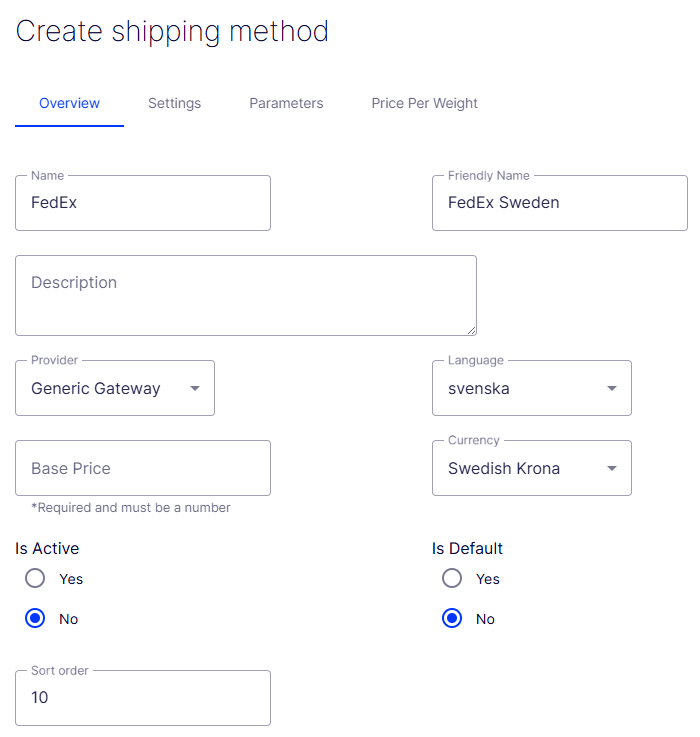
Access shipping information
The following example retrieves the shipping methods and rates for the current cart so the storefront can display them to the customer:
// Get the list of shipping methods to filter.
ShippingMethodDto methods = ShippingManager.GetShippingMethods(SiteContext.Current.LanguageName);

// Filter to the methods that apply to this cart's shipping address.
List<ShippingMethodDto.ShippingMethodRow> shippingRows = new List<ShippingMethodDto.ShippingMethodRow>();

foreach (ShippingMethodDto.ShippingMethodRow method in methods.ShippingMethod.Rows)
{
    shippingRows.Add(method);
}

List<ShippingRate> list = new List<ShippingRate>();

foreach (ShippingMethodDto.ShippingMethodRow row in shippingRows)
{
    Type type = Type.GetType(row.ShippingOptionRow.ClassName);
    string message = String.Empty;
    IShippingGateway provider = (IShippingGateway)Activator.CreateInstance(type);

    List<LineItem> items = new List<LineItem>();

    foreach (LineItem lineItem in CartHelper.LineItems)
    {
        items.Add(lineItem);
    }

    if (items.Count > 0)
    {
        list.Add(provider.GetRate(row.ShippingMethodId, items.ToArray(), ref message));
    }
}
To store the selected shipping method, set the LineItem properties. You do not need to create a shipment object — the Cart Prepare workflow does that.
ShippingMethodDto methods = ShippingManager.GetShippingMethods(SiteContext.Current.LanguageName);

ShippingMethodDto.ShippingMethodRow row = methods.ShippingMethod.FindByShippingMethodId(new Guid(ShippingRatesList.SelectedValue));
foreach (LineItem lineItem in CartHelper.LineItems)
{
    lineItem.ShippingMethodName = row.DisplayName;
    lineItem.ShippingMethodId = row.ShippingMethodId;
}
Updated 2 months ago