
Optimizely Commerce Connect API overview
Describes an overview of the Optimizely Commerce Connect integration APIs.
NoteSample code used in this article is taken from Quicksilver templates. The Quicksilver Commerce Connect sample site and installation instructions are available to download from GitHub.
For environment settings, see Install and configure the native integration package.
The following diagram illustrates how Optimizely Product Recommendations operates in both tracking modes:
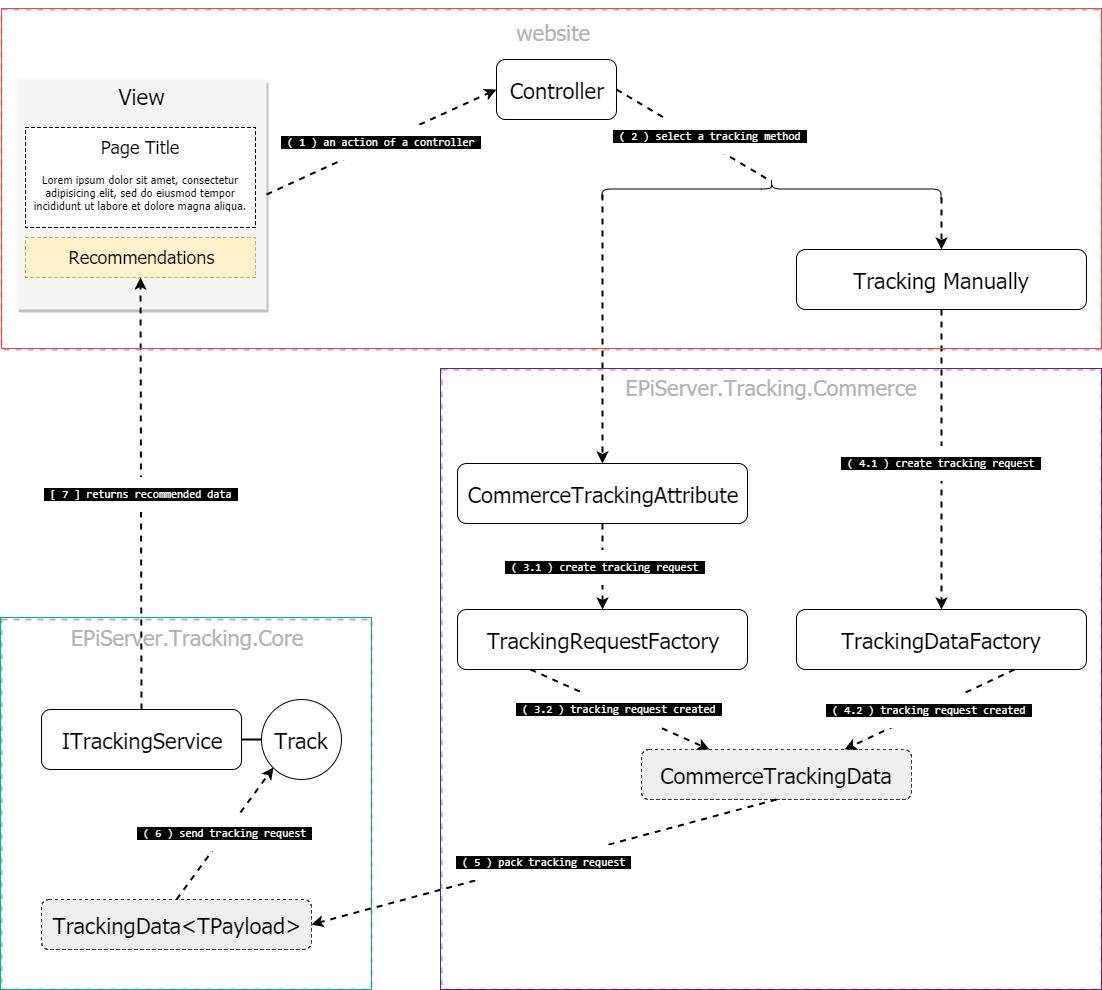
Server-side integration API
The EPiServer.Tracking.Core package contains:
- The
EPiServer.Tracking.Core.ITrackingServiceinterface.
The EPiServer.Tracking.Commerce package contains:
- The
EPiServer.Tracking.Commerce.TrackingServiceExtensionsclass. - The
EPiServer.Tracking.Commerce.CommerceTrackingAttributeclass. - The
EPiServer.Tracking.Commerce.TrackingDataFactoryclass.
Client-side integration API
The EPiServer.Personalization.Commerce package contains:
- The
epiRecommendationsJavaScript object — used to send a tracking request with client-collected tracking data and render the tracking response. - The
TrackingDataFactoryJavaScript object — collects tracking data from the client.
Mark clicks
If a user clicks a recommended item, the click must be tracked to generate useful recommendations. To get information about which recommendation triggered the current request, use the EPiServer.Tracking.Commerce.IRecommendationContext interface.
The Quicksilver template includes a class, EPiServer.Reference.Commerce.Site.Features.Recommendations.Services.RecommendationContext, that implements IRecommendationContext for tracking clicks on recommended products.
Define recommendation layout on a page
To render recommendations, create four sections on a page: upper, left, right, and bottom.
recommendations-upperrecommendations-leftrecommendations-rightrecommendations-bottom
Based on their CSS classes, recommendations are rendered to the upper, left, right, and bottom areas of a page's main content.
In Views/Shared/_Layout.cshtml, add four <div> tags, one for each section:
<div class="recommendations recommendations-upper"></div>
<div class="recommendations recommendations-left"></div>
<div class="recommendations recommendations-right"></div>
<div class="recommendations recommendations-bottom"></div>
The result inside the layout structure looks like the following:
@{ Html.RenderAction("Index", "Navigation"); }
<div class="quicksilver site-wrapper">
    <div class="main-area">@RenderBody()</div>
    <div class="recommendations recommendations-upper"></div>
    <div class="recommendations recommendations-left"></div>
    <div class="recommendations recommendations-right"></div>
    <div class="recommendations recommendations-bottom"></div>
</div>
@{ Html.RenderAction("Index", "Footer"); }
Updated 2 months ago