
Marketing (dev)
Describes the campaign management functionality in Optimizely Commerce Connect.
Use the API in Optimizely Commerce Connect to work with promotions (discounts) as part of a campaign.
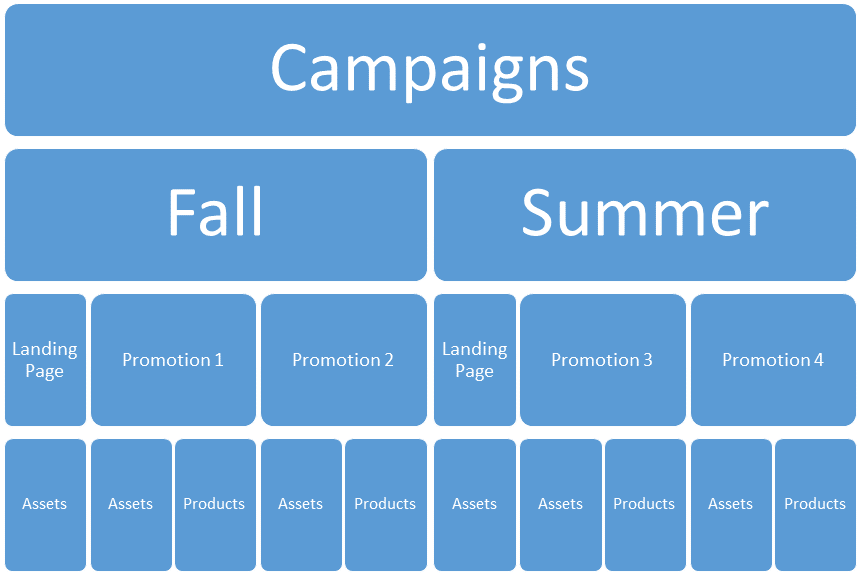
Promotions (discounts) are available to end users under Marketing in the Commerce Connect user interface. By definition, a campaign is a container for creating and applying promotions. A campaign is also a content type, supported by the content model in Optimizely.
Classes in this topic are available in the following namespace:
EPiServer.Commerce.Marketing
Campaign content type
Commerce Connect provides one standard campaign type: SalesCampaign. This class is a basic content, which means it does not follow the normal publishing workflow of content. The class has the properties IsActive, ValidFrom, and ValidUntil, which control the campaign's status.
This class can also restrict a campaign to one or more visitor groups through the VisitorGroup property, which supports targeting customer segments. The sales campaign also has a RevenueGoal property.
using EPiServer.Commerce.Catalog.ContentTypes;
using EPiServer.Commerce.Marketing;
using EPiServer.Commerce.Marketing.DataAnnotations;
using EPiServer.Core;
using EPiServer.DataAbstraction;
using EPiServer.DataAnnotations;
using System.Collections.Generic;
using System.ComponentModel.DataAnnotations;

namespace EPiServer.Commerce.Sample.Models.Campaigns {
  [ContentType(GUID = "530a7f07-8d12-4625-bda3-8e135a10b74d")]
  [AvailableContentTypes(Include = new [] {
    typeof (PromotionData)
  })]
  public class SeasonalCampaign: SalesCampaign {
    [Display(Order = 12, GroupName = SystemTabNames.PageHeader, Prompt = "Hero Image")]
    public virtual ContentReference HeroImage {
      get;
      set;
    }

    [Display(Order = 13, GroupName = SystemTabNames.PageHeader, Prompt = "Banner Image")]
    public virtual ContentReference BannerImage {
      get;
      set;
    }
  }
}
Use render templates
Campaign content uses normal rendering templates. By default, only partial views are available for campaign content. To enable campaigns and pages, see Campaign content as pages.
The following example defines a partial controller for campaign content:
using EPiServer.Commerce.Marketing;
using EPiServer.Framework.DataAnnotations;
using EPiServer.Web.Mvc;

namespace MyOptimizelySite.Controllers {
  [TemplateDescriptor(Default = true)]
  public class CampaignPartialController: PartialContentComponent<SalesCampaign> {
    protected override IViewComponentResult InvokeComponent(SalesCampaign currentCampaign) {
      // Implementation of action view the page
      return View(currentCampaign);
    }
  }
}
The following example shows the rendering view for the campaign partial view:
@using EPiServer.Core
@using EPiServer.Web.Mvc.Html

@model EPiServer.Commerce.Marketing.SalesCampaign

<h1>
  @Html.DisplayFor(m => m.Name)
</h1>

<h3>
  @Html.PropertyFor(m => m.Description)
</h3>
To enable a full page rendering for a campaign, add a content controller:
using System.Collections.Generic;
using System.Linq;
using System.Web.Mvc;
using EPiServer;
using EPiServer.Commerce.Marketing;
using EPiServer.Core;
using EPiServer.Framework.DataAnnotations;
using EPiServer.Web.Mvc;
using MyOptimizelySite.Models.Pages;
using System.Web.Security;

namespace MyOptimizelySite.Controllers {
  [TemplateDescriptor(Default = true)]
  public class CampaignPageController: ContentController<SalesCampaign> {
    public ActionResult Index(SalesCampaign currentCampaign) {
      // Implementation of action view the page.
      return View(currentCampaign);
    }
  }
}
The following example shows the rendering view for the campaign page view:
@using EPiServer.Core
@using EPiServer.Web.Mvc.Html

@model EPiServer.Commerce.Marketing.SalesCampaign

<h1>
    @Html.DisplayFor(m => m.Name)
</h1>
<h3>
    @Html.PropertyFor(m => m.Description)
</h3>
Campaign content as pages
The following example defines a campaign content type that implements IRoutable:
using EPiServer.Commerce.Marketing;
using EPiServer.Core;
using EPiServer.DataAbstraction;
using EPiServer.DataAnnotations;
using EPiServer.Web.Routing;
using System.ComponentModel.DataAnnotations;

namespace EPiServer.Commerce.Sample.Models.Campaigns {
  [ContentType(GUID = "530a7f07-8d12-4625-bda3-8e135a10b74d")]
  [AvailableContentTypes(Include = new [] {
    typeof (PromotionData)
  })]
  public class SeasonalCampaign: SalesCampaign, IRoutable {
    [Display(Order = 12, GroupName = SystemTabNames.PageHeader, Prompt = "Hero Image")]
    public virtual ContentReference HeroImage {
      get;
      set;
    }

    [Display(Order = 13, GroupName = SystemTabNames.PageHeader, Prompt = "Banner Image")]
    public virtual ContentReference BannerImage {
      get;
      set;
    }

    public virtual string RouteSegment {
      get;
      set;
    }
  }
}
Register a route for the campaign content type during initialization:
using EPiServer.Core;
using EPiServer.DataAbstraction;
using EPiServer.Framework;
using EPiServer.Framework.Initialization;
using EPiServer.ServiceLocation;
using EPiServer.Web.Routing;
using EPiServer.Web.Routing.Segments;
using System.Linq;
using System.Web.Routing;

namespace EPiServer.Commerce.Sample.Business.Initialization {
  /// <summary>
  /// Initialization module to handle the initialization of Commerce.
  /// </summary>
  [ModuleDependency(typeof (EPiServer.Commerce.Initialization.InitializationModule))]
  [InitializableModule]
  public class CampaignInitialization: IConfigurableModule {
    /// <summary>
    /// Initializes Commerce using the specified context.
    /// </summary>
    /// <param name="context">The context.</param>
    public void Initialize(InitializationEngine context) {
      EPiServer.Global.RoutesRegistered += Global_RoutesRegistered;
    }

    private void Global_RoutesRegistered(object sender, RouteRegistrationEventArgs e) {
      RegisterRoutes(RouteTable.Routes);
    }

    private static void RegisterRoutes(RouteCollection routes) {
      // Route for editing commerce content (which has a root not connected to the global root)
      MapCampaignRoute(routes,
        name: "campaignroot",
        url: "Campaigns/{language}/{nodeedit}/{partial}/{action}",
        defaults: new {
          action = "index"
        });
    }

    private static void MapCampaignRoute(RouteCollection routes, string name, string url, object defaults, object constraints = null) {
      var contentRootService = ServiceLocator.Current.GetInstance < ContentRootService > ();
      var root = ServiceLocator.Current.GetInstance < IContentLoader > ()
        .GetItems(contentRootService.List(), new LoaderOptions())
        .SingleOrDefault(x => x.Name.Equals("SysCampaignRoot"));
      var segmentRouter = ServiceLocator.Current.GetInstance < IUrlSegmentRouter > ();
      segmentRouter.RootResolver = (sd) => root.ContentLink;

      var parameters =
        new MapContentRouteParameters {
          UrlSegmentRouter = segmentRouter,
            BasePathResolver = null, //Use Cms default
            Direction = SupportedDirection.Both,
            Constraints = constraints
        };

      routes.MapContentRoute(
        name,
        url,
        defaults,
        parameters);
    }

    public void Uninitialize(InitializationEngine context) {
      // Uninitialize catalog content version
    }

    public void ConfigureContainer(ServiceConfigurationContext context) {}
  }
}
Related blog post: Filter your commerce campaigns for access by Jeroen Stemerdink
Updated 2 months ago