
Tax jurisdictions
Create tax jurisdictions and define their geographic boundaries for tax configuration.
Tax jurisdictions are the foundational building blocks of your tax configuration. Define individual jurisdictions before you assign them to products, transactions, or jurisdiction groups. Common scenarios include:
- Precise geographic targeting – Define tax applicability down to the city, district, county, or zip code range so that tax rules apply only where legally required.
- Multi-level tax authority compliance – Many locations require tax collection at multiple levels (state, county, city). Creating a separate jurisdiction for each authority lets you stack them accurately.
- Custom geocoding – When your system uses a third-party tax engine or mapping service, a GeoCode ties your jurisdiction definition to that external system's identifier.
- Zip code range scoping – Some tax districts do not align neatly with city or county boundaries. The zip code range fields let you target an irregular district precisely.
Go to Settings > Tax Jurisdictions.
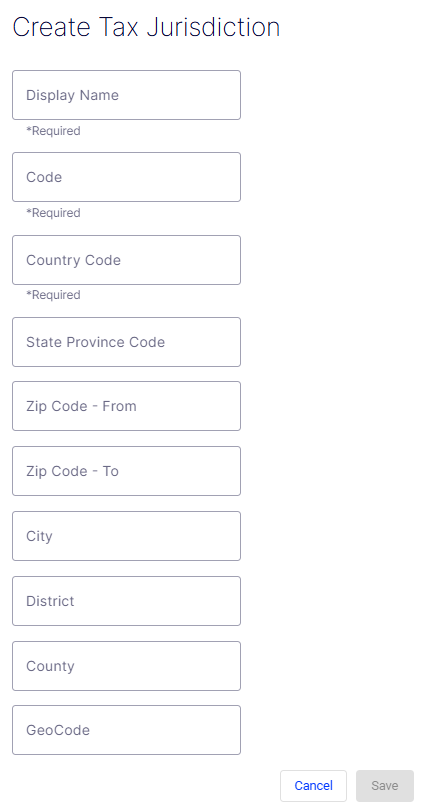
The Create Tax Jurisdiction form defines a single taxing authority and the geographic boundaries within which it applies. Each jurisdiction you create can then be added to a jurisdiction group or referenced directly in tax rules.
- Display Name – A required free-text field for the human-readable label of the jurisdiction. This name displays throughout the UI wherever the jurisdiction is referenced (for example, California – GeneralSales).
- Code – A required free-text field for the unique programmatic identifier used in API calls and integrations. It should be concise and free of spaces (for example,
CA-GENERAL). - Country Code – A required field specifying the country to which this jurisdiction belongs. Use standard ISO 3166-1 alpha-2 codes (for example,
US,CA,GB). - State Province Code – An optional field for the state or province within the specified country. Use standard abbreviations (for example,
CAfor California,MAfor Massachusetts). - Zip Code - From – An optional field defining the start of a zip code range. Use together with Zip Code - To to restrict the jurisdiction to a specific postal range.
- Zip Code - To – An optional field defining the end of a zip code range. Leave blank if the jurisdiction applies to an entire state or country rather than a specific postal band.
- City – An optional field to restrict the jurisdiction to a specific city within the state or province.
- District – An optional field for a named tax district that does not correspond to a standard city or county boundary (for example, a special transit or improvement district).
- County – An optional field to restrict the jurisdiction to a specific county within the state or province.
- GeoCode – An optional field for an external geographic identifier used by third-party tax engines or mapping services to match this jurisdiction to their internal records.
- Cancel – Discards all entered data and exits the form without creating a jurisdiction.
- Save – Submits the form and creates the jurisdiction. The button is disabled (grayed out) until all required fields – Display Name, Code, and Country Code – are filled in.
Updated 2 months ago
Did this page help you?