
Create contracts
Implement Optimizely CMS (SaaS) contracts to standardize content types, streamline management, and simplify data access with Optimizely Graph.
Contracts, also known as interfaces, define shared properties and behaviors across content types. They standardize the structure to ensure consistency and improve developer efficiency. When you integrate a contract with Optimizely Graph, Optimizely extends these benefits to the content delivery APIs. This streamlines data access and enables more flexible content querying.
For example, you can create a contract called Categorizable and specify that any content type implementing it must include the properties Category and Tags.
Content types such as Blog article, Press release, and News article can then implement this Categorizable contract. By doing so, you ensure the following:
- Every Blog article consistently has a Category and Tags.
- Every Press release consistently has a Category and Tags.
- Every News article consistently has a Category and Tags.
This enforcement of consistency provides several advantages within CMS (SaaS).
- Consistent content management – Content editors encounter a uniform experience. Regardless of the specific content type, the Category and Tags fields always display, promoting standardized metadata application.
- Enhanced search and filtering – Developers and content managers can search for, group, and filter content based on the contract's properties. For instance, you can retrieve all Categorizable content and filter by Category: Marketing or Tag: Product Launch, without needing to differentiate between Blog article, Press release, or News article.
- Code reusability – Developers write generic code that interacts with any content type implementing a specific contract. This reduces redundancy, simplifies development, and improves maintainability.
Contracts and Optimizely Graph
Contract benefits extend to Optimizely Graph, transforming how developers query and consume content. When you define a Contract in CMS (SaaS), it automatically generates a corresponding schema within Optimizely Graph.
This integration offers significant benefits for developers.
- Unified querying – Developers construct a single GraphQL query targeting the Categorizable contract (schema) in Optimizely Graph. This query retrieves content from all content types that implement that contract (for example, "Blog article", "Press release", or "News article").
- Simplified data access – Instead of needing to write separate queries for each content type and then merging the results, developers can get all relevant content that adheres to the "Categorizable" structure in one go. This greatly simplifies data retrieval and integration for applications consuming content from Optimizely Graph.
- Decoupled development – It further decouples the front-end development from the specific content type implementations. Developers can build components that expect any "Categorizable" content, and the Graph API ensures they receive it consistently, regardless of the original CMS (SaaS) content type.
So, in summary, Contracts not only enforce consistency within CMS (SaaS), but also extend that consistency to your content delivery APIs through Optimizely Graph, creating more efficient and flexible content querying for developers.
Create a contract
-
Go to Settings > Content Types and select Create New > Contract. The Create New Contract window displays.
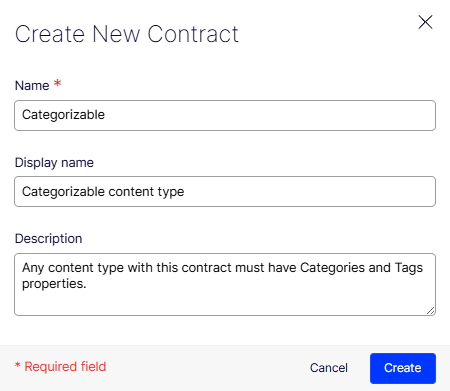
- Name – Enter the internal, programmatic name for your contract (such as Categorizable).
- Display name – Enter a user-friendly name that content editors see (such as Categorizable content type).
- Description – Provide a clear description of what content types implementing this contract must include (for example, Any content type with this contract must have Categories and Tags properties.).
-
Click Properties to add properties to the contract.
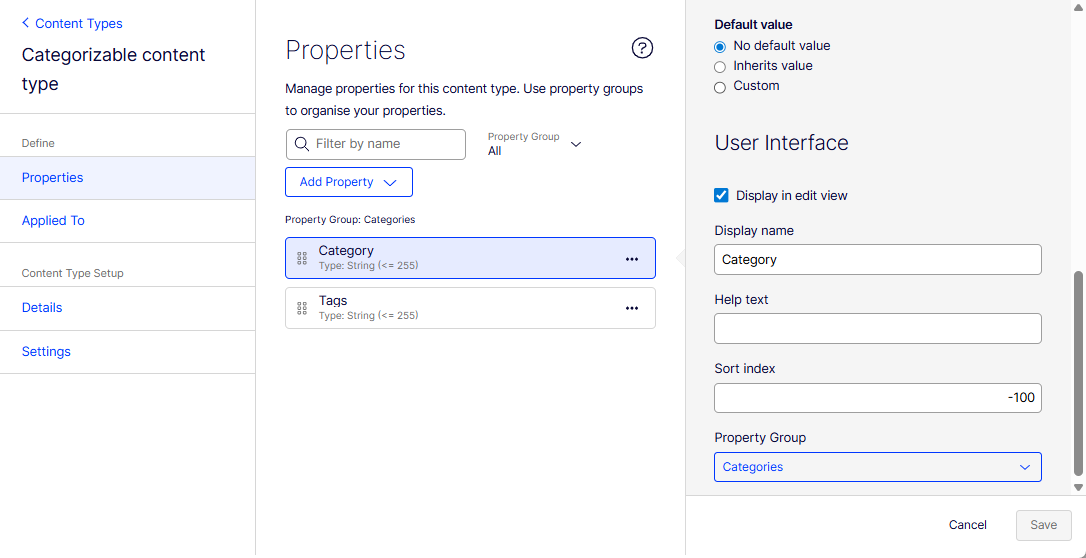
Add the properties that all content types implementing this contract must possess. For instance, if your contract is Categorizable, you would add properties like Category and Tags. For each property, configure its settings.
- Display in edit view – Select this option if you want the property to be visible and editable in the content editor's view when a content type implements this contract.
- Display name – This is the label for the property that content editors see.
- Help text – Provide helpful guidance for content editors on how to use this property.
- Sort index – This determines the order in which properties appear in the UI.
- Property Group – Assign the property to a relevant group for better organization in the UI.
Implement the contract in content types
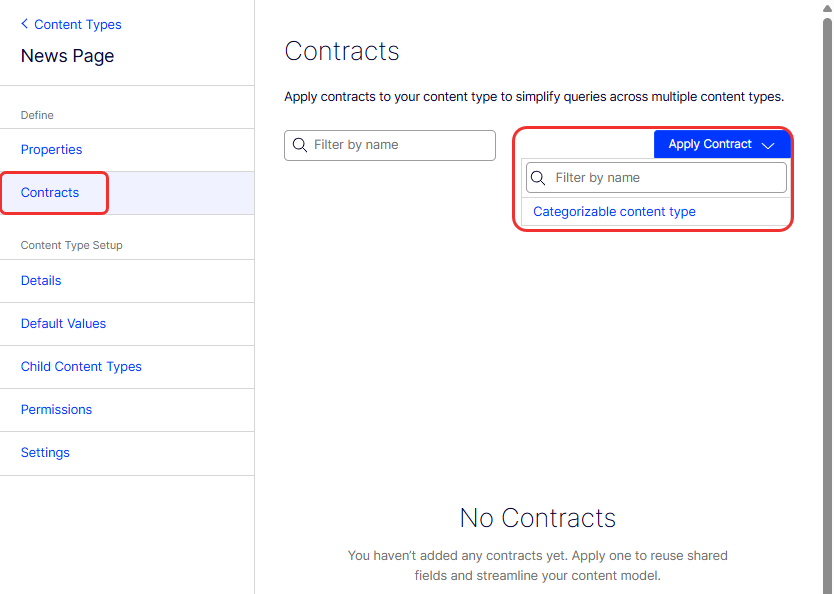
After defining your contract (Categorizable content type) and its properties (Category and Tags), you then apply this contract to other content types.
For example, go to the Contracts section of your Blog article, Press release, or News page content types and specify that they implement or inherit from the Categorizable content type contract.
NoteYou need to create the properties on the content types before you apply the contract.
Graph query example based on contracts
The following GraphQL query example retrieves items categorized as "Meetup", including their metadata, tags, and specific details like excerpt and main body if they are blog articles:
query MyQuery {
  Categorizable(where: { Category: { eq: "Meetup" } }) {
    items {
      _metadata {
        key
        displayName
      }
      Category
      Tags
      ... on BlogArticle {
        Excerpt
        MainBody
      }
    }
  }
}
Updated 3 months ago