
Onboard DAM to CMS (SaaS)
Manage asset types and select a DAM instance to enable embedding features.
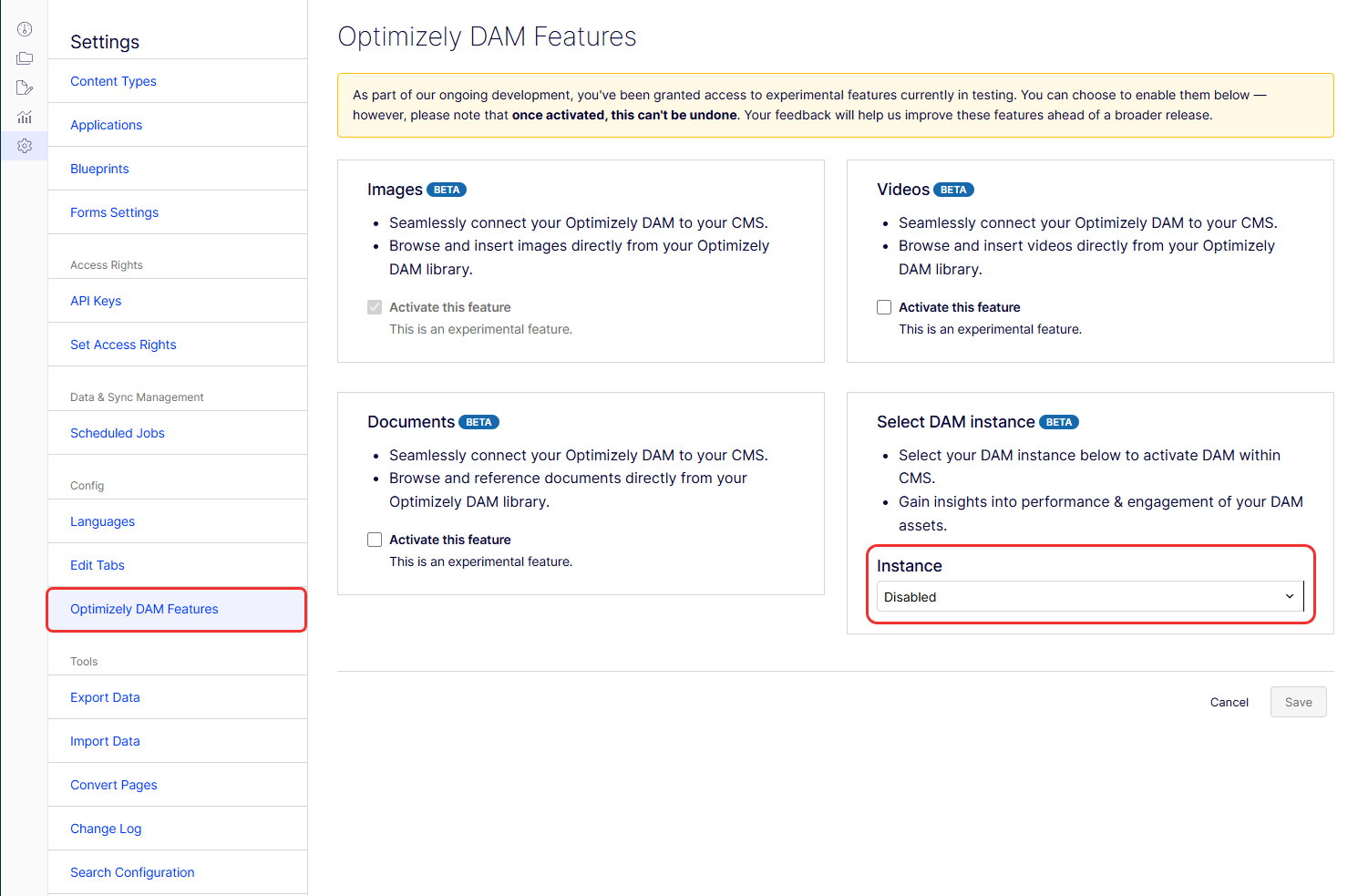
Optimizely Digital Asset Management (DAM) and Optimizely Graph integrate with Optimizely Content Management System (SaaS). After the connection is established, you can manage which asset types are available through the Optimizely DAM Features page. Enable each asset type individually by selecting Activate this feature and click Save.
Select a DAM instance
Selecting a DAM instance enables the following feature:
- Embeddable DAM – Adds a DAM option to the CMS Edit menu, letting you insert assets directly from Optimizely DAM.
To select a DAM instance:
-
Go to Settings > Optimizely DAM Features.
-
Select a DAM instance from the Instance drop-down list in the Select DAM Instance section.
-
Click Save.
Delivery to the frontend
Optimizely Graph is the delivery channel for content in CMS (SaaS) and DAM assets. Content is indexed into Optimizely Graph, including the reference of the DAM assets identity. Optimizely Graph queries for CMS content include the DAM asset with its data in a shared result. You do not need additional lookups to retrieve DAM data because the data is included in the response.
Query example of CMS and DAM content
In Optimizely Graph, the following code shows how to query an Example content type page that has three ContentReference properties, MainImage, Video, and Pdf and return a joint result of CMS and DAM data. In the example, Video and Pdf are ordinary ContentReference properties without item type specified. The ContentReference property MainImage has item type specified as cmp_PublicImageAsset and therefore that does not need to be projected or cast in the query.
query PageWithAssetsQuery {
  Example(
    where: { _metadata: { key: { eq: "303ddcad1b7c4895a730abbb0730a677" } } }
  ) {
    items {
      _id
      Title
      MainImage {
        url {
          graph
        }
        item {
           Id
           Url
           Title
        }
      }
      Video {
        item {
          ... on cmp_PublicVideoAsset {
            Id
            Url
            Title
          }
        }
      }
      Pdf {
        item {
          ... on cmp_PublicRawFileAsset {
            Id
            Url
            Title
          }
        }
      }
    }
  }
}{
"data": {
"Example": {
"items": [
{
"_id": "303ddcad-1b7c-4895-a730-abbb0730a677_en_Published",
"Title": "This CMS is the page title",
"MainImage": {
"url": {
"graph": "graph://cmp/cmp_PublicImageAsset/9e12db58114f11f09358feebe22be741"
},
"item": {
"Id": "c010ae43a6d648319b8e8dd97efe7948",
"Url": "https://images1.cmp.optimizely.com/Zz1jMDEwYWU0My1hNmQ2LTQ4MzEtOWI4ZS04ZGQ5N2VmZTc5NDg=",
"Title": "Example DAM image asset"
}
},
"Video": {
"item": {
"Id": "e59ca3d8308740d5960e8f0ef2663a14",
"Url": "https://fehcwm.files.cmp.optimizely.com/download/e59ca3d8308740d5960e8f0ef2663a14",
"Title": "Example DAM video asset"
}
},
"Other": {
"item": {
"Id": "5ace995264a94742a577f17ef76ea64d",
"Url": "https://fehcwm.files.cmp.optimizely.com/download/5ace995264a94742a577f17ef76ea64d",
"Title": "Example DAM Pdf asset"
}
}
}
]
}
},
"extensions": {
"correlationId": "94d8440bb95b1a2c",
"cost": 75,
"costSummary": [
"Example(75) = limit(20) + fields(3) + basicFilter(1)*2 + links(1)*50"
]
}
}Export and import across instances
ImportantExporting content that uses DAM assets from one CMS (SaaS) instance and importing it into another is not supported.
Updated 3 months ago