
send-odp-data-with-real-time-audiences-for-feature-experimentation-for-the-react-native-sdk
Describes the sendOdpEvent method, which sends Optimizely Feature Experimentation event data to Optimizely Data Platform (ODP).
Prerequisites
You must configure Real-Time Audiences for Feature Experimentation before sending events to ODP from Feature Experimentation.
Minimum SDK version
v4.0.0+
Description
The Optimizely Client method sendOdpEvent lets you send data to the ODP server. You can then use this data to analyze user behavior and optimize experiences across different channels and touchpoints.
Use the sendOdpEvent method to:
- Merge or stitch users together and determine which event is associated with which customer.
- Send various types of events and actions, such as pageviews, clicks, form submissions, and others. You can include additional data to provide more context and information about the event being tracked.
For example, by connecting an email address identifier with a fs_user_id identifier, you can use the sendOdpEvent method to send events that are associated with both identifiers. This enables you to track and analyze the behavior of a specific user across different touchpoints and devices.
You cannot create or update user profile data like name or address with sendOdpEvent. Instead, you can use the ODP Create and update customers API endpoint or ODP UI to manage customer profiles.
Send events to Optimizely Data Platform
Use the useOptimizelyClient hook to access the client instance and call sendOdpEvent:
import { useOptimizelyClient } from '@optimizely/react-sdk';

function MyComponent() {
  const client = useOptimizelyClient();

  const handleAction = () => {
    if (client) {
      const identifiers = new Map([
        ['fs_user_id', 'user123'],
        ['email', '[email protected]'],
      ]);
      const data = new Map([['count', 1]]);

      try {
        client.sendOdpEvent('purchased', 'fullstack', identifiers, data);
      } catch (error) {
        // handle error
      }
    }
  };

  return <Button title="Track ODP Event" onPress={handleAction} />;
}
If hooks are not available in your context, you can call client.sendOdpEvent() directly on the client instance.
Notes
- The React Native SDK discards the event immediately if there are any errors (
sdkNotReady,odpNotIntegrated, orodpNotEnabled).- The React Native SDK discards all events (implicit or explicit) with a warning log if requested before the datafile is ready.
- ODP must be enabled by passing
createOdpManager()tocreateInstance.
Parameters
This table lists the required and optional parameters for the sendOdpEvent method.
| Parameter | Type | Description |
|---|---|---|
action (required) | string | Specifies the subcategory of the event type, used to track the app and user lifecycle. |
type | string | The type of event to be sent. Defaults to fullstack for all React Native SDK-generated events if not specified. |
identifiers | Map<string, string> | A key-value map of user identifiers. Must have at least one key-value pair. |
data | Map<string, unknown> | The event data in a key-value map. The value can be any type (string, number, or boolean). The SDK adds default event data: idempotence_id, data_source_type, data_source, and data_source_version. Sending the same key overwrites the default values. |
Returns
This method sends event data to the Optimizely Data Platform (ODP) server. It does not provide return values.
Method signature
sendOdpEvent(action: string, type?: string | undefined, identifiers?: Map<string, string> | undefined, data?: Map<string, unknown> | undefined): void
Client setup
Ensure ODP is enabled when creating your client:
import {
  createInstance,
  createPollingProjectConfigManager,
  createBatchEventProcessor,
  createOdpManager,
} from '@optimizely/react-sdk';

const optimizely = createInstance({
  projectConfigManager: createPollingProjectConfigManager({
    sdkKey: 'YOUR_SDK_KEY',
  }),
  eventProcessor: createBatchEventProcessor(),
  odpManager: createOdpManager(),
});
The following diagram shows the network calls between your application, the React Native SDK, and the ODP server when calling the sendOdpEvent method:
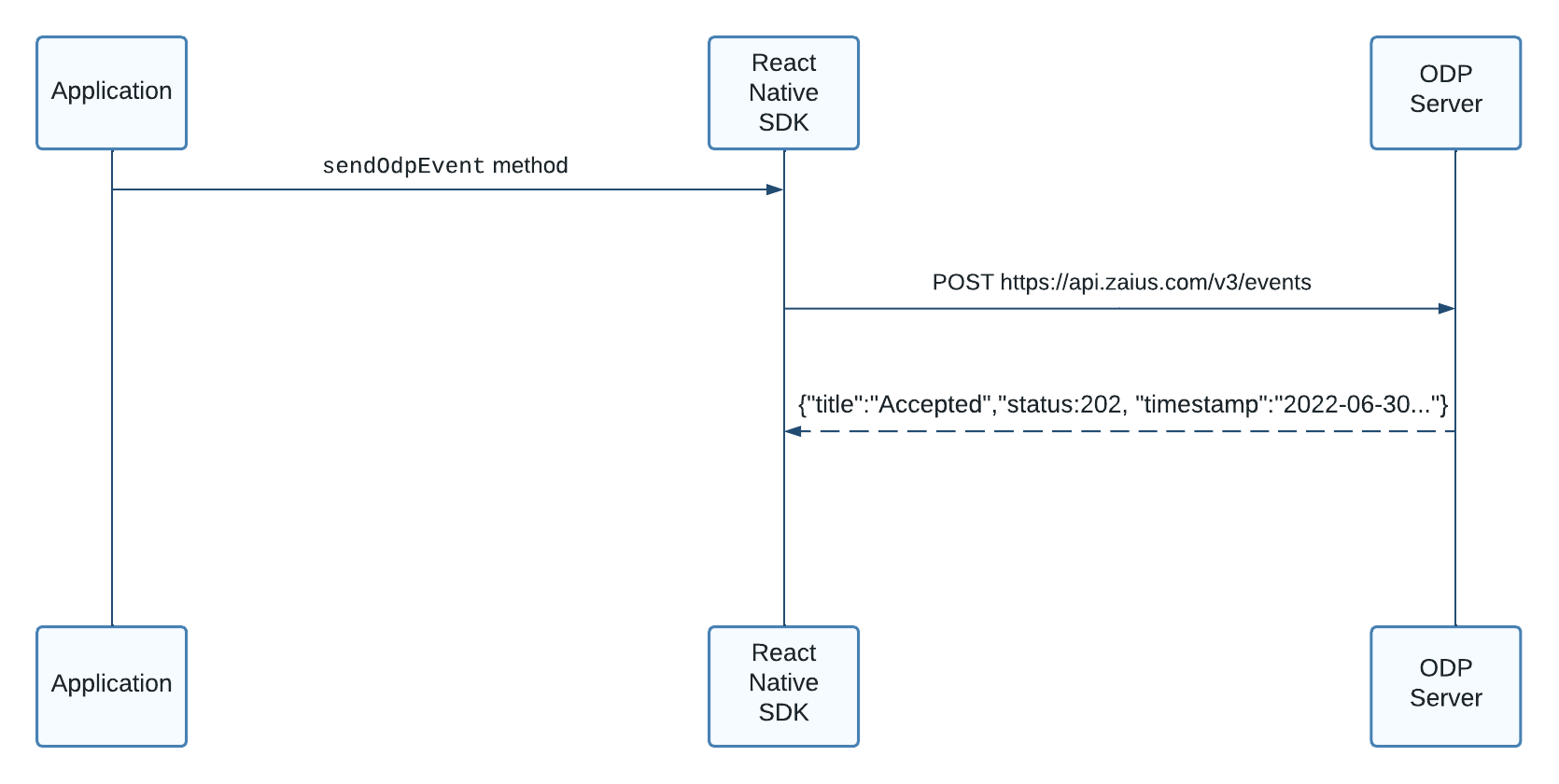
- Your application calls the
sendOdpEventmethod. - The React Native SDK makes a POST request to ODP.
- ODP responds with acknowledgment or relevant error.
Source files
The language and platform source files containing the implementation for the React Native SDK are available on GitHub.
Updated about 2 months ago