
Access Application Insights API to query telemetry
How to get access to Application Insights from the DXP Management Portal when running your solution in DXP.
Application Insights API Access lets you query telemetry from Application Insights for a specific environment.
Generate API credentials
-
Go to your project in the DXP portal and select the API tab.
-
Select an environment and click Generate API Access in the Application Insights API Access section. This action generates and displays the information needed to access Application Insights. Credentials last for 1 year after being generated and will need to be re-generated after that point.
WarningThis action removes all previously generated secret credentials. Any access using previously generated credentials will be lost.
The secret is only shown once, while other variables are static.
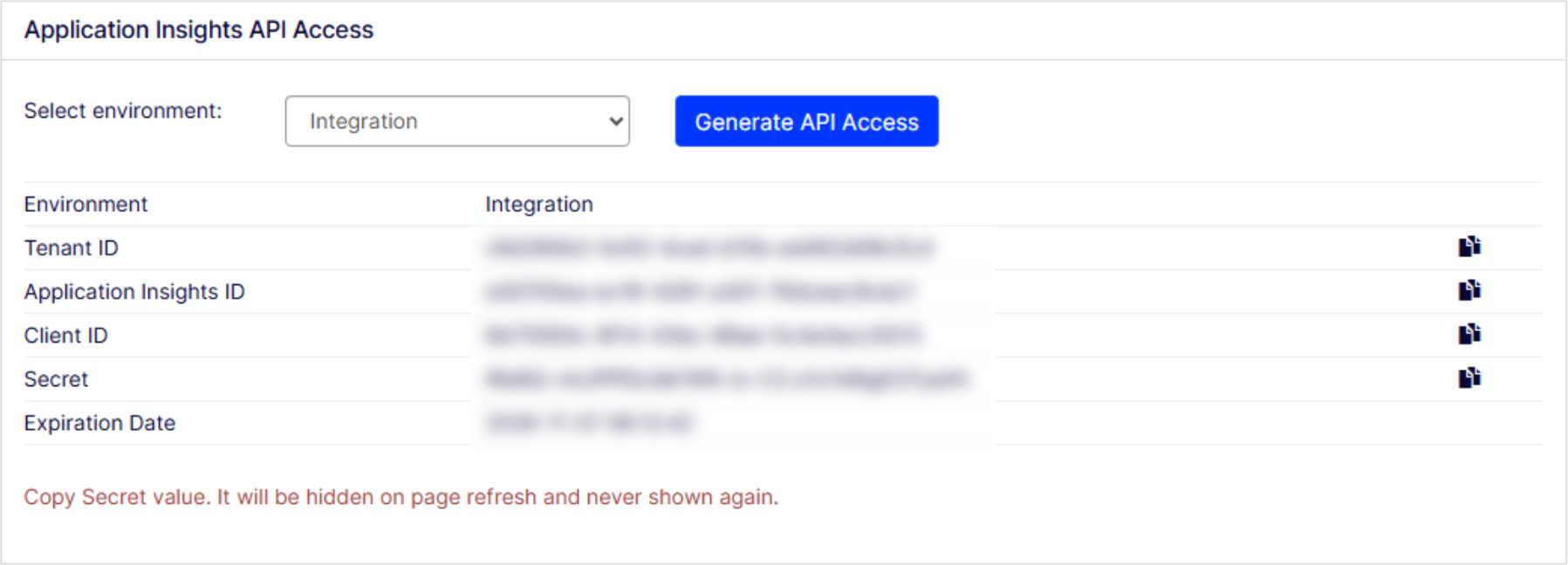
Access to Application Insights through the API
- Acquire Token (OAuth 2.0 Client Credentials). Replace
TENANT_ID,CLIENT_ID, andSECRETwith your information from the previous section.The response contains yourcurl -X POST \ -H "Content-Type: application/x-www-form-urlencoded" \ https://login.microsoftonline.com/TENANT_ID/oauth2/token \ -d "grant_type=client_credentials&client_id=CLIENT_ID&client_secret=SECRET&resource=https%3A%2F%2Fapi.applicationinsights.io"access_token. - Run an Analytics Query. Replace
APPLICATION_INSIGHTS_IDwith your information from the previous section.curl -X GET \ -H "Authorization: Bearer ACCESS_TOKEN" \ "https://api.applicationinsights.io/v1/apps/APPLICATION_INSIGHTS_ID/query?query=requests%20%7C%20take%2010"
Access to Application Insights through code
Replace APPLICATION_INSIGHTS_ID, TENANT_ID, CLIENT_ID, and SECRET with your information from the Generate API credentials section.
using System.Net.Http.Headers;
using System.Text;
using System.Text.Json;
using Azure.Identity;

public class ApplicationInsightsDataQuery {

  public static async Task Main(string[] args) {
    try {
      string ApplicationId = "APPLICATION_INSIGHTS_ID";
      string tenantId = "TENANT_ID";
      string clientId = "CLIENT_ID";
      string clientSecret = "SECRET";

      // Authenticate with Service Principal
      var credential = new ClientSecretCredential(tenantId, clientId, clientSecret);
      var token = await credential.GetTokenAsync(
        new Azure.Core.TokenRequestContext(
          new [] {
            "https://api.applicationinsights.io/.default"
          }
        )
      );

      using var httpClient = new HttpClient();

      httpClient.DefaultRequestHeaders.Authorization =
        new AuthenticationHeaderValue("Bearer", token.Token);

      // Example query: last 5 requests
      var query = new {
        query = "requests | take 5"
      };

      var content = new StringContent(JsonSerializer.Serialize(query), Encoding.UTF8, "application/json");

      var response = await httpClient.PostAsync(
        $ "https://api.applicationinsights.io/v1/apps/{ApplicationId}/query",
        content
      );

      var result = await response.Content.ReadAsStringAsync();
      Console.WriteLine(result);
    } catch (Exception ex) {
      Console.ForegroundColor = ConsoleColor.Red;
      Console.WriteLine($"\nAn error occurred while attempting to query Application Insights:");
      Console.WriteLine($"Error Type: {ex.GetType().Name}");
      Console.WriteLine($"Message: {ex.Message}");
      Console.ResetColor();
    }
  }
}
NoteOptimizely cannot assist with troubleshooting third party integration functionality that leverages the above Application Insights credentials. Optimizely can only provide guidance on setting up access to Application Insights.
Updated 2 months ago