
Where
Describes the where parameter, which is part of the GraphQL API used for the Optimizely querying service.
The where argument in Optimizely Graph filters and searches for values within your query to refine the results you receive. Use it to scope a query to a specific content slice (for example, biographies for a single author, or pages modified after a release date) so the response carries only the items your experience needs.
The where clause takes one or more filter conditions:
where: [{filter_condition}]The filter_condition is defined as follows:
predicate: {
      filter_operators: expression
}
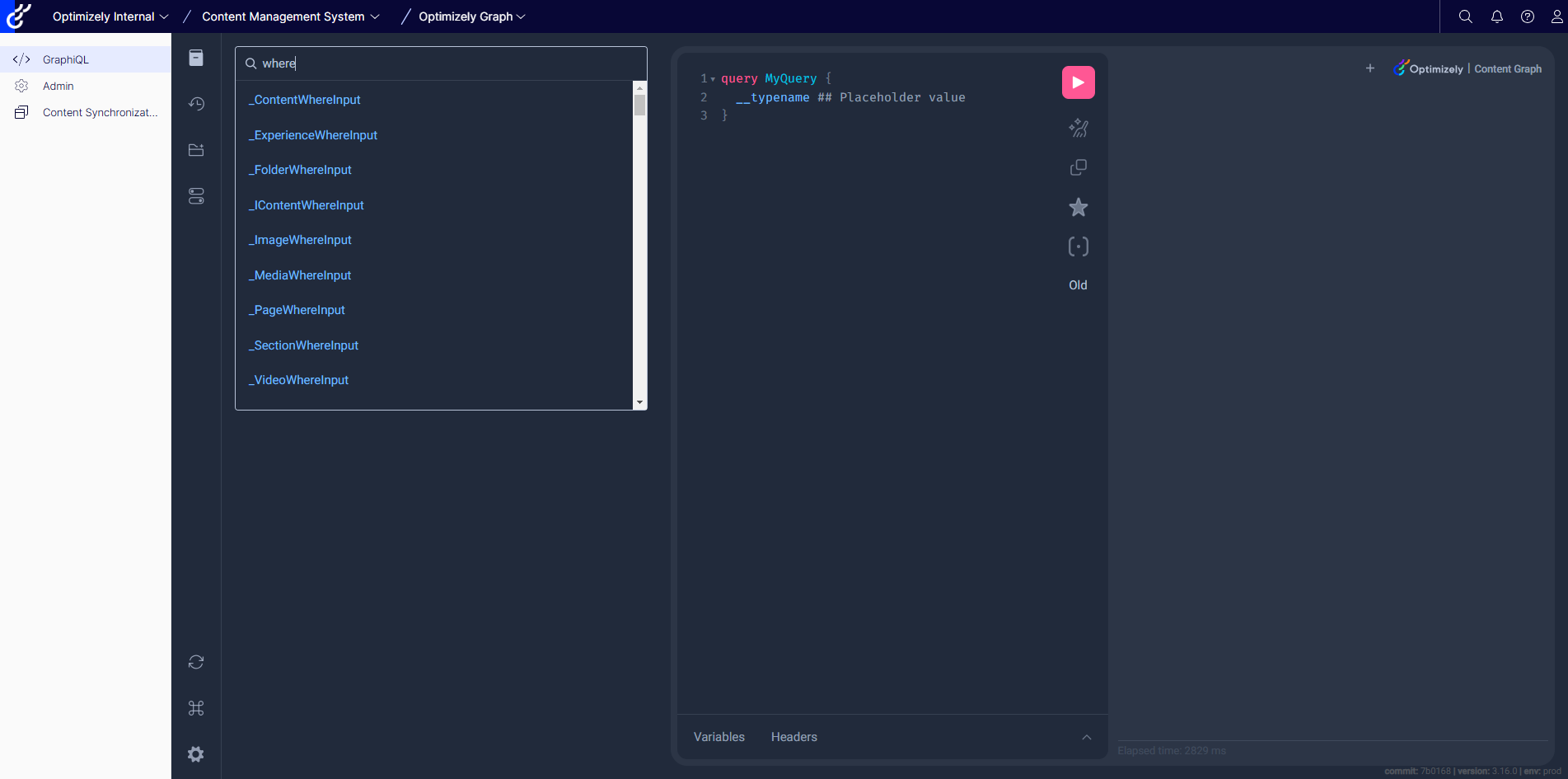
Use the GraphiQL schema explorer to understand how the where parameter works. This tool visually represents the available fields and their types, letting you identify which fields you can filter using the where parameter. The available fields differ depending on the content type, but some are included as part of the original GraphQL query language. The abstract content types that start with an I define common fields.
Definitions
The following definitions explain each piece of a where filter so you can compose conditions accurately. In Optimizely Graph, certain fields are universally available as part of the query language, especially those defined by abstract content types that usually start with I. These fields provide standard filtering capabilities across various content types, ensuring flexibility and consistency in query formulation.
{filter_condition}– Defines the conditions to meet for Optimizely Graph to return the result. There is no limit to the number of predicates that you can include in afilter_condition.predicate– A field name.filter_operators– Matching functions (called operators) that operate specifically on string, number, date, and Boolean values, and operator options such asboostandsynonymsthat work together with the operators.expression– A string, numeric, enumerated, or Boolean value.
Note
- Optimizely Graph supports using the
_modifiedextend argument to query content. Whenever content syncs to the service, Optimizely Graph marks that content with the_modifiedextend field equal tonow().- For numeric filtering (for example,
gt,gte,lt,lte) with floating point numbers, Optimizely Graph supports accurate filtering up to three decimals.
- For example,
gt: 18.524is accurate. However, forgt: 18.5243, the remainder decimals after three decimals are ignored.
| filter_operators | Description | String type | SearchableString type | Number type | Date type | Boolean type |
|---|---|---|---|---|---|---|
eq | Tests equality between two literal expressions. Can be case-insensitive. | Yes | Yes | Yes | Yes | No |
noteq | Tests whether two literal expressions are not equal to each other. Can be case-insensitive. | Yes | Yes | Yes | Yes | No |
like | Tests whether a specific character string matches a specified pattern. | Yes | Yes | No | No | No |
contains | Filters fields that contain character-based data for precise or less precise matches to single words and phrases. | No | Yes | No | No | No |
gt | Tests whether one expression is greater than another. | No | No | Yes | Yes | No |
gte | Tests whether one expression is greater than or equal to another. | No | No | Yes | Yes | No |
lt | Tests whether one expression is less than another. | No | No | Yes | Yes | No |
lte | Tests whether one expression is less than or equal to another. | No | No | Yes | Yes | No |
exist | Tests whether a specific expression exists. | Yes | Yes | Yes | No | Yes |
startsWith | Tests whether a specific expression starts with a specific pattern. | Yes | Yes | No | No | No |
endsWith | Tests whether a specific expression ends with a specific pattern. | Yes | No | No | No | No |
in | Tests whether a specific literal expression is in an array. | Yes | Yes | Yes | No | No |
notIn | Tests whether a specific literal expression is not in an array. | Yes | Yes | Yes | No | No |
boost | Boosts a {filter_condition} by a positive number, so certain results can be ranked higher when sorting by RELEVANCE. | Yes | Yes | Yes | Yes | Yes |
synonyms | Expands the expression with synonyms stored in the system. | Yes | Yes | No | No | No |
Examples
The following examples show how to use some common filter conditions in the where clause.
Where with eq operators
eq operatorsThe following query returns the BiographyPage whose Name field equals Alan Turing in the English locale.
{
  BiographyPage(where: {
    Name: {
         eq: "Alan Turing"
     }
  }, locale: [en]) {
    Name
    Language {
      Name
      DisplayName
    }
  }
}
Query with dates
Date queries in Optimizely Graph are flexible. You can query for exact date values indexed in the ISO 8601 standard, supply the same date in a different format, or filter on an open or closed date range.
Query for exact date values indexed in the ISO 8601 standard.
{
  BiographyPage(where: { Born: { eq: "1983-11-14T00:00:00Z" } }) {
    items {
      Name
      Born
    }
    total
  }
}
Write the same date query in a different format, but specify the time zone as UTC. Otherwise, Optimizely Graph converts the date value to a date value from the local system, resulting in no matches.
{
  BiographyPage(where: { Born: { eq: "11/14/1983 00:00:00 AM UTC" } }) {
    items {
      Name
      Born
    }
    total
  }
}
Date queries also support time ranges with an optional time component. The following query returns results where the value for Born is equal to or greater than "1947-07-30".
{
  BiographyPage(where: { Born: { gte: "1947-07-30" } }) {
    items {
      Name
      Born
    }
    total
  }
}
Where with multiple filter conditions
Where with multiple filter conditionsThe following query combines two filter conditions in a single where clause to return BiographyPage items whose Name is Alan Turing and whose language display name is English.
{
  BiographyPage(where: {
      Name: {
        eq: "Alan Turing"
      }
      Language: {
        DisplayName: {
          eq: "English"
        }
      }
  }, locale: [en]) {
    Name
    Language {
      Name
      DisplayName
    }
  }
}
NoteThe AND operator is the default logical operator that applies to the group of multiple filtered conditions, so you can understand the previous query like the following:
if (Name == "Alan Turing" AND Language.DisplayName == "English")
See Logical connectors for information about logical operators AND, OR, and NOT.
Where with _modified extend date argument
_modified extend date argumentThe _modified field stores the date and time when content was created, updated, or deleted in the service. The value in _modified is not the same as the created or saved value on the content.
Use the _modified field to perform a delta import of content from the service. For example, return content that was modified after (gt) 2023-09-13T04:36:14Z. Filter by the _modified field together with cursor to perform the delta import of content from the service.
{
  BiographyPage(where: {
      _modified: {
        gte: "2021-09-13T04:36:14Z"
      }
  }, locale: [en]) {
    Name
    Language {
      Name
      DisplayName
    }
  }
}
Updated 2 months ago