
Joins with linking
How to create joins on items within and across content types.
Joins with linking let you traverse relationships between content items in a single Optimizely Graph query, so you retrieve connected content without orchestrating multiple round trips. Use joins when you need to surface related items, build content graphs, or model relationships such as authorship, references, or social connections.
Items are instances of content types. Join items from the same or other content types within or across sources in a single Optimizely Graph query by linking them with different connection types. This lets you query your content as a graph, although still represented as a hierarchy due to the nature of GraphQL. The advantages of using joins with linking include the following:
- A single GraphQL query to create joins within and between content types and get a single response, which is faster and more efficient than building or parsing multiple queries or responses yourself.
- Flexibility to establish connections within your data models, add more semantics to the data modeling, and support automated linking in the Optimizely Graph query language.
- Filtering and search capabilities are still supported during a linked query.
Linking discovers relationships by matching values across content types. A property that points directly at another item belongs in a reference property instead. Examples include a hero image and a related product.
Optimizely Graph lets you create links based on properties (fields) of an item. Specify the property of the item that you want to link from, and the property of an item that you want to link to. Optimizely Graph lets you create joins on any field to any field, where the field must be the outer node (that is, the node that directly contains a value), so you cannot link to nodes that are a composition. A link is established when a common value exists between both properties.
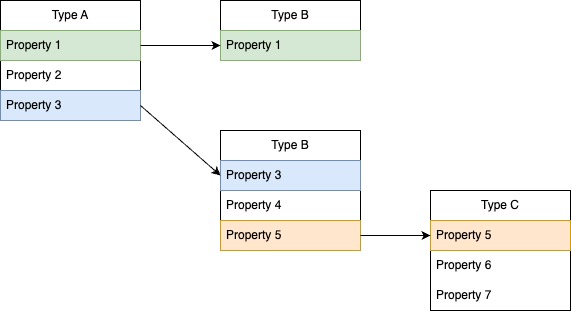
Configure links in Content Types with API
Configure links in Content Types definitions to tell Optimizely Graph how items connect, so the _link field can join them at query time. Define each link type once at the root level and reference it from any query.
Configure links in the Content Types definitions on the root level, similar to languages and contentTypes, with the property links. The links property is optional. Specify multiple link types and define these types with a key like this:
"links": {
    "DEFAULT": {
      "from": "Tags",
      "to": "ContentLink.GuidValue"
    },
    "AUTHOR": {
      "from": "MetaKeywords___searchable",
      "to": "Tags"
    },
    "knows-of": {
      "from": "Tags",
      "to": "Tags"
    },
    "friend": {
      "from": "FriendOf",
      "to": "Name___searchable"
    }
}
Optimizely recommends that you always set the DEFAULT link type, because Optimizely uses this when the type is not specified. Specify the values of the properties as JSON path.
from– The property that is the origin of the link.to– The property that is the destination of the link.
The properties can be multi-valued, so they can be of type array. When you have not specified the DEFAULT, the linking works the same as the parent or child queries. Optimizely creates the GraphQL schema by using the keys specified in the Content Types definition. Optimizely creates enums by converting the keys to uppercase and replacing hyphens with underscores. When duplicate keys exist, Optimizely uses the first one only. In the previous example, Optimizely creates the following link type enums: DEFAULT, AUTHOR, KNOWS_OF, and FRIEND.
Query with _link
_linkThe _link field performs joins on the configured properties. Use it inside items to traverse from one content type to a related content type and retrieve fields from both in a single response.
Specify _link as a field within items. It accepts an optional input argument called type that accepts LinkTypes enum values. Optimizely creates these enum values based on the keys you specified in the Content Types definitions.
Note
- Optimizely Graph does not impose any restrictions on the content types, so you can do joins on a query from any content type to any content type.
- A link is established when at least one common value exists between the
toandfrom, and you define the common value.- Optimizely restricts the nesting of
_linkto a depth of 3, so you cannot create joins deeper than this level.
Here is a basic example of a query that creates a join between instances of StartPage and BiographyPage.
{
  StartPage {
    items {
      MetaKeywords
      _link {
        BiographyPage {
          items {
            Name
            Tags
          }
        }
      }
    }
  }
}
Examples
The following examples show how the configured link types behave in practice, so you can pattern-match the right approach for your own content model.
Assume that the previous link types are defined in the Content Types definitions. Create the following queries with this configuration.
When you query without specifying any link type, the query uses the DEFAULT link type, as in this example, which joins items from StandardPage within BiographyPage.
{
  BiographyPage {
    items {
      Name
      Tags
      _link {
        StandardPage(where: { ContentLink: { GuidValue: { exist: true } } }) {
          items {
            Name
            _fulltext
            ContentLink {
              GuidValue
            }
          }
        }
      }
    }
  }
}
The response looks like this. Note that Optimizely created links between the items in the Tags field with values reference1 and reference2.
{
  "data": {
    "BiographyPage": {
      "items": [
        {
          "Name": "Arnold Schwarzenegger",
          "Tags": [],
          "_link": {
            "StandardPage": null
          }
        },
        {
          "Name": "Alan Turing",
          "Tags": [
            "reference1",
            "reference2"
          ],
          "_link": {
            "StandardPage": {
              "items": [
                {
                  "Name": "Standard Page 12",
                  "_fulltext": [
                    "Wild Wild West is a 1999 American steampunk Western film co-produced and directed by Barry Sonnenfeld and written by S. S. Wilson and Brent Maddock alongside Jeffrey Price and Peter S. Seaman, from a story penned by brothers Jim and John Thomas. Loosely adapted from The Wild Wild West, a 1960s television series created by Michael Garrison, it is the only production since the television film More Wild Wild West (1980) to feature the characters from the original series. The film stars Will Smith (who previously collaborated with Sonnenfeld on Men in Black two years earlier in 1997) and Kevin Kline as two U.S. Secret Service agents who work together to protect U.S. President Ulysses S. Grant (Kline, in a dual role) and the United States from all manner of dangerous threats during the American Old West.",
                    "Standard Page 12"
                  ],
                  "ContentLink": {
                    "GuidValue": "reference2"
                  },
                  "__typename": "StandardPage"
                },
                {
                  "Name": "Standard Page 13",
                  "_fulltext": [
                    "chi nhánh Cần Thơ",
                    "Standard Page 13"
                  ],
                  "ContentLink": {
                    "GuidValue": "reference1"
                  },
                  "__typename": "StandardPage"
                }
              ]
            }
          }
        },
        {
          "Name": "Marie Curie",
          "Tags": [
            "reference2"
          ],
          "_link": {
            "StandardPage": {
              "items": [
                {
                  "Name": "Standard Page 12",
                  "_fulltext": [
                    "Wild Wild West is a 1999 American steampunk Western film co-produced and directed by Barry Sonnenfeld and written by S. S. Wilson and Brent Maddock alongside Jeffrey Price and Peter S. Seaman, from a story penned by brothers Jim and John Thomas. Loosely adapted from The Wild Wild West, a 1960s television series created by Michael Garrison, it is the only production since the television film More Wild Wild West (1980) to feature the characters from the original series. The film stars Will Smith (who previously collaborated with Sonnenfeld on Men in Black two years earlier in 1997) and Kevin Kline as two U.S. Secret Service agents who work together to protect U.S. President Ulysses S. Grant (Kline, in a dual role) and the United States from all manner of dangerous threats during the American Old West.",
                    "Standard Page 12"
                  ],
                  "ContentLink": {
                    "GuidValue": "reference2"
                  },
                  "__typename": "StandardPage"
                }
              ]
            }
          }
        }
      ]
    }
  }
}
Define social networks within your data, as the following query shows with the FRIEND link type. Note that this is a purely fictional example.
{
  BiographyPage {
    items {
      Name
      FriendOf
      _link(type: FRIEND) {
        BiographyPage {
          items {
            Name
          }
        }
      }
    }
  }
}
The following response shows that Alan Turing is friends with Marie Curie, and vice versa. The other persons do not have a linked friend.
{
  "data": {
    "BiographyPage": {
      "items": [
        {
          "Name": "Arnold Schwarzenegger",
          "FriendOf": [],
          "_link": {
            "BiographyPage": null
          }
        },
        {
          "Name": "Alan Turing",
          "FriendOf": [
            "Marie Curie"
          ],
          "_link": {
            "BiographyPage": {
              "items": [
                {
                  "Name": "Marie Curie"
                }
              ]
            }
          }
        },
        {
          "Name": "Marie Curie",
          "FriendOf": [
            "Alan Turing"
          ],
          "_link": {
            "BiographyPage": {
              "items": [
                {
                  "Name": "Alan Turing"
                }
              ]
            }
          }
        }
      ]
    }
  }
}
The joins are flexible and let you create circular joins, as the following example with KNOWS_OF shows, which links from and to the same field. Note that Optimizely restricts the depth of _link usage to 3.
{
  BiographyPage {
    items {
      Name
      Tags
      _link(type: KNOWS_OF) {
        BiographyPage {
          items {
            Name
            Tags
            __typename
          }
        }
      }
    }
  }
}
The response could look like this:
{
  "data": {
    "BiographyPage": {
      "items": [
        {
          "Name": "Arnold Schwarzenegger",
          "Tags": [],
          "_link": {
            "BiographyPage": null
          }
        },
        {
          "Name": "Alan Turing",
          "Tags": [
            "reference1",
            "reference2"
          ],
          "_link": {
            "BiographyPage": {
              "items": [
                {
                  "Name": "Alan Turing",
                  "Tags": [
                    "reference1",
                    "reference2"
                  ],
                  "__typename": "BiographyPage"
                },
                {
                  "Name": "Marie Curie",
                  "Tags": [
                    "reference2"
                  ],
                  "__typename": "BiographyPage"
                }
              ]
            }
          }
        },
        {
          "Name": "Marie Curie",
          "Tags": [
            "reference2"
          ],
          "_link": {
            "BiographyPage": {
              "items": [
                {
                  "Name": "Alan Turing",
                  "Tags": [
                    "reference1",
                    "reference2"
                  ],
                  "__typename": "BiographyPage"
                },
                {
                  "Name": "Marie Curie",
                  "Tags": [
                    "reference2"
                  ],
                  "__typename": "BiographyPage"
                }
              ]
            }
          }
        }
      ]
    }
  }
}
Add two link types into one query as a solution to join three tables with different key pairs, as the following example shows:
{
      BiographyPage {
        items {
          Name
          Tags
          LinkWithDefaultType: _link {
            StandardPage {
              items {
                Name
                ContentLink {
                  GuidValue
                }
              }
            }
          }
          LinkWithSpecificType: _link(type: KNOWS_OF) {
            BiographyPage {
              items {
                Name
                Tags
              }
            }
          }
        }
      }
    }
The response could look like this:
{
  "data": {
    "data": {
      "BiographyPage": {
        "items": [
          {
            "LinkWithDefaultType": {
              "StandardPage": {
                "items": [
                  {
                    "ContentLink": {
                      "GuidValue": "test",
                    },
                    "Name": "Page title2",
                  },
                ],
              },
            },
            "LinkWithSpecificType": {
              "BiographyPage": {
                "items": [
                  {
                    "Name": "Arnold Schwarzenegger",
                    "Tags": [
                      "test",
                    ],
                  },
                  {
                    "Name": "Alan Turing",
                    "Tags": [
                      "reference1",
                      "reference2",
                      "test",
                    ],
                  },
                ],
              },
            },
            "Name": "Arnold Schwarzenegger",
            "Tags": [
              "test",
            ],
          },
          {
            "LinkWithDefaultType": {
              "StandardPage": {
                "items": [
                  {
                    "ContentLink": {
                      "GuidValue": "reference2",
                    },
                    "Name": "Standard Page 12",
                  },
                  {
                    "ContentLink": {
                      "GuidValue": "reference1",
                    },
                    "Name": "Standard Page 13",
                  },
                  {
                    "ContentLink": {
                      "GuidValue": "test",
                    },
                    "Name": "Page title2",
                  },
                ],
              },
            },
            "LinkWithSpecificType": {
              "BiographyPage": {
                "items": [
                  {
                    "Name": "Arnold Schwarzenegger",
                    "Tags": [
                      "test",
                    ],
                  },
                  {
                    "Name": "Alan Turing",
                    "Tags": [
                      "reference1",
                      "reference2",
                      "test",
                    ],
                  },
                  {
                    "Name": "Marie Curie",
                    "Tags": [
                      "reference2",
                    ],
                  },
                ],
              },
            },
            "Name": "Alan Turing",
            "Tags": [
              "reference1",
              "reference2",
              "test",
            ],
          },
          {
            "LinkWithDefaultType": {
              "StandardPage": {
                "items": [
                  {
                    "ContentLink": {
                      "GuidValue": "reference2",
                    },
                    "Name": "Standard Page 12",
                  },
                ],
              },
            },
            "LinkWithSpecificType": {
              "BiographyPage": {
                "items": [
                  {
                    "Name": "Alan Turing",
                    "Tags": [
                      "reference1",
                      "reference2",
                      "test",
                    ],
                  },
                  {
                    "Name": "Marie Curie",
                    "Tags": [
                      "reference2",
                    ],
                  },
                ],
              },
            },
            "Name": "Marie Curie",
            "Tags": [
              "reference2",
            ],
          },
        ],
      },
    },
}
Updated 19 days ago