
Optimizely Graph schema
How to access the GraphQL schema for the Optimizely querying service when retrieving content in Optimizely solutions.
GraphQL is a query language that lets clients request only the fields they need. GraphQL is a query language that lets clients request only the fields they need. Optimizely Graph uses a GraphQL schema to describe the shape of the data available to client applications that call the service. The schema defines a hierarchy of types and fields from the back-end data store and specifies which queries and mutations are available against the data graph.
Optimizely Graph generates a unique schema for every site that syncs its data to the service. The shape of the data depends on how the content types are defined in the site's configuration. Exploring the uniquely generated schema for your site is essential to build query-driven applications with Optimizely Graph.
Access the schema
Locate the generated GraphQL schema in your Optimizely Graph environment so you can inspect the types and fields available to your queries.
Go to the API Gateway page in your Optimizely Graph environment and authenticate with your public key to find the generated GraphQL schema. See Get started with the GraphQL API. You can also use the GraphQL UI to access the GraphQL schema.
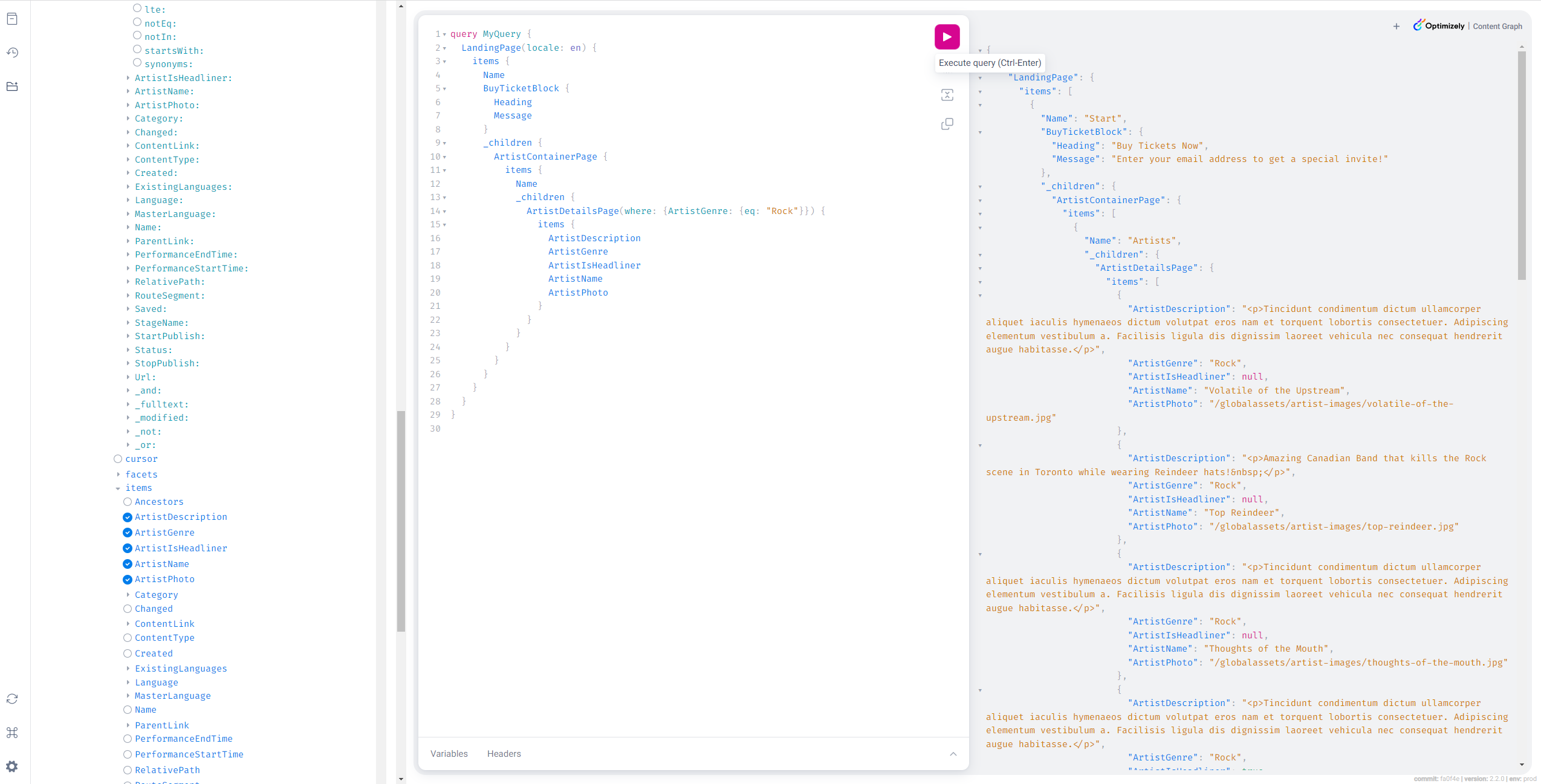
Methods and parameters
Each content type in the schema is exposed as one method with its own return type, so a single query can request exactly the properties relevant to that type.
GraphQL schemas contain one method per content type, and each method contains several parameters. Each method has a return type that matches the properties of the content type. This lets you select which content type properties to return in the result.
Field names, reserved fields, and characters
Each schema uses naming conventions that signal what a field does and where it comes from. Understanding the conventions makes the schema easier to read and helps you avoid collisions with reserved names.
GraphQL schemas contain regular field names of content, reserved field names, input arguments, enumerated values, and reserved characters.
ImportantReserved fields in Optimizely Graph start with an underscore (
_) and are used by the system. Do not use fields prefixed with underscores in your domain models. The system cannot guarantee all the query and search capabilities to work correctly for any field starting with an underscore.
The naming convention for these parts of a schema is as follows:
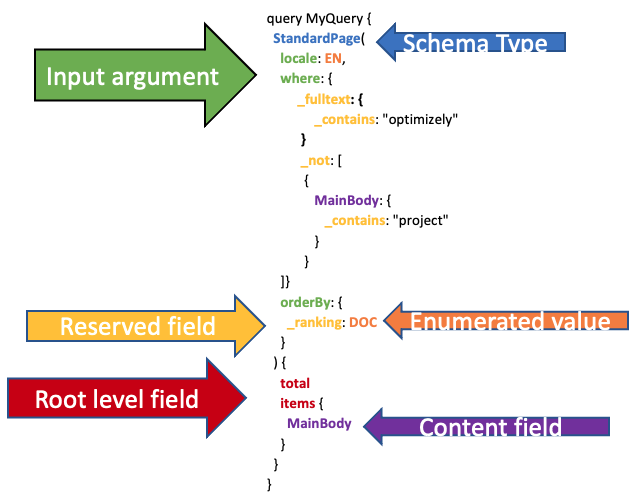
- Field names (regular) follow the site's content delivery model conventions. For example, if the model is serialized as Pascal case, the fields also display as Pascal case in the GraphQL schema. These fields display in the Input and Output types. The schema type or name of the schema is in Pascal case (PascalCase).
- Reserved field names start with an underscore prefix that permits special functionality. For example:
_fulltext– A concatenation of the values of searchable fields to support full-text search._link– A special field that embeds items of a content type within another item using a common value. See joins with linking._score– The relevance ranking score, which is a number that shows how similar content is given the query, resulting in a ranked list of results._id– The unique internal ID used by Graph for a content item._metadata– All descendants within_metadataare special fields used by Optimizely CMS._ranking– Orders results by a relevance score, internal document ID, or other special metrics._modified– A date field that indicates when the content was ingested._or,_and, and_not– Used for expressing Boolean logic in queries.
- Irregular reserved field names are fields that are tightly coupled with CMS (PaaS) (CMS 12.0 or earlier):
ContentTypeStatusStartPublishStopPublishLanguage.NameRolesWithReadAccessUsersWithReadAccess_rbac
Root-level fields are in camel case (camelCase):
items– The root level for projecting the actual results.total– Shows the hit count or number of matching results the query gives.facets– Projects the aggregated field values, including matching hit count. These values can then be used for filtering.autocomplete– Shows autocomplete, word completion, type-ahead, or search-as-you-type suggestions in which an application predicts the rest of a word a user is typing.cursor– Shows the value that can be used for pagination with a cursor.
Input arguments are names of arguments in a method that follow snake case (snake_case) convention.
- Enumerated values are fixed values in uppercase (UPPERCASE) and snake case belonging to input arguments or reserved fields:
- The reserved field
_rankinghas values such asRELEVANCE,DOC,BOOST_ONLY, andSEMANTIC. - An exception is the
localeargument, which has different language codes likeen,sv,fr, and so on.
- The reserved field
- Reserved characters are part of the GraphQL syntax and must be escaped with a single backslash for querying. These characters are double quotes (
\") and backslash (\\).
The following illustration summarizes these conventions hierarchically:
Updated about 2 months ago