
Sync fallback language versions
Describes how to sync and query fallback language versions in Optimizely Graph
Optimizely Graph supports fallback languages. Queries return content from an alternative language when localized content is unavailable. Fallback languages deliver consistent content across locales without additional query logic.
To use fallback languages with Optimizely Graph, prepare your content types and index content correctly.
Before you begin
Ensure the following:
- You use the
nextpreset. - Your index uses
useTypedFieldNames=true. - Your project includes the locales you want to support.
- You have access to sync content to Optimizely Graph.
This example uses three locales: en, sv, and de.
Prepare content types
This example prepares simple content types to demonstrate how the fallback languages feature works. Fallback languages work only with the next preset.
The example uses useTypedFieldNames=true and three locales: en, sv, and de.
{
  "label": "Test fallback",
  "preset": "next",
  "useTypedFieldNames": true,
  "description": "These content types are to demonstrate how to use fallback language feature",
  "languages": [
    "en",
    "sv",
    "de"
  ],
  "links": {},
  "contentTypes": {
    "Article": {
      "contentType": [],
      "properties": {
        "Title": {
          "type": "String"
        },
        "Description": {
          "type": "String"
        }
      }
    }
  },
  "propertyTypes": {
  }
}
Create the indices using Swagger, Postman, curl, or any tool that makes HTTP requests. The following example uses curl with Basic authentication and a Turnstile HMAC key pair. Run it on Linux, macOS, or Windows Subsystem for Linux (WSL).
Save your content types to content_type.json and run the following command:
curl --location --request PUT 'https://cg.optimizely.com/api/content/v3/types?id=default' \
--header 'Content-Type: application/json' \
--header 'Authorization: Basic <Token>' \
--data @content_type.json
For information on how to create the token, refer to Basic auth.
Prepare content for the fallback feature
When indexing fallback content, ensure your content has the following fields:
_metadata.locale– The language the content is in, for exampleen._metadata.fallbackForLocale– The locales that the content is the fallback version for, in this examplesv._metadata.status– Must be set toPublishedso it is queryable using a single key._metadata.types– Set toArticle.__typename– Set toArticle._rbac– Must be set tor:Everyone:Readto be queryable using a single key.
Indexed content scenarios
This example indexes three content items:
- English (main content)
- Swedish (fallback to English)
- German (main content)
Main English content
The main version must:
- Set
_metadata.localetoen. - Omit
_metadata.fallbackForLocale. - Index to the
enlocale.
{"index":{"_id":"12345_en_Published","language_routing":"en"}}
{
    "ContentType": "Article",
    "Title$$String": "Germany",
    "Description$$String": "Germany is a country in Europe",
    "_metadata": {
        "locale": "en",
        "types": ["Article"],
        "status": "Published"
    },
    "_rbac": "r:Everyone:Read",
    "__typename": "Article"
}
Swedish fallback content
Fallback content must:
- Set
_metadata.localeto the actual content language (en). - Set
_metadata.fallbackForLocaletosv. - Index to the
svlocale.
{"index":{"_id":"12345_sv_Published","language_routing":"sv"}}
{
    "ContentType": "Article",
    "Title$$String": "Germany",
    "Description$$String": "Germany is a country in Europe",
    "_metadata": {
        "locale": "en",
        "fallbackForLocale": "sv",
        "types": ["Article"],
        "status": "Published"
    },
    "_rbac": "r:Everyone:Read",
    "__typename": "Article"
}
Main German content
The main German version must:
- Set
_metadata.localetode. - Omit
_metadata.fallbackForLocale. - Index to the
delocale.
{"index":{"_id":"12345_de_Published","language_routing":"de"}}
{
    "ContentType": "Article",
    "Title$$String": "Deutschland",
    "Description$$String": "Deutschland ist ein Land in Europa",
    "_metadata": {
        "locale": "de",
        "types": ["Article"],
        "status": "Published"
    },
    "_rbac": "r:Everyone:Read",
    "__typename": "Article"
}
The resulting NDJSON for all three content items is as follows:
{"index":{"_id":"12345_en_Published","language_routing":"en"}}
{"ContentType":"Article","Title$$String":"Germany","Description$$String":"Germany is a country in Europe","_metadata":{"locale":"en","types":["Article"],"status":"Published"},"_rbac":"r:Everyone:Read","__typename":"Article"}
{"index":{"_id":"12345_sv_Published","language_routing":"sv"}}
{"ContentType":"Article","Title$$String":"Germany","Description$$String":"Germany is a country in Europe","_metadata":{"locale":"en","fallbackForLocale":"sv","types":["Article"],"status":"Published"},"_rbac":"r:Everyone:Read","__typename":"Article"}
{"index":{"_id":"12345_de_Published","language_routing":"de"}}
{"ContentType":"Article","Title$$String":"Deutschland","Description$$String":"Deutschland ist ein Land in Europa","_metadata":{"locale":"de","types":["Article"],"status":"Published"},"_rbac":"r:Everyone:Read","__typename":"Article"}
Sync content to Optimizely Graph
Sync all content using the NDJSON format:
curl --location 'https://cg.optimizely.com/api/content/v2/data' \
--header 'Content-Type: application/x-ndjson' \
--header 'Authorization: Basic <Token>' \
--data '{"index":{"_id":"12345_en_Published","language_routing":"en"}}
{"ContentType":"Article","Title$$String":"Germany","Description$$String":"Germany is a country in Europe","_metadata":{"locale":"en","types":["Article"],"status":"Published"},"_rbac":"r:Everyone:Read","__typename":"Article"}
{"index":{"_id":"12345_sv_Published","language_routing":"sv"}}
{"ContentType":"Article","Title$$String":"Germany","Description$$String":"Germany is a country in Europe","_metadata":{"locale":"en","fallbackForLocale":"sv","types":["Article"],"status":"Published"},"_rbac":"r:Everyone:Read","__typename":"Article"}
{"index":{"_id":"12345_de_Published","language_routing":"de"}}
{"ContentType":"Article","Title$$String":"Deutschland","Description$$String":"Deutschland ist ein Land in Europa","_metadata":{"locale":"de","types":["Article"],"status":"Published"},"_rbac":"r:Everyone:Read","__typename":"Article"}'
Summary of indexing rules
- Main content must not define
_metadata.fallbackForLocale. - Fallback content must define
_metadata.fallbackForLocaleand be indexed to the fallback locale. _metadata.localealways reflects the actual language of the content.
Query fallback language versions
Fallback handling is automatic. You do not need to modify queries.
Query for the main English version
query MyQuery {
  Article(locale: en) {
    items {
      Title
      Description
    }
  }
}
Response
{
  "Article": [
    {
      "Title": "Germany",
      "Description": "Germany is a country in Europe"
    }
  ]
}
Query for the German version
query MyQuery {
  Article(locale: de) {
    items {
      Title
      Description
    }
  }
}
Response
{
  "Article": [
    {
      "Title": "Deutschland",
      "Description": "Deutschland ist ein Land in Europa"
    }
  ]
}
Query Swedish content with fallback
If Swedish content does not exist, Graph returns the English fallback.
query MyQuery {
  Article(locale: sv) {
    items {
      Title
      Description
    }
  }
}
Response
{
  "Article": [
    {
      "Title": "Germany",
      "Description": "Germany is a country in Europe"
    }
  ]
}
Use fallback languages with CMS (SaaS)
Configure fallback languages in CMS to control which language Graph returns when localized content is unavailable.
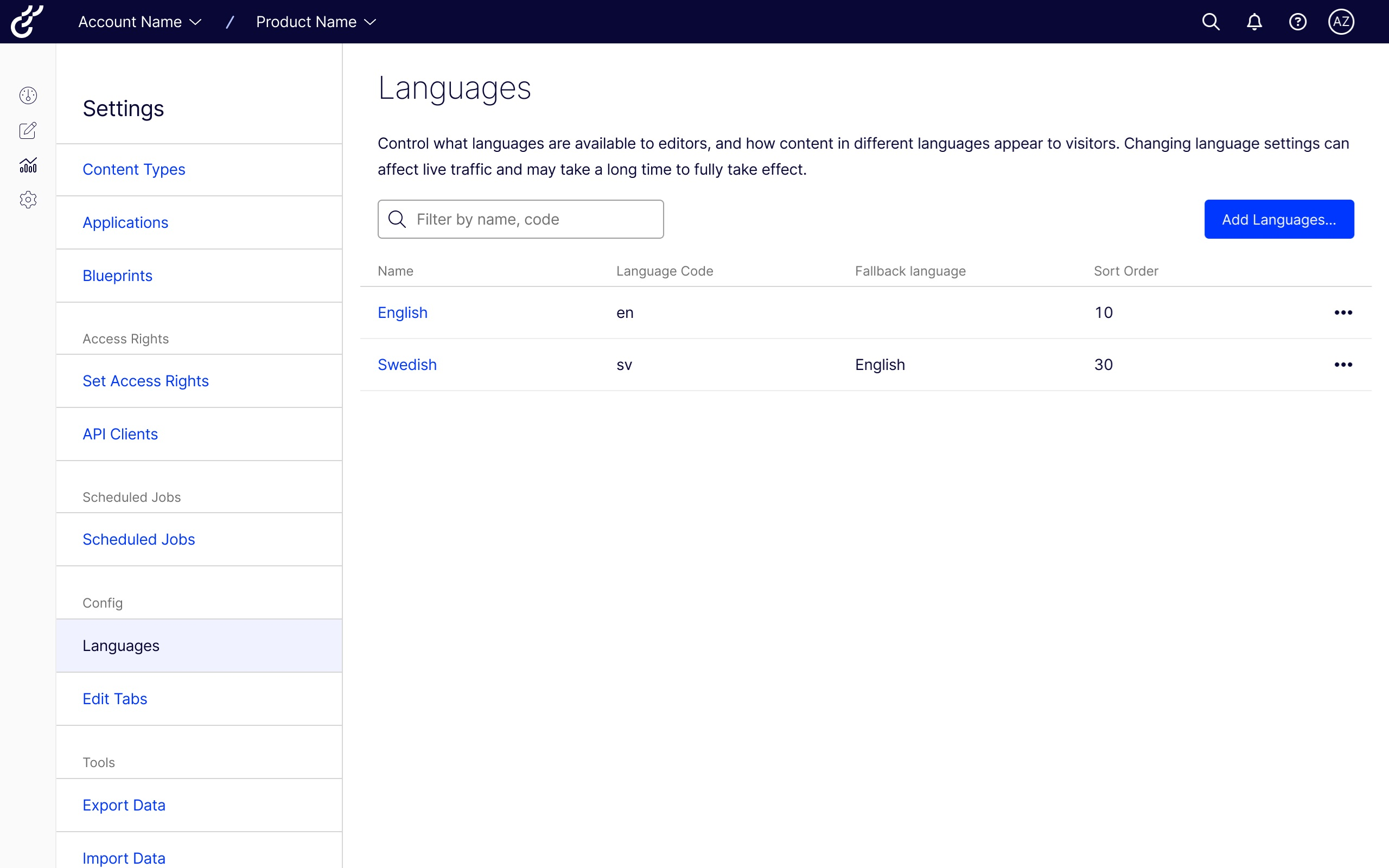
- Open Settings > Languages.
- In the Fallback language column, review the current configuration.
- Add a language or edit an existing language to define its fallback language.
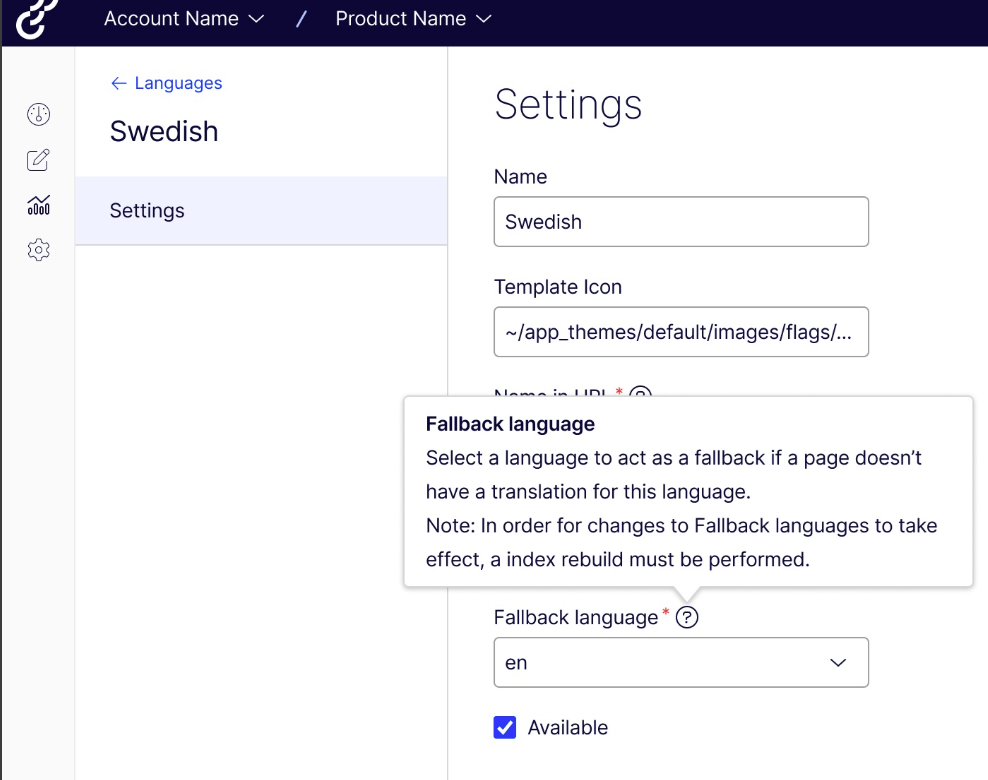
- Click Save.
After you update fallback language settings, run a full Optimizely Graph sync to apply the changes. When the sync completes, Graph applies the fallback language rules to all relevant queries.