
Recursive queries
Use recursive queries in Optimizely Graph.
Use recursive queries in Optimizely Graph to fetch deeply nested or interconnected CMS content (such as a landing page that holds blocks of blocks) in a single request, so you do not have to chain separate calls per depth level.
In content management systems (CMSs), content items are often linked or nested within one another. For example, a landing page might contain content blocks, each containing other nested elements. Graph provides mechanisms to traverse these relationships efficiently.
Self-recurring queries (@recursive directive solution)
@recursive directive solution)Self-recurring queries use the @recursive directive to fetch nested content up to a bounded depth, giving you a predictable, client-friendly way to render hierarchical content without writing one query per level.
The @recursive directive lets you recursively extend your query with the specified depth while traversing nested relationships. Using the GraphQL client to communicate with Graph is a limited but safer option.
The following example shows the recursive directive:
query recursiveQuery {
  _Content(limit: 100, where: { _metadata: { types: { eq: "StartPage" } } }) {
    items {
      ... on StartPage {
        TestAreas {
          ...LandingPage
        }
      }
    }
  }
}

fragment LandingPage on _IContent {
  _metadata {
    displayName
    types
  }
  ... on GroupCardListBlock {
    GroupedItemContentArea @recursive(depth: 10)
  }
  ... on LandingPage {
    TopContentArea @recursive(depth: 2)
    MainContentArea @recursive
  }
}
Explanation
The list below walks through the two parts of the preceding query so you can map each section to the role it plays.
- Entry point – The query starts by fetching
StartPagecontent items.TestAreasis typed asContentAreato contain nested content items. - Fragment – The
LandingPagefragment defines the data structure you want to retrieve from each content item.
@recursive directive
@recursive directiveReview the directive arguments below to understand how each occurrence of @recursive in the example controls the depth and shape of the nested response.
-
GroupedItemContentArea @recursive(depth: 10)– Instructs Graph to fetch nested content withinGroupedItemContentAreaup to a depth of 10 levels. The allowed depth is between one and 10. -
TopContentArea @recursive(depth: 2)– Similar to the previous example, but limited to two levels of nesting. -
MainContentArea @recursive– Has no specified depth, so Graph fetches nested content withinMainContentAreaby one level (the default value). -
Apply the
@recursivedirective to a field that returns the same type as its associated fragment. For example, content areas such asGroupedItemContentArea,TopContentArea, andMainContentAreaare suitable for the@recursivedirective because they all return_IContent. Verify this by checking the Documentation Explorer on GraphiQL.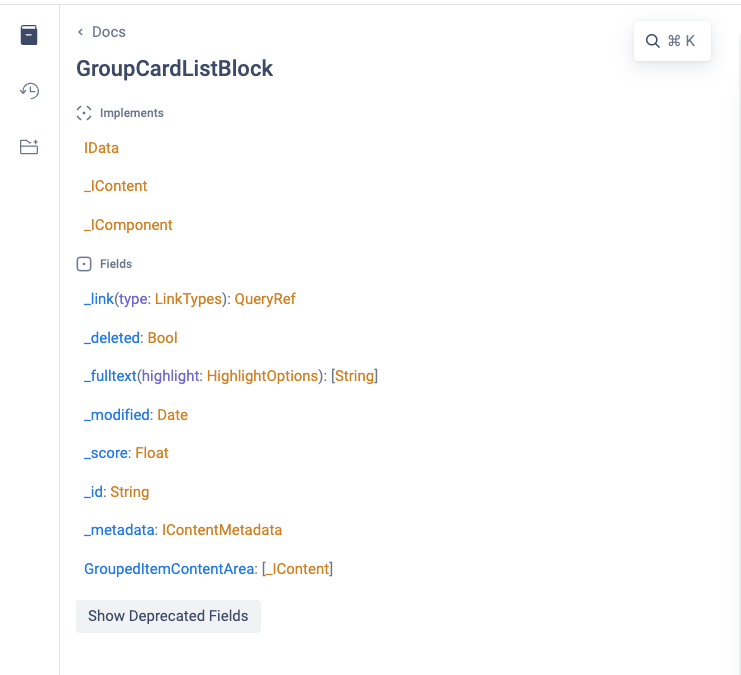
Key points
The following benefits help you decide when to reach for @recursive instead of issuing multiple flat queries.
- Flexibility – Control the recursion depth for different fields.
- Efficiency – Recursive queries are more efficient than multiple round trips to fetch nested data.
- Cycle prevention – The depth argument prevents infinite loops.
Circular-referenced queries (cyclic fragments)
Circular-referenced queries offer a more natural way to retrieve nested blocks when you do not want to declare a fixed depth: reuse a fragment as either self-referenced (A -> A) or cross-referenced (A -> B -> C -> A) so Graph follows the link graph in your indexed content.
Reuse the fragment definitions as either self-referenced (A -> A) or cross-referenced (A -> B -> C -> A) to retrieve the nested data.
The following example shows a cyclic query:
query cyclicQuery {
  _Content(limit: 100, where: { _metadata: { types: { eq: "StartPage" } } }) {
    items {
      ... on StartPage {
        TestAreas {
          ...LandingPage
        }
      }
    }
  }
}

fragment LandingPage on _IContent {
  _metadata {
    displayName
    types
  }
  ... on GroupCardListBlock {
    GroupedItemContentArea {
      ...LandingPage
    }
  }
  ... on LandingPage {
    TopContentArea {
      ...LandingPage
    }
    MainContentArea {
      ...LandingPage
    }
  }
}
Explanation
The notes below contrast the cyclic example with the earlier @recursive query and call out the placement rules you must follow for cyclic fragments.
- This query and fragment are identical to the recursive query.
- The difference is that the
LandingPagefragment reference in the query has no depth information, so the recursion is unbounded in theory. In practice, it depends on the indexed data, which has 10 levels of depth. - Place the
...LandingPagelines under fields that share the same data type as the associated fragment, which is_IContentin this case. The example places it correctly insideGroupedItemContentArea,TopContentArea, andMainContentArea, all of which return_IContent, similar to the placement requirements for the@recursivedirective.
Important considerations
Weigh the following trade-offs before you choose cyclic fragments over the @recursive directive.
- Performance – Be mindful of the performance implications, especially when dealing with deeply nested content.
- Compliance – Although a cyclic query is an easier and more flexible method, it might not be compatible with your GraphQL client.