
Full-text search
Describes opt-in for content properties, when using the GraphQL API for the Optimizely querying service, to retrieve content in Optimizely solutions.
Full-text search, also known as lexical search, matches words or phrases in longer text such as a description or article body. Opt in for the content-type properties you want full-text search to cover. By default, the system filters fields only as an exact value.
Full-text search uses tokenization (splitting text into searchable terms) and language stemming (reducing words to their root form, such as running to run). Use the following operators to apply these techniques:
matchoperator – The recommended full-text search operator. Optimized for returning the most relevant results and applying common text-matching techniques. It works on searchable string fields, which should contain large chunks of text.containsoperator – Recommended when queries must match as phrases only.containsis a limited search feature for full-text search because it performs phrase matching only. Relevant items often appear even when the query does not match as a phrase.
The match operator returns more relevant and more general results than contains, which improves the experience for site visitors. Use the match operator as the default operator for site search.
By default, Optimizely Graph ranks by relevance, which pairs well with match. The match operator also works with synonyms and does not match on stop words. The following list describes the matching criteria after stop-word removal.
The match operator returns items in the following order:
- Exact matches return to the top.
- Phrase matches return below the exact matches.
- Matching words that occur closer to each other return below phrase matches.
- Matches for all words in the query but in a different order return next.
- Matches for some of the words return at the bottom of the list, where more matches rank higher.
The locale value influences the scores that match computes. When content is unevenly distributed because translation in a locale is incomplete, matches from that locale lower the overall relevance score. Optimizely Graph cannot guarantee that the match operator follows the previously listed heuristics in this case.
In this case, customize the ranking using the boost option. The following is an example query:
query MyQuery {
  Content(
    locale: ALL
    where: {
      _fulltext: { match: "Schwarzenegger description" }
      _or: [
        { Language: {Name: {eq: "en"}} }
        { Language: {Name: {in: ["sv","de"], boost:20}} }
      ]
    }
  ) {
    total
    items {
      Name
      _fulltext
      _score
      Language {
        Name
      }
    }
  }
}
NoteThe
matchandcontainsoperators match on terms tokenized by word boundaries according to UAX #29: Unicode Text Segmentation. When you match a term with a leading or trailing punctuation character, the system ignores those characters.
Enable full-text search support for fields
Mark each content-type property as searchable so that the indexer includes its values in full-text queries. This is the editorial control that determines which fields contribute to search relevance.
Enable full-text search support from the Optimizely CMS Admin view by selecting the Searchable property checkbox. This option is available for each property on the content type.
NoteWhen the Searchable property option changes, the Content type indexing job starts automatically. You still need to run the Content indexing job manually.
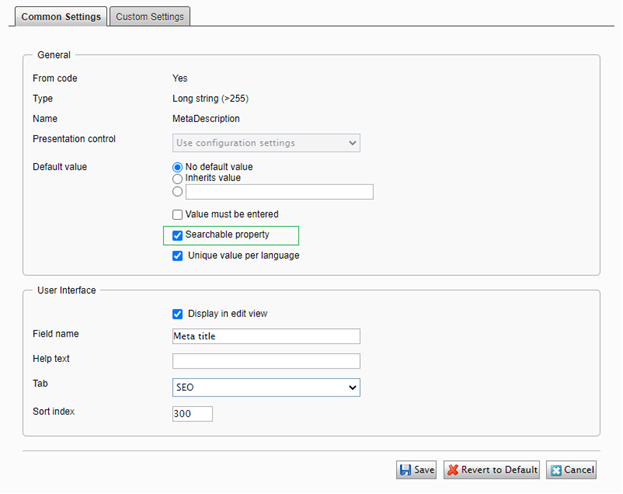
The change is reflected in the GraphQL schema with the SearchableStringFilterInput type for fields where this option is enabled. This adds support for the contains operator.
Search content for searchable fields with _fulltext
Use the _fulltext field to query every searchable property on a content type in one expression instead of listing each field. This is the simplest way to build a site-wide search experience from the GraphQL API.
The GraphQL querying service generates a special _fulltext field for each content type, and the field matches the searchable fields on content. You can apply searchable to any field type, including dates and numbers. Optimizely Graph supports full-text search on values of any basic field type when searchable is set, so contains on the _fulltext field projects across those types. The following GraphQL field types are supported with _fulltext:
- String
- Date
- Int
- Float
- Bool
The system preserves the separate values of the searchable fields without overlap between values.
When you enable a field's Searchable property, the system also makes its child elements searchable. The _fulltext field is more efficient than querying for searchable fields separately.
Get searchable field values in content types
Retrieve all searchable field values, including nested ones, in a single _fulltext projection so that downstream consumers, such as result lists or AI agents, can read every searchable value without iterating per-field.
The GraphQL querying service lets you get searchable field values, including nested field values, in one _fulltext field with array string type at the top level directly under items. All content types are supported.
The following is an example:
{
  Content(locale: en) {
    items {
      Name
      _fulltext
    }
  }
}
The following is an example result:
{
  "data": {
    "Content": {
      "items": [
        {
          "Name": "Abraham Lincoln",
          "_fulltext": [
            "Abraham Lincoln",
            "With malice toward none; with charity for...",
            "..."
          ]
        },
        {
          "Name": "Vincent Van Gogh",
          "_fulltext": [
            "<h3>Example</h3>",
            "Vincent Van Gogh",
            "..."
          ]
        }
      ]
    }
  }
}
Updated 2 months ago