
Autocomplete typing
Enable faster, more accurate search with autocomplete typing in Optimizely Search & Navigation.
Autocomplete suggests search phrases as a site visitor types characters into a search field.
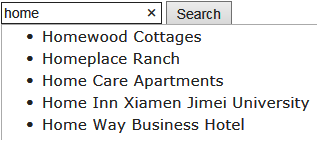
The suggestion list becomes more precise as a user types more characters.
Optimizely Search & Navigation executes a query using that term if a site visitor selects a suggestion. Autocomplete speeds up the search experience when it correctly predicts words being typed.
The autocomplete functionality only works from the beginning of a phrase; the search term must begin with the first word in the autocomplete phrase.
Sources of autocomplete suggestions
Optimizely Search & Navigation provides two sources of autocomplete suggestions.
-
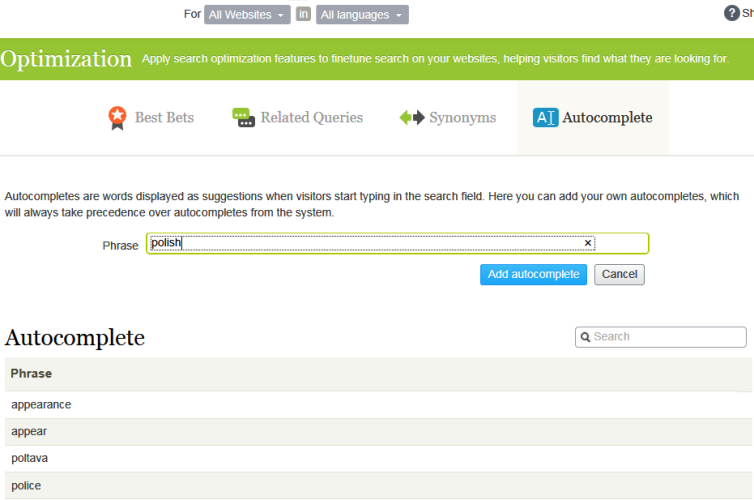
Manually entered search terms on the Optimizely Search & Navigation Optimization screen's Autocomplete tab.
-
Automatically generated search terms, based on previous searches, that resulted in at least one hit.
Manually-added suggestions take precedence over system-generated ones. For example, if a search for polic results in one user clicking a search result that uses police, Optimizely Search & Navigation makes police an autocomplete suggestion for polic. But, if you manually add policy as a suggestion, that term displays above police in the suggestion list.
Usage recommendations
-
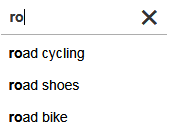
Base autocomplete suggestions on search keywords for targeted content. For example, if your website sells bicycles, add the following suggestions to display when a site visitor types ro.
-
For a new website, manually add autocomplete suggestions for important words. Even if no previous searches for them were made, the suggestions direct site visitors to appropriate pages.
Add, edit, and delete autocomplete phrases
You can define autocomplete suggestions for a specific language and a specific website. To create a suggestion, follow these steps.
- Select Search & Navigation > Manage > Optimization > Autocomplete from edit view.
- In the Phrase field, enter autocomplete suggestions (one at a time).
The Autocomplete tab manages two types of phrases:
- Manual – Phrases that you add on this tab.
- Statistical – Phrases that Search & Navigation generates automatically from site visitors' previous successful searches.
Use the context menu to edit or delete an autocomplete phrase.
After you enter autocomplete suggestions, your developer must update website pages that host search controls to implement Autocomplete.
Manage statistical autocomplete phrases
Statistical autocomplete phrases are suggestions that Search & Navigation generates automatically from site visitors' previous successful searches. From Search & Navigation 16.8.0, you can edit and delete statistical phrases, which lets you remove inappropriate or unwanted terms from the suggestions shown to site visitors.
- Select Search & Navigation > Manage > Optimization > Autocomplete.
- Set the type filter to Statistical.
- Use the context menu to edit or delete a phrase.
Change the order of autocomplete phrases
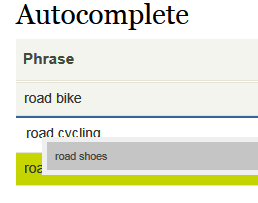
The order of suggestions in the Autocomplete list determines their sequence in a search field's suggestion list.
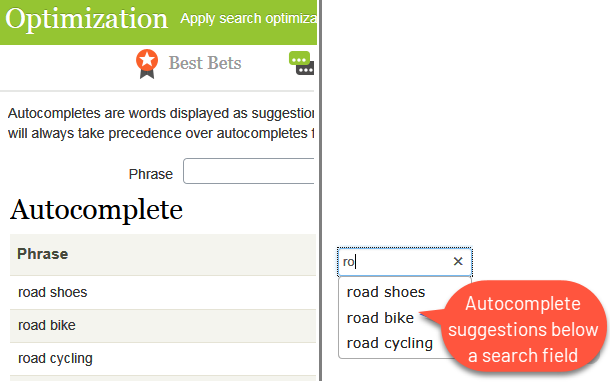
To change the order of suggestions, follow these steps:
-
Select the suggestion you want to move.
-
Drag it to the new position.
-
Release the mouse button when you see a blue line below the new position.
Updated 2 months ago