
Shopify sync source guide
Build a custom data sync source for OCP using Shopify products as a practical, end-to-end example.
Use this guide to build an Optimizely Connect Platform (OCP) app that implements a custom data sync source. The reference app imports Shopify product catalog into OCP through the Sync Manager. This guide simplifies the production code by removing internal references and flattening abstractions for readability. View the full source code on GitHub.
Plan
Requirements
-
Define app functionality before you start. This app syncs product catalog data from a Shopify store into OCP through the Sync Manager. After you log in to OCP, you can sync this data to other Optimizely products such as Optimizely Graph and Content Management System (SaaS). For example, you can query synced Shopify products through Graph and render them in CMS-powered storefronts.
The app supports the following two sync methods:
- Historical import – A manually triggered job that imports all existing products from a Shopify store in batches. See Configure the Shopify app.
- Real-time sync – A webhook-triggered function that receives product
create,update, anddeleteevents from Shopify when they occur.
-
Define the evaluation criteria to confirm the app is functional:
- Configure your Shopify app in Data Setup > App Directory.
- Trigger a historical import on the Settings tab to import all products from the Shopify store. When you create, update, or delete a product in Shopify, a webhook syncs the changes in near real time. The app emits deleted products with an
isDeletedflag. When you update a collection in Shopify, the app re-fetches all products in that collection and re-emits them so collection membership changes propagate. - Go to Data Setup > Sync Manager and click New Sync to sync Shopify data to other Optimizely products. View the available fields for mapping under Field Mappings for your selected Shopify product source.
Design
After defining requirements, design the app considering the following components:
- Source schema – Use a single
shopify_productsstatic schema with custom types for variants, images, collections, and options. - API choice – Use the Shopify GraphQL Admin API with a converter to transform responses into the source schema format.
- Authorization – Use Shopify Admin API access tokens with credential validation on save.
- Sync mechanisms – Implement a historical import job (pull) and a webhook function (push), both using
sources.emit(). The webhook function handles productcreates,updates,deletes, andcollection updates. - Webhook management – Register and remove Shopify webhooks throughout the app lifecycle with the Shopify API, covering the topics
products/create,products/update,products/delete, andcollections/update.
Source schema
OCP supports two schema types:
- Static schema – A YAML file that defines fields at build time. Use this when the data structure is known in advance.
- Dynamic schema – A TypeScript class that generates the schema at runtime. Use this when the structure depends on external configuration or varies per app instance. See Data sync source for information.
This app uses a static schema because Shopify product fields are consistent across all stores. The source is Product, with a schema titled shopify_products, modeled using the following structure:
- Primitive fields –
product ID(the primary key),title,description,vendor,product type,handle,status, andtimestamps. - Array fields – Tags, represented as
[string]. - Custom types –
variant(pricing, inventory, SKU),image(URL, dimensions, alt text),collection(ID and title), andoption(names and values). Each custom type is represented as an array field, for example[variant]and[image].
NoteThis schema demonstrates several data sync source capabilities, like primary keys, arrays of primitives, and arrays of custom types.
API choice
This app uses the Shopify GraphQL Admin API instead of the REST Admin API. GraphQL provides the following advantages:
- Fewer API calls – Lets you fetch products, variants, images, collections, and options in a single query instead of multiple REST calls.
- Cursor-based pagination – Lets you paginate through large product catalogs.
- Selective fields – Lets you request only the required fields, reducing payload size.
NoteOCP source schemas use a flat, REST-like structure, so the app includes a converter that transforms GraphQL responses into that format.
Authorization
Shopify admin API access tokens never expire, making them ideal for service-to-service communication outside user sessions. To ensure accuracy, the app validates credentials at the time of saving with a test API call to the Shopify store.
Sync mechanisms
The app implements two complementary sync mechanisms:
- Historical import job – A job triggered from Settings that pages through all products using GraphQL cursor-based pagination. Each page of products is transformed and emitted to the source using
sources.emit(). The job tracks its cursor position in state so it can resume if interrupted. - Webhook function – A function that receives Shopify product webhooks (
create,update,delete) andcollections/updateevents, then emits each event to the source. Forcreateandupdateevents, the function re-fetches the product through GraphQL to include collection data that Shopify does not include in webhook payloads. Fordeleteevents, it emits the product ID with the_isDeletedflag. Forcollection/updateevents, it fetches all products in the collection and re-emits them.
Webhook management
This app registers Shopify webhooks at the app level through the lifecycle class. When you save credentials, the app registers webhooks for products/create, products/update, products/delete, and collections/update. On uninstall, the app queries the Shopify API to find and remove registered webhooks.
Prepare to code
- Register the app name in OCP to reserve the app's unique ID:
$ ocp app register ✔ The app id to reserve ocp_sync_source_reference_app ✔ The display name of the app Shopify Source Sync Reference App ✔ Target product for the app Connect Platform - for developing an app for Optimizely's holistic integration solution, Optimizely Connect Platform (OCP). ✔ Keep this app private and not share it with other developers in your organization? No Registering app ocp_sync_source_reference_app in all shards Registered app ocp_sync_source_reference_app with name "Shopify Source Sync Reference App" in us - Select
Connect Platformwhen prompted forTarget product for the app. - Scaffold the app:
$ ocp app init Name of your app (e.g., My App): Shopify Source Sync Reference App ID of your app (e.g., my_app): ocp_sync_source_reference_app Version [1.0.0-dev.1]: 1.0.0-dev.1 App Summary (brief): Shopify Source Sync Reference App Support URL: https://support.optimizely.com Contact email address: [email protected] Select the category for the app: Commerce Platform Select a template project: Empty OCP app Creating directory /Users/you/apps/ocp-sync-source-reference-app Performing initial Yarn install yarn install v1.22.22 [1/4] Resolving packages... [2/4] Fetching packages... [3/4] Linking dependencies... [4/4] Building fresh packages... success Saved lockfile. New OCP app project created at /Users/you/apps/ocp-sync-source-reference-app * View README.md for information on getting started * Check out the documentation (https://docs.developers.optimizely.com/optimizely-connect-platform/docs) - Use
Empty OCP appas the template project. This template provides the minimal OCP app scaffold. - Select
Commerce Platformfor the category so that the app then displays correctly in the App Directory.
Implement
Define the source schema
A source represents a data stream your app sends into OCP. Define sources in app.yml so OCP knows what data your app provides and how to display it in Sync Manager. Add a sources section to app.yml:
sources:
  Product:
    description: Shopify Product
    schema: shopify_products
Each source entry has two properties:
description– A human-readable label that displays in Sync Manager.schema– The schema filename that defines the data structure. OCP looks for a corresponding YAML file atsrc/sources/schema/<schema>.yml.
The source key (Product) is the identifier you pass to sources.emit() when sending data. The schema value (shopify_products) must match the filename of the schema definition.
Create the schema file
Create src/sources/schema/shopify_products.yml to define the product data structure. The schema specifies fields, their types, and the primary key.
name: shopify_products
display_name: Shopify Products
description: Shopify products with variants, images, collections, and options
fields:
  - name: shopify_product_id
    type: string
    display_name: Product ID
    description: Shopify product ID
    primary: true
  - name: title
    type: string
    display_name: Title
    description: Product title
  - name: body_html
    type: string
    display_name: Description
    description: Product description in HTML format
  - name: vendor
    type: string
    display_name: Vendor
    description: Product vendor
  - name: product_type
    type: string
    display_name: Product Type
    description: Type of product
  - name: handle
    type: string
    display_name: Handle
    description: Product handle (URL slug)
  - name: published_at
    type: string
    display_name: Published At
    description: Date when the product was published
  - name: created_at
    type: string
    display_name: Created At
    description: Date when the product was created
  - name: updated_at
    type: string
    display_name: Updated At
    description: Date when the product was last updated
  - name: tags
    type: "[string]"
    display_name: Tags
    description: Product tags
  - name: status
    type: string
    display_name: Status
    description: Product status (active, archived, draft)
  - name: variants
    type: "[variant]"
    display_name: Variants
    description: Product variants
  - name: images
    type: "[image]"
    display_name: Images
    description: Product images
  - name: collections
    type: "[collection]"
    display_name: Collections
    description: Collections this product belongs to
  - name: options
    type: "[option]"
    display_name: Options
    description: Product options (size, color, etc.)

custom_types:
  - name: variant
    display_name: Variant
    description: Product variant with pricing and inventory
    fields:
      - name: variant_id
        type: string
        display_name: Variant ID
        description: Shopify variant ID
      - name: title
        type: string
        display_name: Title
        description: Variant title
      - name: price
        type: float
        display_name: Price
        description: Variant price
      - name: compare_at_price
        type: float
        display_name: Compare At Price
        description: Original price for sale items
      - name: sku
        type: string
        display_name: SKU
        description: Stock keeping unit
      - name: inventory_quantity
        type: long
        display_name: Inventory Quantity
        description: Current inventory level
      - name: inventory_policy
        type: string
        display_name: Inventory Policy
        description: Whether to allow sales when out of stock
      - name: barcode
        type: string
        display_name: Barcode
        description: Product barcode or UPC
      - name: created_at
        type: string
        display_name: Created At
        description: Date when the variant was created
      - name: updated_at
        type: string
        display_name: Updated At
        description: Date when the variant was last updated
  - name: image
    display_name: Image
    description: Product image
    fields:
      - name: image_id
        type: string
        display_name: Image ID
        description: Shopify image ID
      - name: url
        type: string
        display_name: URL
        description: Image URL
      - name: width
        type: long
        display_name: Width
        description: Image width in pixels
      - name: height
        type: long
        display_name: Height
        description: Image height in pixels
      - name: alt_text
        type: string
        display_name: Alt Text
        description: Image alt text
      - name: position
        type: long
        display_name: Position
        description: Image sort order
  - name: collection
    display_name: Collection
    description: Product collection
    fields:
      - name: collection_id
        type: string
        display_name: Collection ID
        description: Shopify collection ID
      - name: title
        type: string
        display_name: Title
        description: Collection title
  - name: option
    display_name: Option
    description: Product option (e.g., Size, Color)
    fields:
      - name: option_id
        type: string
        display_name: Option ID
        description: Shopify option ID
      - name: name
        type: string
        display_name: Name
        description: Option name
      - name: position
        type: long
        display_name: Position
        description: Option sort order
      - name: values
        type: "[string]"
        display_name: Values
        description: Available option values
The schema has four structural concepts:
- Fields– Top-level properties of the data. Each field has a
name,type,display_name, anddescription. This schema defines 14 top-level fields covering product metadata, timestamps, and relationships. - Primary key – Exactly one field must have
primary: true. OCP uses this field (shopify_product_id) to uniquely identify each record and handle updates and deletes. - Array types – Wrap a type in brackets to indicate an array. Use
"[string]"for arrays of primitives. The quotes prevent YAML from interpreting brackets as a list. Use"[variant]"to reference an array of a custom type. - Custom types – Define reusable nested structures in the
custom_typessection. This schema defines four custom types:variant(pricing and inventory),image(URLs and dimensions),collection(ID and title), andoption(name and values). Reference custom types by name in fieldtypevalues.
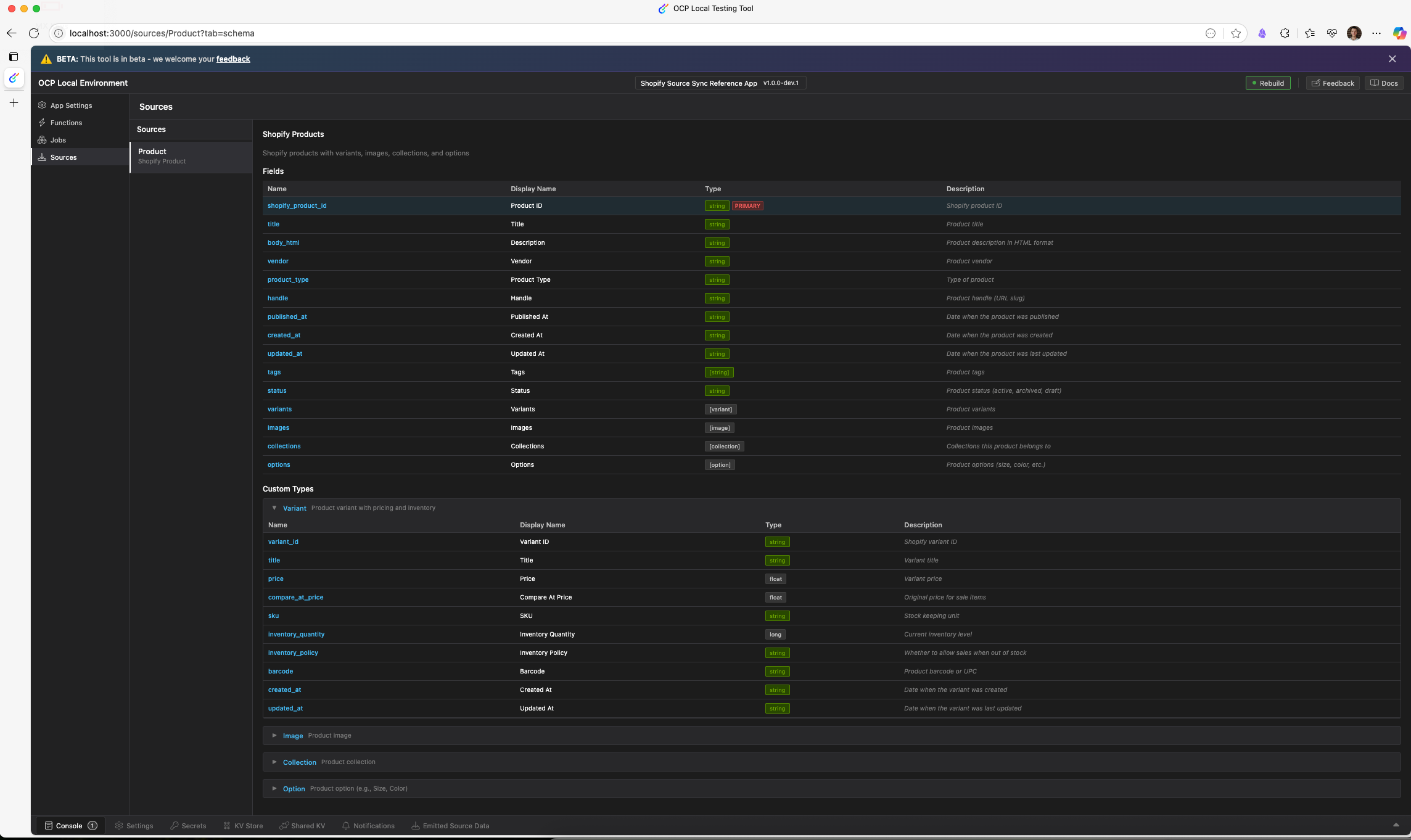
In the local testing tool, the source displays with the fields defined in the schema:
Define the settings form
The Settings form collects Shopify store credentials, configures sync options, and provides an import trigger. Create forms/settings.yml:
sections:
  - key: shopify_credentials
    label: Shopify Credentials
    properties:
      - webhooks_active
      - webhook_error
    elements:
      - key: store_url
        type: text
        label: Shopify Store URL
        required: true
        help: Enter your Shopify store URL (without https://)
      - key: access_token
        type: secret
        label: Access Token
        required: true
        help: Permanent access token from your private app
      - type: instructions
        text: |
          **Webhook status: Active** — Real-time product sync is enabled.
        visible:
          key: shopify_credentials.webhooks_active
          equals: true
      - type: instructions
        text: |
          **Webhook status: Not configured** — Save valid credentials to enable real-time product sync.
        visible:
          operation: all
          comparators:
            - key: shopify_credentials.webhooks_active
              equals: false
            - key: shopify_credentials.webhook_error
              empty: true
      - type: instructions
        text: |
          **Webhook status: Failed** — {{{shopify_credentials.webhook_error}}}
        visible:
          operation: all
          comparators:
            - key: shopify_credentials.webhooks_active
              equals: false
            - key: shopify_credentials.webhook_error
              empty: false

  - key: sync_options
    label: Sync Options
    elements:
      - key: sync_limit
        type: text
        dataType: number
        label: Batch Size
        required: true
        help: Number of products fetched per API request during import (max recommended 250)
      - key: include_archived
        type: toggle
        label: Include Archived Products
        help: If enabled, archived products will also be synced
      - key: include_drafts
        type: toggle
        label: Include Draft Products
        help: If enabled, draft products will also be synced

  - key: import_actions
    label: Import
    elements:
      - type: instructions
        text: |
          Use the button below to run a full import of all Shopify products.
          This will sync every product (including variants, images, collections,
          and options) to all configured data syncs.
      - key: trigger_full_import
        type: button
        label: Run Full Import
        action: trigger_full_import
        help: Triggers a full import of all Shopify products to all configured syncs
Key form features:
type: secret– Masks the access token in the UI so credentials do not display in plain text.properties– Declares settings keys (webhooks_active, andwebhook_error) that the app sets programmatically and the form reads for display. These are not user-editable.visiblewithoperation: all– Conditional display using compound conditions. The webhook status instructions display only when all comparators are satisfied. For example, Not configured displays only whenwebhooks_activeisfalseandwebhook_erroris empty.{{{...}}}template syntax – Renders dynamic settings values in instruction text. Triple-brace syntax outputs the raw value without HTML escaping, displaying the webhook error message.dataType: number– Validates numeric input for the batch size field, even if the element usestype: textfor its visual appearance.type: toggle– Boolean switches for filtering options such as archived or draft products.type: buttonwithaction– Triggers the historical import job when selected. Theactionvalue maps to a lifecycle handler. See the next step.
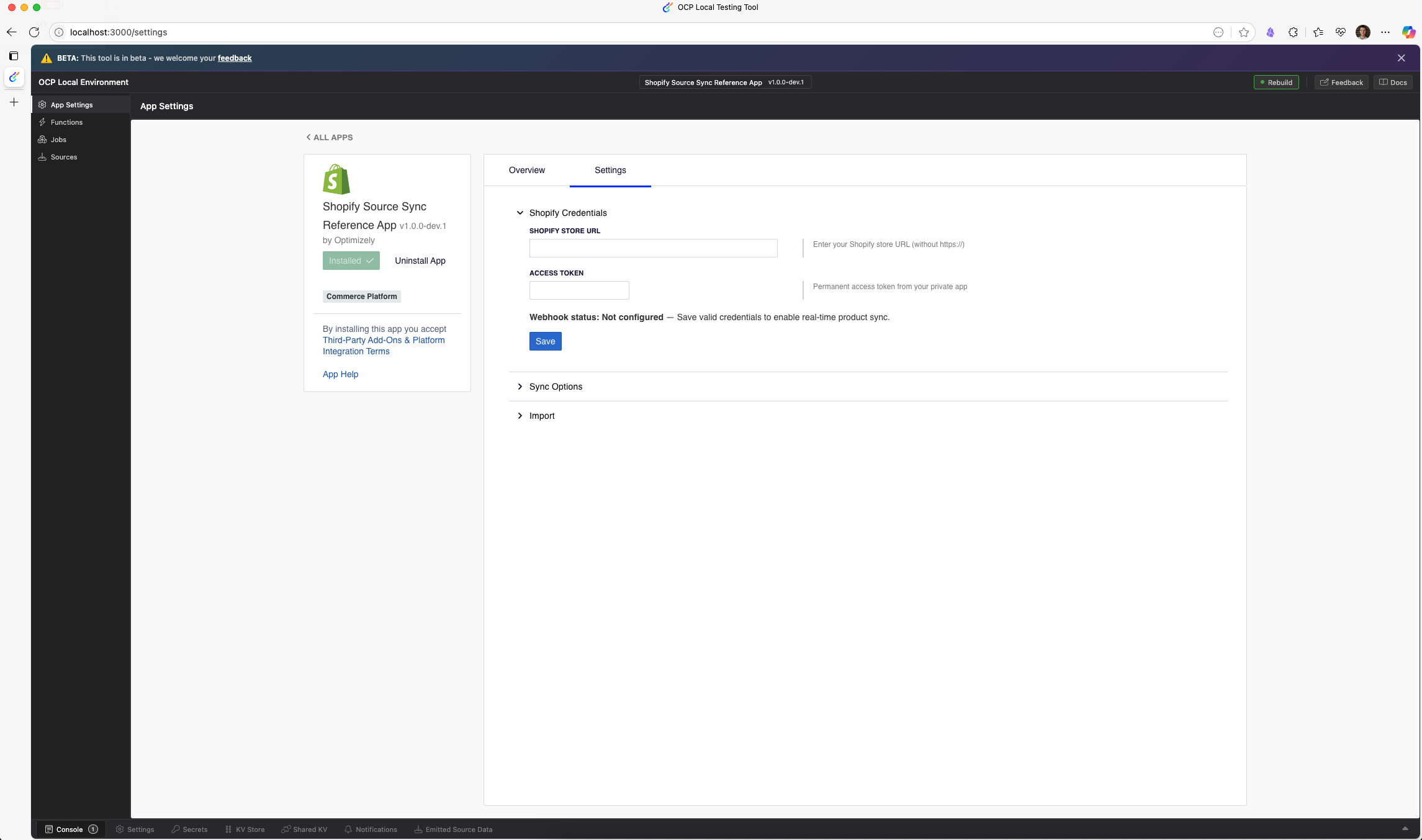
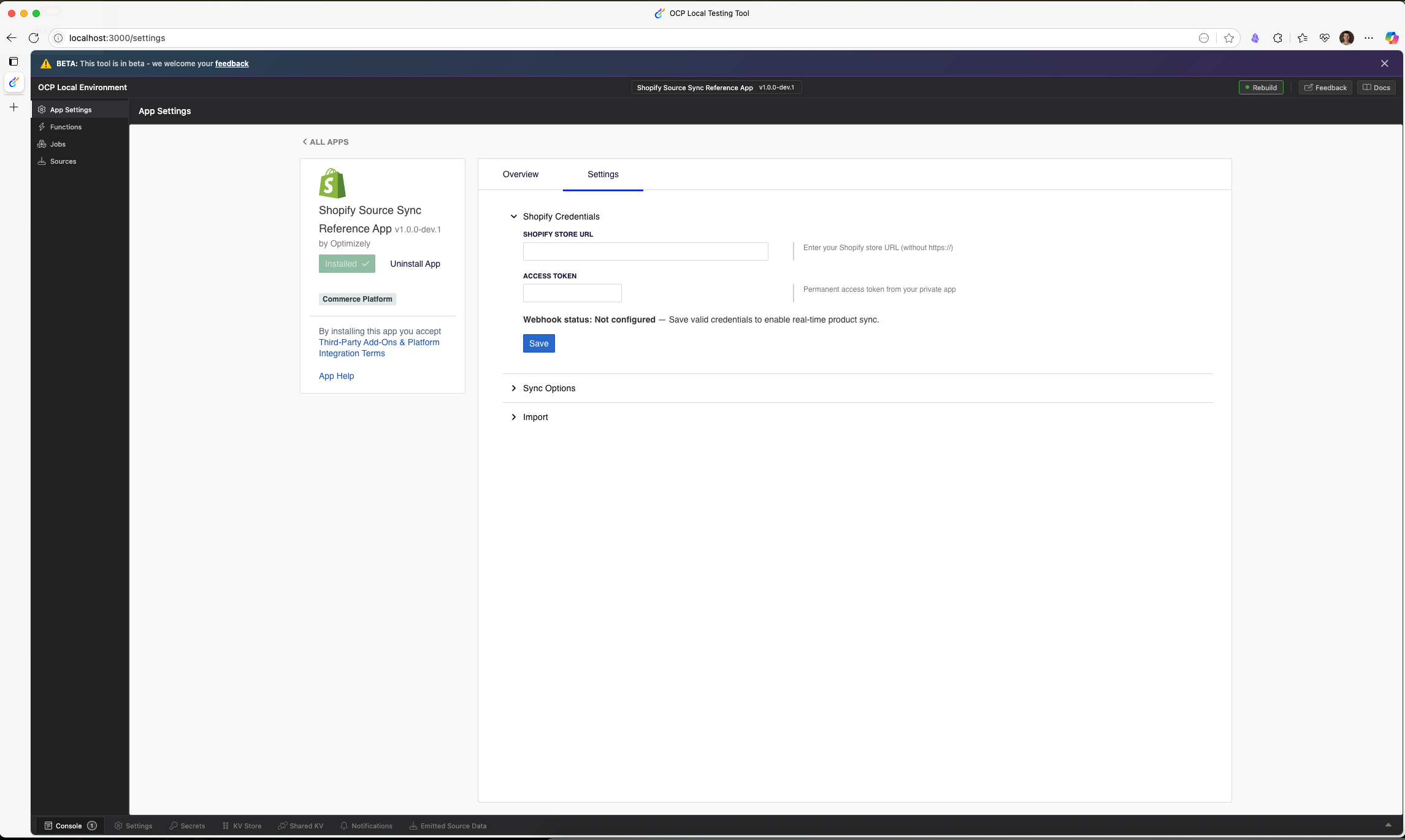
When you run the app locally with ocp dev, you can view the following Settings form:
Connect to Shopify API and implement the historical import job
This section adds the Shopify API client, a data transformation pipeline, the historical import job, and lifecycle credential handling. These components fetch products from Shopify, convert them to the source schema format, and emit them to the Sync Manager.
Update app.yml
app.yml- Register the import job to let OCP know how to run it.
- Add a
jobssection aftersources:
jobs:
  import_products:
    entry_point: ImportProducts
    description: Performs a one-time import of all Shopify products
The entry_point value matches the exported class name. OCP resolves the class from the src/jobs/ directory. The jobs.trigger() SDK method references the job by its key, import_products.
Create src/data/ShopifyProducts.ts
src/data/ShopifyProducts.tsDefine TypeScript interfaces for Shopify product data. The app maintains two interface sets, GraphQL types matching the Shopify Admin API response shape, and REST types serving as the internal data format throughout the pipeline.
/**
 * Interface representing a Shopify product from GraphQL API
 */
export interface ShopifyGraphQLProduct {
  id: string;
  title: string;
  descriptionHtml: string;
  vendor: string;
  productType: string;
  handle: string;
  publishedAt: string | null;
  createdAt: string;
  updatedAt: string;
  tags: string[];
  status: string;
  variants: {
    edges: Array<{
      node: ShopifyGraphQLVariant;
    }>;
  };
  options: ShopifyGraphQLOption[];
  images: {
    edges: Array<{
      node: ShopifyGraphQLImage;
    }>;
  };
  collections: {
    edges: Array<{
      node: {
        id: string;
        title: string;
      };
    }>;
  };
}

/**
 * Interface representing a Shopify product variant from GraphQL API
 */
export interface ShopifyGraphQLVariant {
  id: string;
  title: string;
  price: string;
  compareAtPrice: string | null;
  sku: string;
  inventoryQuantity: number;
  inventoryPolicy: string;
  barcode: string | null;
  createdAt: string;
  updatedAt: string;
}

/**
 * Interface representing a Shopify product option from GraphQL API
 */
export interface ShopifyGraphQLOption {
  id: string;
  name: string;
  position: number;
  values: string[];
}

/**
 * Interface representing a Shopify product image from GraphQL API
 */
export interface ShopifyGraphQLImage {
  id: string;
  url: string;
  width: number;
  height: number;
  altText: string | null;
}

/**
 * Interface representing a Shopify product from REST API
 */
export interface ShopifyProduct {
  id: number;
  title: string;
  body_html: string;
  vendor: string;
  product_type: string;
  handle: string;
  published_at: string;
  created_at: string;
  updated_at: string;
  tags: string;
  status: string;
  variants: ShopifyVariant[];
  options: ShopifyOption[];
  images: ShopifyImage[];
  image: ShopifyImage | null;
}

/**
 * Interface representing a Shopify product variant from REST API
 */
export interface ShopifyVariant {
  id: number;
  shopify_product_id: number;
  title: string;
  price: string;
  compare_at_price: string | null;
  sku: string;
  inventory_quantity: number;
  inventory_policy: string;
  barcode: string | null;
  created_at: string;
  updated_at: string;
}

/**
 * Interface representing a Shopify product option from REST API
 */
export interface ShopifyOption {
  id: number;
  shopify_product_id: number;
  name: string;
  position: number;
  values: string[];
}

/**
 * Interface representing a Shopify product image from REST API
 */
export interface ShopifyImage {
  id: number;
  shopify_product_id: number;
  position: number;
  src: string;
  width: number;
  height: number;
  alt: string | null;
}- GraphQL vs REST interfaces – The GraphQL types match Shopify's Admin API response structure with nested
edges/nodepatterns. The REST types use a flattened format withsnake_casenaming that the rest of the pipeline consumes. Maintaining both lets the converter handle the translation in a single place. - Dual ID formats – GraphQL IDs are strings in
gid://shopify/Product/12345format. REST IDs are numeric. The converter extracts numeric IDs from the GraphQL format.
Create src/lib/shopifyConverter.ts
src/lib/shopifyConverter.tsThis module converts Shopify GraphQL API responses into a REST-compatible format. It handles ID extraction, array flattening, and collection attachment.
import {
  ShopifyGraphQLProduct,
  ShopifyProduct,
  ShopifyVariant,
  ShopifyOption,
  ShopifyImage
} from '../data/ShopifyProducts';

export interface CollectionInfo {
  collection_id: string;
  title: string;
}

/**
 * Convert a Shopify GraphQL product to a REST-compatible product format
 */
export function convertGraphQLProductToRESTFormat(graphQLProduct: ShopifyGraphQLProduct): ShopifyProduct {
  // Extract the numeric ID from the GraphQL ID (gid://shopify/Product/12345 -> 12345)
  const idMatch = graphQLProduct.id.match(/\/Product\/(\d+)$/);
  const numericId = idMatch ? parseInt(idMatch[1], 10) : 0;

  // Convert variants
  const variants: ShopifyVariant[] = graphQLProduct.variants.edges.map((edge) => {
    const variantIdMatch = edge.node.id.match(/\/ProductVariant\/(\d+)$/);
    const variantNumericId = variantIdMatch ? parseInt(variantIdMatch[1], 10) : 0;

    return {
      id: variantNumericId,
      shopify_product_id: numericId,
      title: edge.node.title,
      price: edge.node.price,
      compare_at_price: edge.node.compareAtPrice || null,
      sku: edge.node.sku,
      inventory_quantity: edge.node.inventoryQuantity,
      inventory_policy: edge.node.inventoryPolicy,
      barcode: edge.node.barcode,
      created_at: edge.node.createdAt,
      updated_at: edge.node.updatedAt
    };
  });

  // Convert options
  const options: ShopifyOption[] = graphQLProduct.options.map((option) => {
    const optionIdMatch = option.id.match(/\/ProductOption\/(\d+)$/);
    const optionNumericId = optionIdMatch ? parseInt(optionIdMatch[1], 10) : 0;

    return {
      id: optionNumericId,
      shopify_product_id: numericId,
      name: option.name,
      position: option.position,
      values: option.values
    };
  });

  // Convert images
  const images: ShopifyImage[] = graphQLProduct.images.edges.map((edge, index) => {
    const imageIdMatch = edge.node.id.match(/\/ProductImage\/(\d+)$/);
    const imageNumericId = imageIdMatch ? parseInt(imageIdMatch[1], 10) : 0;

    return {
      id: imageNumericId,
      shopify_product_id: numericId,
      position: index + 1,
      src: edge.node.url,
      width: edge.node.width,
      height: edge.node.height,
      alt: edge.node.altText
    };
  });

  // Convert tags from array to string
  const tagsString = graphQLProduct.tags.join(', ');

  // Extract collection data (id + title)
  const collections: CollectionInfo[] = graphQLProduct.collections.edges.map((edge) => {
    const collectionIdMatch = edge.node.id.match(/\/Collection\/(\d+)$/);
    const collectionId = collectionIdMatch ? collectionIdMatch[1] : '0';
    return {
      collection_id: collectionId,
      title: edge.node.title
    };
  }).filter((c) => c.collection_id !== '0');

  // Return the converted product
  const convertedProduct = {
    id: numericId,
    title: graphQLProduct.title,
    body_html: graphQLProduct.descriptionHtml,
    vendor: graphQLProduct.vendor,
    product_type: graphQLProduct.productType,
    handle: graphQLProduct.handle,
    published_at: graphQLProduct.publishedAt || '',
    created_at: graphQLProduct.createdAt,
    updated_at: graphQLProduct.updatedAt,
    tags: tagsString,
    status: graphQLProduct.status,
    variants,
    options,
    images,
    image: images.length > 0 ? images[0] : null
  };
  // Add collections as a non-enumerable property to avoid polluting the REST format
  // but make it available to our transformer
  Object.defineProperty(convertedProduct, '_collections', {
    value: collections,
    enumerable: false,
    writable: false
  });

  return convertedProduct;
}gid://ID extraction – Shopify's GraphQL API returns global IDs likegid://shopify/Product/12345. The regex/\/Product\/(\d+)$/extracts the numeric portion for use as a plain ID throughout the app.- Edge/node flattening – GraphQL connections use an
edges[].nodepattern for pagination support. The converter flattens these into plain arrays that match the REST format the transformer expects. - Tags array to string – GraphQL returns tags as
string[]. The REST format uses a single comma-separated string. The transformer later splits them back into an array for the OCP schema. - Non-enumerable
_collections– The converter attaches collections to the product object as a non-enumerable property usingObject.defineProperty. This hides them fromJSON.stringify()and spread operations while keeping them accessible to the transformer through(product as any)._collections.
Create src/lib/ShopifyClient.ts
src/lib/ShopifyClient.tsThe API client handles all communication with the Shopify Admin API. It uses GraphQL for product queries and REST for webhook management.
import { logger } from '@zaiusinc/app-sdk';
import {
  ShopifyProduct,
  ShopifyGraphQLProduct
} from '../data/ShopifyProducts';
import {
  convertGraphQLProductToRESTFormat
} from './shopifyConverter';

export interface ShopifyCredentials {
  storeUrl: string;
  accessToken: string;
}

export interface ShopifyWebhook {
  id?: number;
  address: string;
  topic: string;
  format: string;
}

const SHOPIFY_API_VERSION = '2026-01';

export class ShopifyClient {
  private graphqlEndpoint: string;
  private accessToken: string;
  private storeUrl: string;

  public constructor(credentials: ShopifyCredentials) {
    this.storeUrl = credentials.storeUrl;
    this.graphqlEndpoint = `https://${credentials.storeUrl}/admin/api/${SHOPIFY_API_VERSION}/graphql.json`;
    this.accessToken = credentials.accessToken;
  }

  /**
   * Execute a GraphQL query against the Shopify Admin API
   */
  private async executeGraphQL<T>(query: string, variables?: Record<string, any>): Promise<T> {
    try {
      const response = await fetch(this.graphqlEndpoint, {
        method: 'POST',
        headers: {
          'X-Shopify-Access-Token': this.accessToken,
          'Content-Type': 'application/json',
        },
        body: JSON.stringify({
          query,
          variables,
        }),
      });

      if (!response.ok) {
        throw new Error(`Shopify API error: ${response.status} ${response.statusText}`);
      }

      const { data, errors } = await response.json() as { data: any; errors?: any[] };

      if (errors && Array.isArray(errors) && errors.length > 0) {
        const errorMessages = errors.map((e) => (typeof e === 'object' && e !== null && 'message' in e) ?
          String(e.message) : 'Unknown GraphQL error');
        throw new Error(`GraphQL error: ${errorMessages.join(', ')}`);
      }

      return data;
    } catch (error: any) {
      logger.error(`Error executing GraphQL query: ${error.message}`);
      throw error;
    }
  }

  /**
   * Get a paginated list of products using GraphQL
   */
  public async getProducts(limit = 50, cursor?: string): Promise<{
    products: ShopifyProduct[];
    nextPageInfo?: string;
  }> {
    try {
      const query = `
        query GetProducts($first: Int!, $after: String) {
          products(first: $first, after: $after) {
            pageInfo {
              hasNextPage
              endCursor
            }
            edges {
              node {
                id
                title
                descriptionHtml
                vendor
                productType
                handle
                publishedAt
                createdAt
                updatedAt
                tags
                status
                variants(first: 50) {
                  edges {
                    node {
                      id
                      title
                      price
                      compareAtPrice
                      sku
                      inventoryQuantity
                      inventoryPolicy
                      barcode
                      createdAt
                      updatedAt
                    }
                  }
                }
                options {
                  id
                  name
                  position
                  values
                }
                images(first: 20) {
                  edges {
                    node {
                      id
                      url
                      width
                      height
                      altText
                    }
                  }
                }
                collections(first: 20) {
                  edges {
                    node {
                      id
                      title
                    }
                  }
                }
              }
            }
          }
        }
      `;

      const variables = {
        first: limit,
        after: cursor || null,
      };

      const data = await this.executeGraphQL<{
        products: {
          pageInfo: {
            hasNextPage: boolean;
            endCursor: string;
          };
          edges: Array<{
            node: ShopifyGraphQLProduct;
          }>;
        };
      }>(query, variables);

      const products = data.products.edges.map((edge) => convertGraphQLProductToRESTFormat(edge.node));

      const nextPageInfo = data.products.pageInfo.hasNextPage ?
        data.products.pageInfo.endCursor :
        undefined;

      return {
        products,
        nextPageInfo,
      };
    } catch (error: any) {
      logger.error(`Error fetching products from Shopify: ${error.message}`);
      throw error;
    }
  }

  /**
   * Get a single product by ID using GraphQL
   */
  public async getProductById(productId: number): Promise<ShopifyProduct> {
    try {
      const gid = `gid://shopify/Product/${productId}`;
      const query = `
        query GetProduct($id: ID!) {
          product(id: $id) {
            id
            title
            descriptionHtml
            vendor
            productType
            handle
            publishedAt
            createdAt
            updatedAt
            tags
            status
            variants(first: 50) {
              edges {
                node {
                  id
                  title
                  price
                  compareAtPrice
                  sku
                  inventoryQuantity
                  inventoryPolicy
                  barcode
                  createdAt
                  updatedAt
                }
              }
            }
            options {
              id
              name
              position
              values
            }
            images(first: 20) {
              edges {
                node {
                  id
                  url
                  width
                  height
                  altText
                }
              }
            }
            collections(first: 20) {
              edges {
                node {
                  id
                  title
                }
              }
            }
          }
        }
      `;

      const data = await this.executeGraphQL<{
        product: ShopifyGraphQLProduct;
      }>(query, { id: gid });

      if (!data.product) {
        throw new Error(`Product not found: ${productId}`);
      }

      return convertGraphQLProductToRESTFormat(data.product);
    } catch (error: any) {
      logger.error(`Error fetching product ${productId} from Shopify: ${error.message}`);
      throw error;
    }
  }

  /**
   * Get all products in a collection by collection ID using GraphQL
   */
  public async getProductsByCollectionId(collectionId: number): Promise<ShopifyProduct[]> {
    try {
      const gid = `gid://shopify/Collection/${collectionId}`;
      const query = `
        query GetCollectionProducts($id: ID!, $first: Int!, $after: String) {
          collection(id: $id) {
            products(first: $first, after: $after) {
              pageInfo {
                hasNextPage
                endCursor
              }
              edges {
                node {
                  id
                  title
                  descriptionHtml
                  vendor
                  productType
                  handle
                  publishedAt
                  createdAt
                  updatedAt
                  tags
                  status
                  variants(first: 50) {
                    edges {
                      node {
                        id
                        title
                        price
                        compareAtPrice
                        sku
                        inventoryQuantity
                        inventoryPolicy
                        barcode
                        createdAt
                        updatedAt
                      }
                    }
                  }
                  options {
                    id
                    name
                    position
                    values
                  }
                  images(first: 20) {
                    edges {
                      node {
                        id
                        url
                        width
                        height
                        altText
                      }
                    }
                  }
                  collections(first: 20) {
                    edges {
                      node {
                        id
                        title
                      }
                    }
                  }
                }
              }
            }
          }
        }
      `;

      let allProducts: ShopifyProduct[] = [];
      let cursor: string | null = null;

      do {
        const data = await this.executeGraphQL<{
          collection: {
            products: {
              pageInfo: {
                hasNextPage: boolean;
                endCursor: string;
              };
              edges: Array<{
                node: ShopifyGraphQLProduct;
              }>;
            };
          } | null;
        }>(query, { id: gid, first: 50, after: cursor });

        if (!data.collection) {
          logger.warn(`Collection not found: ${collectionId}`);
          return [];
        }

        const edges: Array<{node: ShopifyGraphQLProduct}> = data.collection.products.edges;
        const products = edges.map(
          (edge) => convertGraphQLProductToRESTFormat(edge.node)
        );
        allProducts = [...allProducts, ...products];

        cursor = data.collection.products.pageInfo.hasNextPage
          ? data.collection.products.pageInfo.endCursor
          : null;
      } while (cursor);

      return allProducts;
    } catch (error: any) {
      logger.error(`Error fetching products for collection ${collectionId}: ${error.message}`);
      throw error;
    }
  }

  /**
   * Create a webhook in Shopify
   */
  public async createWebhook(topic: string, address: string): Promise<any> {
    try {
      const restEndpoint = `https://${this.storeUrl}/admin/api/${SHOPIFY_API_VERSION}/webhooks.json`;

      const response = await fetch(restEndpoint, {
        method: 'POST',
        headers: {
          'X-Shopify-Access-Token': this.accessToken,
          'Content-Type': 'application/json',
        },
        body: JSON.stringify({
          webhook: {
            topic,
            address,
            format: 'json',
          },
        }),
      });

      if (!response.ok) {
        const errorText = await response.text();
        throw new Error(`Shopify API error: ${response.status} ${response.statusText} - ${errorText}`);
      }

      const data = await response.json() as any;
      logger.info(`Created webhook for ${topic} pointing to ${address}`);
      return data.webhook;
    } catch (error: any) {
      logger.error(`Error creating webhook: ${error.message}`);
      throw error;
    }
  }

  /**
   * Delete a webhook in Shopify
   */
  public async deleteWebhook(webhookId: number): Promise<boolean> {
    try {
      const restEndpoint = `https://${this.storeUrl}/admin/api/${SHOPIFY_API_VERSION}/webhooks/${webhookId}.json`;

      const response = await fetch(restEndpoint, {
        method: 'DELETE',
        headers: {
          'X-Shopify-Access-Token': this.accessToken,
        },
      });

      if (!response.ok) {
        throw new Error(`Shopify API error: ${response.status} ${response.statusText}`);
      }

      logger.info(`Deleted webhook with ID ${webhookId}`);
      return true;
    } catch (error: any) {
      logger.error(`Error deleting webhook: ${error.message}`);
      return false;
    }
  }

  /**
   * Get all webhooks configured in the Shopify store
   */
  public async getWebhooks(): Promise<ShopifyWebhook[]> {
    try {
      const restEndpoint = `https://${this.storeUrl}/admin/api/${SHOPIFY_API_VERSION}/webhooks.json`;

      const response = await fetch(restEndpoint, {
        method: 'GET',
        headers: {
          'X-Shopify-Access-Token': this.accessToken,
        },
      });

      if (!response.ok) {
        throw new Error(`Shopify API error: ${response.status} ${response.statusText}`);
      }

      const data = await response.json() as any;
      return data.webhooks;
    } catch (error: any) {
      logger.error(`Error fetching webhooks: ${error.message}`);
      return [];
    }
  }

  /**
   * Test the Shopify credentials by making a simple API call
   */
  public async testCredentials(): Promise<boolean> {
    try {
      const restEndpoint = `https://${this.storeUrl}/admin/api/${SHOPIFY_API_VERSION}/webhooks.json`;
      const response = await fetch(restEndpoint, {
        method: 'GET',
        headers: {
          'X-Shopify-Access-Token': this.accessToken,
        },
      });
      return response.ok;
    } catch {
      return false;
    }
  }

  /**
   * Sets up all required webhooks for product synchronization
   */
  public async setupProductWebhooks(webhookUrl: string): Promise<number[]> {
    try {
      if (!webhookUrl) {
        throw new Error('Could not get webhook URL for product_webhook function');
      }

      logger.info(`Setting up webhooks to point to: ${webhookUrl}`);

      const topics = [
        'products/create',
        'products/update',
        'products/delete',
        'collections/update'
      ];

      const webhookPromises = topics.map((topic) => this.createWebhook(topic, webhookUrl));
      const webhooks = await Promise.all(webhookPromises);

      return webhooks.map((webhook) => webhook.id);
    } catch (error: any) {
      logger.error(`Error setting up product webhooks: ${error.message}`);
      throw error;
    }
  }
}- Cursor-based pagination – Returns
nextPageInfousing thegetProducts()method, containing the GraphQLendCursor. The import job passes this cursor back in the next call to resume where it left off, avoiding offset-based pagination pitfalls with large catalogs. getProductById()– Fetches a single product by numeric ID through GraphQL, converting thegid://shopify/Product/{id}format. The webhook function uses this to re-fetch products oncreateandupdateevents, enriching them with collection data that Shopify excludes in webhook payloads.getProductsByCollectionId()– Fetches all products in a collection with automatic pagination. When acollections/updatewebhook fires, the webhook function calls this method to re-emit every product in the affected collection.testCredentials()– Validates credentials with a lightweight GET request to the webhooks endpoint. Returns a boolean instead of throwing, so the lifecycle handler can call it without try/catch boilerplate.- GraphQL for reads and REST for webhooks – Fetches products using GraphQL for efficient field selection and single-query collection data. Webhook management uses REST because the Shopify webhook API is simpler through REST endpoints.
setupProductWebhooks()– Creates four webhooks,products/create,products/update,products/delete,collections/updateparallely usingPromise.all. Thecollections/updatetopic triggers re-emission of affected products when collection membership changes.
Create src/lib/transformProductToPayload.ts
src/lib/transformProductToPayload.tsThe transformer converts a REST-format ShopifyProduct into the payload structure, matching the shopify_products source schema defined in app.yml. This is the final step before the app emits data to OCP.
import { ShopifyProduct } from '../data/ShopifyProducts';
import { CollectionInfo } from './shopifyConverter';

/**
 * Transforms a Shopify product into an Optimizely Hub payload with nested types
 */
export function transformProductToPayload(product: ShopifyProduct) {
  // Split comma-separated tags into array
  const tags = product.tags
    ? product.tags.split(',').map((t) => t.trim()).filter((t) => t.length > 0)
    : [];

  // Transform variants
  const variants = (product.variants || []).map((v) => ({
    variant_id: v.id.toString(),
    title: v.title,
    price: parseFloat(v.price),
    compare_at_price: v.compare_at_price ? parseFloat(v.compare_at_price) : null,
    sku: v.sku,
    inventory_quantity: v.inventory_quantity,
    inventory_policy: v.inventory_policy,
    barcode: v.barcode,
    created_at: v.created_at,
    updated_at: v.updated_at,
  }));

  // Transform images
  const images = (product.images || []).map((img) => ({
    image_id: img.id.toString(),
    url: img.src,
    width: img.width,
    height: img.height,
    alt_text: img.alt,
    position: img.position,
  }));

  // Transform collections from the non-enumerable _collections property
  const collectionData: CollectionInfo[] = (product as any)._collections || [];
  const collections = collectionData.map((c) => ({
    collection_id: c.collection_id,
    title: c.title,
  }));

  // Transform options
  const options = (product.options || []).map((opt) => ({
    option_id: opt.id.toString(),
    name: opt.name,
    position: opt.position,
    values: opt.values,
  }));

  return {
    shopify_product_id: product.id.toString(),
    title: product.title,
    body_html: product.body_html,
    vendor: product.vendor,
    product_type: product.product_type,
    handle: product.handle,
    published_at: product.published_at,
    created_at: product.created_at,
    updated_at: product.updated_at,
    tags,
    status: product.status,
    variants,
    images,
    collections,
    options,
  };
}- ID conversion – The transformer converts numeric IDs from the REST format to strings using
.toString()to match thestringtype in the source schema. - Price parsing – The transformer converts string prices like
"29.99"to floats usingparseFloat()to match thefloattype in the variant schema. - Tag splitting – The transformer splits the comma-separated tags string into an array to match the
[string]type in the schema and filters out empty strings. - Non-enumerable
_collectionsaccess – The transformer reads collections through(product as any)._collections, accessing the non-enumerable property the converter sets. The[]fallback handles unprocessed products.
Create src/jobs/ImportProducts.ts
src/jobs/ImportProducts.tsThe import job fetches all products from Shopify in batches, transforms each one, and emits it through the source. OCP calls prepare() once to initialize the job, then calls perform() repeatedly until the job sets to complete: true.
import {
  Job,
  JobStatus,
  logger,
  notifications,
  sources,
  storage,
  ValueHash,
} from '@zaiusinc/app-sdk';
import { ShopifyClient } from '../lib/ShopifyClient';
import { transformProductToPayload } from '../lib/transformProductToPayload';

interface ImportJobStatus extends JobStatus {
  state: {
    currentPage: string | null;
    processedCount: number;
    failedProducts: Array<{id: number; error: string}>;
    retries: number;
  };
}

/**
 * Historical import job to sync all products from Shopify
 */
export class ImportProducts extends Job {
  private shopifyClient!: ShopifyClient;
  private includeArchived!: boolean;
  private includeDrafts!: boolean;

  /**
   * Prepares to run the import job by setting up the Shopify client
   */
  public async prepare(
    params: ValueHash,
    status?: ImportJobStatus
  ): Promise<ImportJobStatus> {
    logger.info('Preparing Shopify product import job');

    const settings: Record<string, string> = await storage.settings.get('shopify_credentials');
    const syncOptions: Record<string, string | number | boolean> = await storage.settings.get('sync_options');

    if (!settings.store_url || !settings.access_token) {
      logger.error('Shopify credentials are not fully configured');

      await notifications.error(
        'Shopify Sync',
        'Import Failed',
        'Shopify credentials are not fully configured. Please complete the Shopify Credentials section in app settings.'
      );

      return {
        state: {
          currentPage: null,
          processedCount: 0,
          failedProducts: [],
          retries: 0
        },
        complete: true
      };
    }

    this.shopifyClient = new ShopifyClient({
      storeUrl: settings.store_url,
      accessToken: settings.access_token
    });

    this.includeArchived = syncOptions.include_archived === true;
    this.includeDrafts = syncOptions.include_drafts === true;

    logger.info(
      `Shopify sync config - include archived: ${this.includeArchived}, ` +
      `include drafts: ${this.includeDrafts}`
    );

    if (status) {
      logger.info(`Resuming previous import job. Processed so far: ${status.state.processedCount}`);
      return status;
    }

    return {
      state: {
        currentPage: null,
        processedCount: 0,
        failedProducts: [],
        retries: 0
      },
      complete: false
    };
  }

  /**
   * Performs the import job, processing one batch of products at a time
   */
  public async perform(
    status: ImportJobStatus
  ): Promise<ImportJobStatus> {
    const state = status.state;

    try {
      logger.info(`Fetching products from Shopify${state.currentPage ? ' (continued)' : ''}`);

      const result = await this.shopifyClient.getProducts(
        50,
        state.currentPage || undefined
      );

      let products = result.products;
      if (!this.includeArchived || !this.includeDrafts) {
        products = products.filter((product) => {
          if (!this.includeArchived && product.status === 'archived') {
            return false;
          }
          if (!this.includeDrafts && product.status === 'draft') {
            return false;
          }
          return true;
        });
      }

      for (const product of products) {
        logger.debug(`Processing product: ${product.id} - ${product.title}`);
        const productPayload = transformProductToPayload(product);
        await sources.emit('Product', {data: productPayload as any});
      }

      state.processedCount += products.length;
      logger.info(`Processed ${state.processedCount} products so far`);

      state.currentPage = result.nextPageInfo || null;

      if (!state.currentPage) {
        logger.info(`Completed importing ${state.processedCount} products from Shopify`);
        await notifications.success(
          'Shopify Sync',
          'Import Completed Successfully',
          `Imported ${state.processedCount} products from Shopify to Optimizely Hub.`
        );

        status.complete = true;
      }

      return status;
    } catch (error: any) {
      logger.error(`Shopify import error: ${error.message}`);

      if (state.retries >= 5) {
        await notifications.error(
          'Shopify Sync',
          'Import Failed',
          `Error importing products from Shopify: ${error.message}. Maximum retries exceeded.`
        );

        status.complete = true;
      } else {
        state.retries++;
        logger.info(`Retry ${state.retries}/5 after error. Waiting before retry...`);

        await new Promise((resolve) => setTimeout(resolve, state.retries * 5000));
      }

      return status;
    }
  }
}prepare()/perform()job pattern – OCP jobs follow a two-phase lifecycle.prepare()runs once to validate configuration and initialize state.perform()runs repeatedly, processing one batch per invocation, until the job sets tostatus.complete = true. This pattern lets OCP manage job scheduling and resume interrupted jobs.- Resumable state – The
ImportJobStatusinterface extendsJobStatuswith astateobject, tracking the pagination cursor, processed count, and retry count. Ifprepare()receives a previousstatus, it resumes from where the job left off instead of restarting. sources.emit()– The job emits each transformed product through theProductsource defined inapp.yml. OCP routes the emitted data to all configured syncs for that source. Thedataproperty contains the payload matching theshopify_productsschema.- Retry with backoff – The job increments a retry counter on error and waits
retries * 5000msbefore the nextperform()call. After five failures, it sends an error notification and marks the job complete. The increasing delay prevents hammering the Shopify API during outages. - Status filtering – The job filters archived and draft products based on the
sync_optionssettings. The filter runs after fetching each page, so filtering does not affect pagination.
Update src/lifecycle/Lifecycle.ts
src/lifecycle/Lifecycle.tsUpdate the lifecycle to validate Shopify credentials at the time of saving and trigger the import job from the Settings form:
import {
  Lifecycle as AppLifecycle,
  AuthorizationGrantResult,
  jobs,
  LifecycleResult,
  LifecycleSettingsResult,
  logger,
  Request,
  storage, SubmittedFormData
} from '@zaiusinc/app-sdk';
import { ShopifyClient } from '../lib/ShopifyClient';

export class Lifecycle extends AppLifecycle {
  public async onInstall(): Promise<LifecycleResult> {
    try {
      logger.info('Performing Install');
      return {success: true};
    } catch (error: any) {
      logger.error('Error during installation:', error);
      return {success: false, retryable: true, message: `Error during installation: ${error}`};
    }
  }

  public async onSettingsForm(
    section: string, action: string, formData: SubmittedFormData
  ): Promise<LifecycleSettingsResult> {
    const result = new LifecycleSettingsResult();
    try {
      if (action === 'trigger_full_import') {
        return this.handleTriggerFullImport(result);
      }

      if (section === 'shopify_credentials') {
        return this.handleShopifyCredentials(formData, result);
      }

      await storage.settings.put(section, formData);
      return result;
    } catch {
      return result.addToast('danger', 'Sorry, an unexpected error occurred. Please try again in a moment.');
    }
  }

  private async handleTriggerFullImport(
    result: LifecycleSettingsResult
  ): Promise<LifecycleSettingsResult> {
    const settings: Record<string, string> = await storage.settings.get('shopify_credentials');
    if (!settings.store_url || !settings.access_token) {
      return result.addToast('danger', 'Please configure your Shopify credentials before running an import.');
    }

    await jobs.trigger('import_products', {});
    return result.addToast(
      'success', 'Full product import has been triggered. You will be notified when it completes.'
    );
  }

  private async handleShopifyCredentials(
    formData: SubmittedFormData, result: LifecycleSettingsResult
  ): Promise<LifecycleSettingsResult> {
    const storeUrl = formData.store_url as string;
    const accessToken = formData.access_token as string;

    if (!storeUrl || !accessToken) {
      return result.addToast('danger', 'Please provide both a store URL and access token.');
    }

    const client = new ShopifyClient({storeUrl, accessToken});
    const isValid = await client.testCredentials();

    if (!isValid) {
      return result.addToast('danger', 'Invalid Shopify credentials. Please check your store URL and access token.');
    }

    await storage.settings.put('shopify_credentials', formData);
    return result.addToast('success', 'Shopify credentials saved and verified successfully.');
  }

  public async onAuthorizationRequest(
    _section: string, _formData: SubmittedFormData
  ): Promise<LifecycleSettingsResult> {
    const result = new LifecycleSettingsResult();
    return result.addToast('danger', 'Sorry, OAuth is not supported.');
  }

  public async onAuthorizationGrant(_request: Request): Promise<AuthorizationGrantResult> {
    return new AuthorizationGrantResult('').addToast('danger', 'Sorry, OAuth is not supported.');
  }

  public async onUpgrade(_fromVersion: string): Promise<LifecycleResult> {
    return {success: true};
  }

  public async onFinalizeUpgrade(_fromVersion: string): Promise<LifecycleResult> {
    return {success: true};
  }

  public async onAfterUpgrade(): Promise<LifecycleResult> {
    return {success: true};
  }

  public async onUninstall(): Promise<LifecycleResult> {
    return {success: true};
  }
}- Action-based routing – The
onSettingsFormmethod routes on two dimensions, theactionparameter for clicks liketrigger_full_importand thesectionparameter for form submissions likeshopify_credentials. Other sections fall through to the defaultstorage.settings.put()behavior. testCredentials()– The lifecycle creates aShopifyClientbefore saving credentials and validates them against the Shopify API. The lifecycle rejects invalid credentials with a toast message and does not persist them. This prevents the import job from using bad credentials.jobs.trigger()– The lifecycle programmatically triggers theimport_productsjob defined inapp.yml. The second argument is an empty params object since the job reads its configuration fromstorage.settings. The lifecycle checks that credentials exist before triggering, providing an immediate error message instead of a delayed job failure.- Toast notifications – The lifecycle calls
result.addToast()to display success or error messages in the Settings tab of the OCP UI. Toast types includesuccessfor confirmations anddangerfor errors.
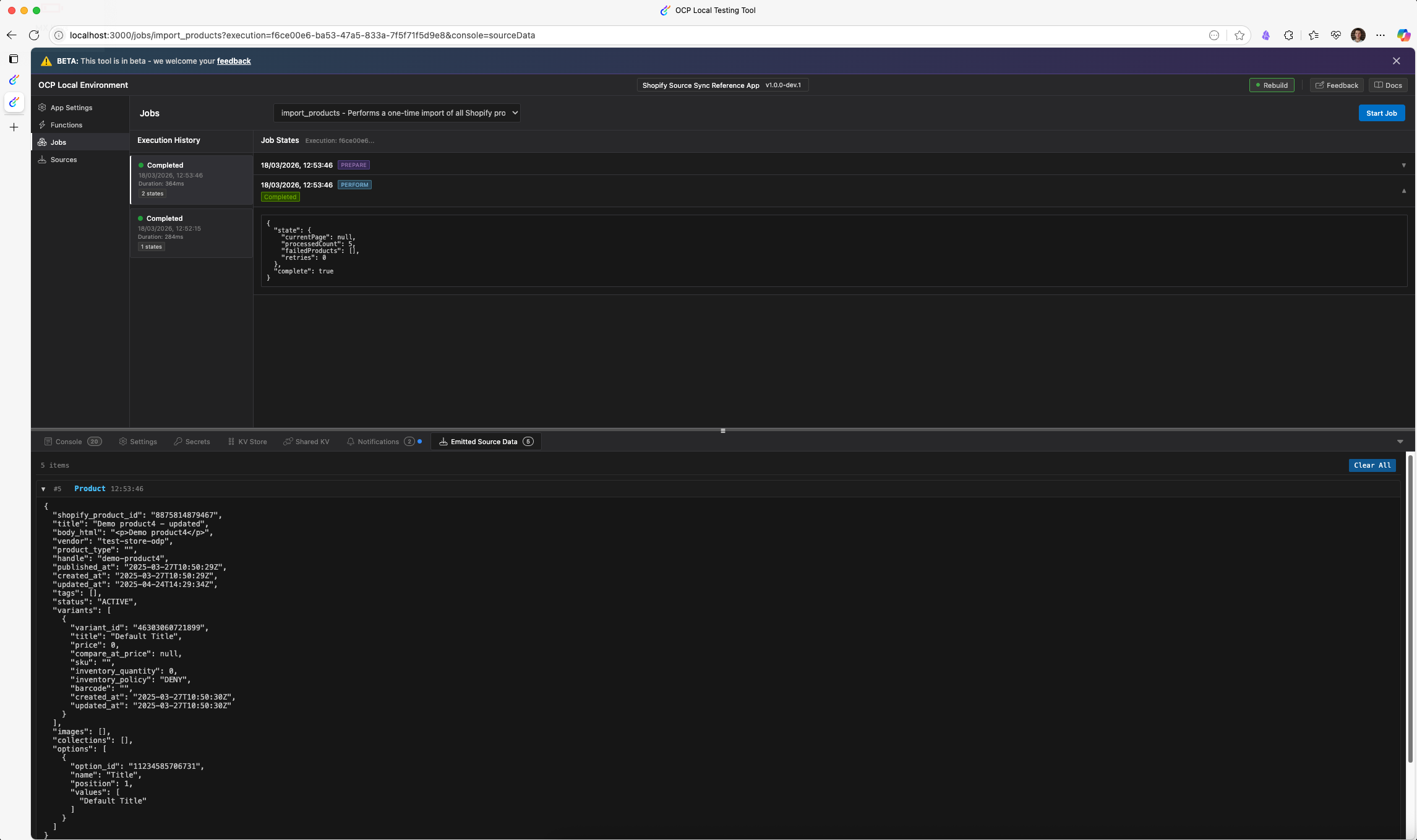
Authenticate to Shopify in the local testing tool and test your job. You can trigger the job from Settings or from the Jobs tab in the local testing tool. If your Shopify account has products, you can see items emitted by the job in the Emitted Source Data tab.
Implement the webhook function
The historical import job handles bulk data loading, but products change continuously in Shopify. To keep OCP synced with those changes, the app needs a webhook function that receives real-time product events (create, update, and delete) from Shopify and emits them through the same source.
Update app.yml
app.ymlRegister the webhook function. OCP exposes an HTTP endpoint for it. Add a functions section before jobs:
functions:
  product_webhook:
    entry_point: ProductWebhook
    description: Receives Shopify product webhooks for real-time sync
The entry_point value matches the exported class name. OCP resolves the class from the src/functions/ directory and generates a URL for the endpoint. Shopify sends webhook payloads to this URL when product events occur.
See the following completed app.yml:
meta:
  app_id: ocp_sync_source_reference_app
  display_name: Shopify Source Sync Reference App
  version: 1.0.0-dev.1
  vendor: optimizely
  summary: Shopify Source Sync Reference App
  support_url: https://support.optimizely.com
  contact_email: [email protected]
  categories:
    - Commerce Platform
  availability:
    - all

runtime: node22

sources:
  Product:
    description: Shopify Product
    schema: shopify_products

functions:
  product_webhook:
    entry_point: ProductWebhook
    description: Receives Shopify product webhooks for real-time sync

jobs:
  import_products:
    entry_point: ImportProducts
    description: Performs a one-time import of all Shopify products
Create src/functions/ProductWebhook.ts
src/functions/ProductWebhook.tsThe webhook function receives Shopify product and collection payloads, handles three distinct webhook topics, and emits data to the Product source.
import { Function, Request, Response, sources, storage, logger } from '@zaiusinc/app-sdk';
import { ShopifyProduct } from '../data/ShopifyProducts';
import { ShopifyClient } from '../lib/ShopifyClient';
import { transformProductToPayload } from '../lib/transformProductToPayload';

export class ProductWebhook extends Function {
  public constructor(request: Request) {
    super(request);
  }

  public async perform(): Promise<Response> {
    try {
      logger.info('[ProductWebhook] Processing incoming Shopify product');

      // Get the product data from the request body
      const shopifyProduct = this.request.bodyJSON as ShopifyProduct;

      if (!shopifyProduct || !shopifyProduct.id) {
        logger.error('Invalid product data received');
        return new Response(400, 'Invalid product data. Missing required fields.');
      }

      const topic = this.request.headers.get('x-shopify-topic');

      // Handle collection updates — re-fetch all products in the collection and emit them
      if (topic === 'collections/update') {
        const collectionId = shopifyProduct.id;
        logger.info(`[ProductWebhook] Processing collection update for collection ${collectionId}`);

        const settings: Record<string, string> = await storage.settings.get('shopify_credentials');
        if (!settings?.store_url || !settings?.access_token) {
          logger.error('[ProductWebhook] Missing credentials for collection update');
          return new Response(500, {success: false, error: 'Missing Shopify credentials'});
        }

        const shopifyClient = new ShopifyClient({
          storeUrl: settings.store_url,
          accessToken: settings.access_token
        });
        const products = await shopifyClient.getProductsByCollectionId(collectionId);

        for (const product of products) {
          const productPayload = transformProductToPayload(product);
          await sources.emit('Product', {data: productPayload as any});
        }

        logger.info(`[ProductWebhook] Emitted ${products.length} products from collection ${collectionId}`);
        return new Response(200, {
          success: true,
          message: `Processed collection update, emitted ${products.length} products`,
          collection_id: collectionId
        });
      }

      // Handle product deletions — product no longer exists in Shopify, so emit with _isDeleted flag
      if (topic === 'products/delete') {
        logger.info(`[ProductWebhook] Processing product deletion for product ${shopifyProduct.id}`);
        await sources.emit('Product', {data: {shopify_product_id: shopifyProduct.id.toString(), _isDeleted: true}});
        return new Response(200, {
          success: true,
          message: 'Successfully processed product deletion',
          shopify_product_id: shopifyProduct.id
        });
      }

      // Re-fetch product via GraphQL to include collection data not present in webhook payloads
      let productForTransform: ShopifyProduct = shopifyProduct;
      try {
        const settings: Record<string, string> = await storage.settings.get('shopify_credentials');
        if (settings?.store_url && settings?.access_token) {
          const shopifyClient = new ShopifyClient({
            storeUrl: settings.store_url,
            accessToken: settings.access_token
          });
          productForTransform = await shopifyClient.getProductById(shopifyProduct.id);
          logger.info(`[ProductWebhook] Re-fetched product ${shopifyProduct.id} with collection data`);
        } else {
          logger.warn('[ProductWebhook] Missing credentials, using raw webhook data');
        }
      } catch (error: any) {
        const pid = shopifyProduct.id;
        logger.warn(`[ProductWebhook] Failed to re-fetch product ${pid}, using raw webhook data: ${error.message}`);
      }

      // Transform the product data to Hub object format
      const payload = transformProductToPayload(productForTransform);

      logger.debug('Emitting transformed product payload', payload);
      await sources.emit('Product', {data: payload as any});

      return new Response(200, {
        success: true,
        message: `Successfully processed product: ${shopifyProduct.title}`,
        shopify_product_id: shopifyProduct.id
      });
    } catch (error: any) {
      logger.error(`Error processing Shopify product: ${error.message}`);
      return new Response(500, {
        success: false,
        error: `An error occurred while processing the product: ${error.message}`
      });
    }
  }
}- Topic-based routing – The function reads the
x-shopify-topicheader to determine how to process the incoming webhook. Shopify sets this header on every webhook delivery, identifying the event type (products/create,products/update,products/delete, orcollections/update). _isDeletedflag – Forproducts/deleteevents, the function emits only the primary key (shopify_product_id) and_isDeleted: true. The Sync Manager uses this flag to remove the record from downstream syncs. Additional fields are unnecessary as the product no longer exists in Shopify.- Collection update handling – When Shopify sends a
collections/updatewebhook, it does not send individualproducts/updateevents for products affected by the collection change. The function fetches all products in the collection throughgetProductsByCollectionId()and re-emits collection to help membership changes propagate to downstream syncs. - Product re-fetch – For
products/createandproducts/updateevents, the function re-fetches the product throughgetProductById()to enrich it with collection data. Shopify webhook payloads exclude collection membership, but the GraphQL API does. If the re-fetch fails due to network error or missing credentials, the function falls back to the raw webhook data. - Shared transformation pipeline – All code paths, such as import job, product webhooks, and collection updates use
transformProductToPayload(), producing identical payloads regardless of the data source. sources.emit('Product', ...)– The same source name (Product) used in the import job. OCP routes the emitted data to all syncs configured for this source. Emitting the same product twice updates the record instead of duplicating it, since the source schema defines a primary key (shopify_product_id).- HTTP status codes – The function returns
200on success,400for invalid payloads, and500for unexpected errors. Shopify retries webhook deliveries that return non-2xx responses, so returning appropriate error codes lets Shopify handle transient failures automatically.
Handle deletes and collection updates
The webhook function handles the following three categories of Shopify events with different approaches.
Product deletions with _isDeleted
When a source emits a record with _isDeleted: true, the Sync Manager signals downstream syncs to remove that record. The emission only needs the primary key and the _isDeleted flag. No other fields are required because the record no longer exists in the external system.
await sources.emit('Product', {data: {shopify_product_id: id.toString(), _isDeleted: true}});This pattern works for any source, not just Shopify. Whenever the external system deletes a record, emit the primary key with _isDeleted: true.
Product re-fetch for collection data
Shopify webhook payloads for products/create and products/update do not include collection membership. The webhook function re-fetches the product through the GraphQL API using getProductById(), which returns the full product including its collections. If the re-fetch fails due to a network error or missing credentials, the function falls back to the raw webhook data. This graceful degradation means the webhook still processes, but the emitted product might lack collection information until the next sync.
Collection update re-emission
When a collection changes in Shopify (products added, removed, or reordered), Shopify sends a collections/update webhook but does not send individual products/update events for the affected products. To propagate collection membership changes, the webhook function fetches all products in the collection using getProductsByCollectionId() and re-emits each one. As sources.emit() is idempotent (keyed on the primary key), re-emitting a product updates the existing record rather than creating a duplicate.
Test webhook function locally
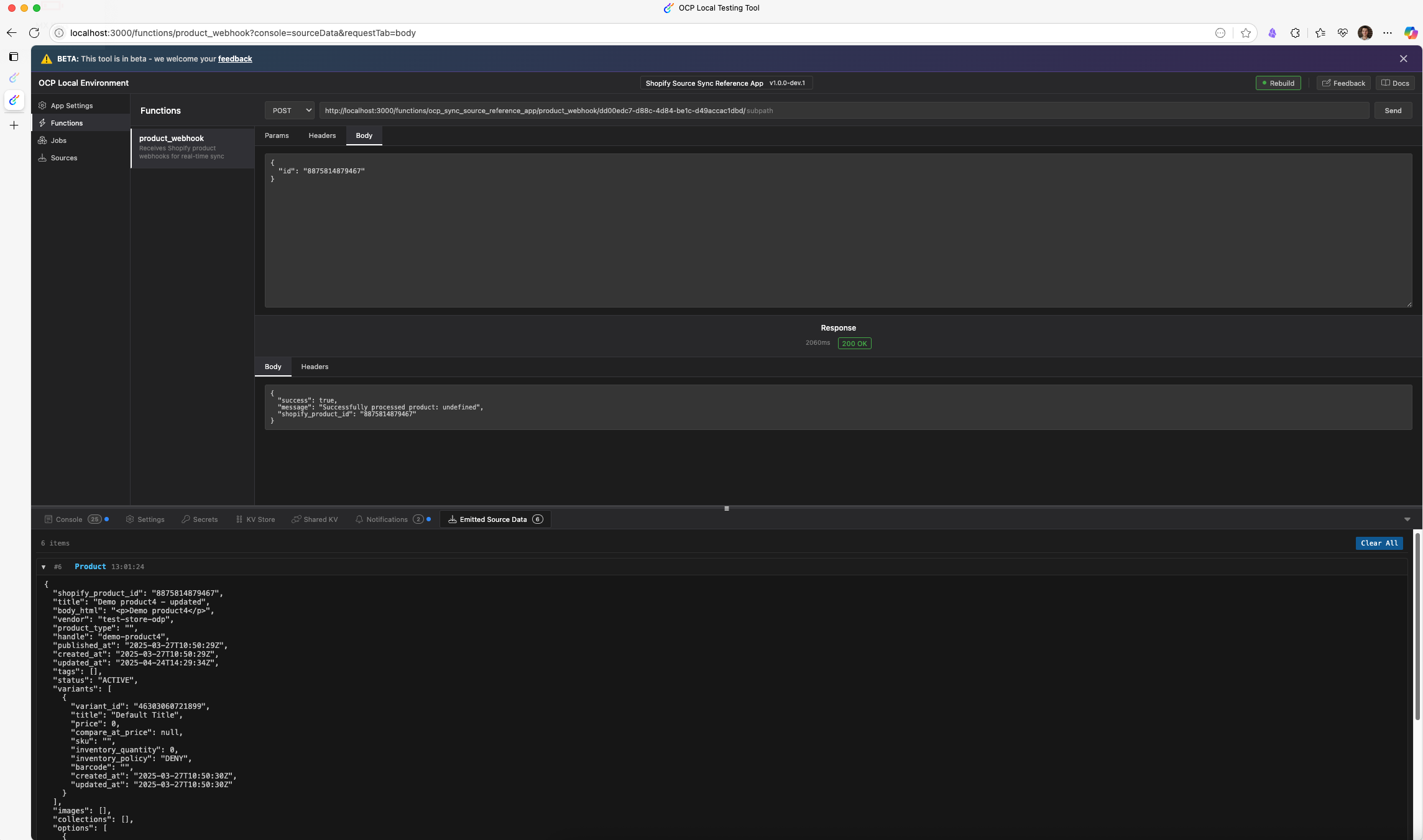
Simulate receiving a webhook notification from Shopify in the local testing tool. Set the x-shopify-topic header and request body. If successful, you can see items emitted by your function in the Emitted Source Data tab.
Manage webhooks
The webhook function from the previous section can receive Shopify events, but webhooks do not register themselves. You must have a management layer. This calls the Shopify API to create webhook subscriptions when you save credentials and deletes them when you uninstall the app.
Create src/lib/ShopifyWebhookManager.ts
src/lib/ShopifyWebhookManager.tsThis class handles webhook registration and cleanup by querying the Shopify API directly.
import { logger } from '@zaiusinc/app-sdk';
import { ShopifyClient, ShopifyCredentials } from './ShopifyClient';

export class ShopifyWebhookManager {
  private credentials: ShopifyCredentials;

  public constructor(credentials: ShopifyCredentials) {
    this.credentials = credentials;
  }

  public async createWebhooks(webhookUrl: string, client?: ShopifyClient): Promise<void> {
    if (!webhookUrl) {
      throw new Error('Webhook URL is not configured');
    }

    const shopifyClient = client || new ShopifyClient(this.credentials);
    await shopifyClient.setupProductWebhooks(webhookUrl);
  }

  public async deleteWebhooks(webhookUrl: string, client?: ShopifyClient): Promise<void> {
    const shopifyClient = client || new ShopifyClient(this.credentials);
    const webhooks = await shopifyClient.getWebhooks();
    const matching = webhooks.filter((webhook) => webhook.address === webhookUrl);

    if (matching.length === 0) {
      return;
    }

    const failedDeletions: number[] = [];
    for (const webhook of matching) {
      try {
        await shopifyClient.deleteWebhook(webhook.id!);
      } catch (err: any) {
        logger.error(`Failed to delete webhook ${webhook.id}: ${err?.message}`);
        failedDeletions.push(webhook.id!);
      }
    }

    if (failedDeletions.length > 0) {
      throw new Error(`Failed to delete webhooks: ${failedDeletions.join(', ')}`);
    }

    logger.info('Webhook deletion completed successfully');
  }
}createWebhooks()– Delegates toShopifyClient.setupProductWebhooks(), which registersproducts/create,products/update,products/delete, andcollections/updatetopics.deleteWebhooks()– Queries the Shopify API throughShopifyClient.getWebhooks(), filters by address to find webhooks matching the app's webhook URL, and deletes each one. If some deletions fail, it throws an error so the caller can handle it. This approach also catches orphaned webhooks.- Optional
clientparameter – Both methods accept an optionalShopifyClientinstance. During credential setup, the lifecycle already has a validated client, so passing it avoids creating a duplicate.
Update src/lifecycle/Lifecycle.ts
src/lifecycle/Lifecycle.tsUpdate the lifecycle to register webhooks when you save credentials and clean them up on uninstall.
import {
  Lifecycle as AppLifecycle,
  AuthorizationGrantResult,
  functions,
  jobs,
  LifecycleResult,
  LifecycleSettingsResult,
  logger,
  Request,
  storage, SubmittedFormData
} from '@zaiusinc/app-sdk';
import { ShopifyClient } from '../lib/ShopifyClient';
import { ShopifyWebhookManager } from '../lib/ShopifyWebhookManager';

export class Lifecycle extends AppLifecycle {
  public async onInstall(): Promise<LifecycleResult> {
    try {
      logger.info('Performing Install');
      return {success: true};
    } catch (error: any) {
      logger.error('Error during installation:', error);
      return {success: false, retryable: true, message: `Error during installation: ${error}`};
    }
  }

  public async onSettingsForm(
    section: string, action: string, formData: SubmittedFormData
  ): Promise<LifecycleSettingsResult> {
    const result = new LifecycleSettingsResult();
    try {
      if (action === 'trigger_full_import') {
        return this.handleTriggerFullImport(result);
      }

      if (section === 'shopify_credentials') {
        return this.handleShopifyCredentials(formData, result);
      }

      await storage.settings.put(section, formData);
      return result;
    } catch {
      return result.addToast('danger', 'Sorry, an unexpected error occurred. Please try again in a moment.');
    }
  }

  private async handleTriggerFullImport(
    result: LifecycleSettingsResult
  ): Promise<LifecycleSettingsResult> {
    const settings: Record<string, string> = await storage.settings.get('shopify_credentials');
    if (!settings.store_url || !settings.access_token) {
      return result.addToast('danger', 'Please configure your Shopify credentials before running an import.');
    }

    await jobs.trigger('import_products', {});
    return result.addToast(
      'success', 'Full product import has been triggered. You will be notified when it completes.'
    );
  }

  private async handleShopifyCredentials(
    formData: SubmittedFormData, result: LifecycleSettingsResult
  ): Promise<LifecycleSettingsResult> {
    const storeUrl = formData.store_url as string;
    const accessToken = formData.access_token as string;

    if (!storeUrl || !accessToken) {
      return result.addToast('danger', 'Please provide both a store URL and access token.');
    }

    const client = new ShopifyClient({storeUrl, accessToken});
    const isValid = await client.testCredentials();

    if (!isValid) {
      return result.addToast('danger', 'Invalid Shopify credentials. Please check your store URL and access token.');
    }

    await storage.settings.put('shopify_credentials', formData);

    try {
      const endpoints = await functions.getEndpoints();
      const webhookUrl = endpoints['product_webhook'];

      const webhookManager = new ShopifyWebhookManager({storeUrl, accessToken});
      try {
        await webhookManager.deleteWebhooks(webhookUrl, client);
      } catch {
        // Ignore deletion errors for old webhooks
      }
      await webhookManager.createWebhooks(webhookUrl, client);
      await storage.settings.patch('shopify_credentials', {webhooks_active: true, webhook_error: ''});

      return result.addToast(
        'success',
        `Connected to Shopify store: ${storeUrl}. Webhooks configured for real-time sync.`
      );
    } catch (webhookError: any) {
      logger.error(`Error setting up webhooks: ${webhookError.message}`);
      await storage.settings.patch('shopify_credentials', {
        webhooks_active: false,
        webhook_error: webhookError.message
      });
      return result.addToast(
        'success',
        `Connected to Shopify store: ${storeUrl}, but webhook setup failed: ${webhookError.message}`
      );
    }
  }

  public async onAuthorizationRequest(
    _section: string, _formData: SubmittedFormData
  ): Promise<LifecycleSettingsResult> {
    const result = new LifecycleSettingsResult();
    return result.addToast('danger', 'Sorry, OAuth is not supported.');
  }

  public async onAuthorizationGrant(_request: Request): Promise<AuthorizationGrantResult> {
    return new AuthorizationGrantResult('').addToast('danger', 'Sorry, OAuth is not supported.');
  }

  public async onUpgrade(_fromVersion: string): Promise<LifecycleResult> {
    return {success: true};
  }

  public async onFinalizeUpgrade(_fromVersion: string): Promise<LifecycleResult> {
    return {success: true};
  }

  public async onAfterUpgrade(): Promise<LifecycleResult> {
    return {success: true};
  }

  public async onUninstall(): Promise<LifecycleResult> {
    try {
      logger.info('Uninstalling app, cleaning up webhooks...');

      const settings: Record<string, string> = await storage.settings.get('shopify_credentials');
      if (settings?.store_url && settings?.access_token) {
        const endpoints = await functions.getEndpoints();
        const webhookUrl = endpoints['product_webhook'];

        const webhookManager = new ShopifyWebhookManager({
          storeUrl: settings.store_url,
          accessToken: settings.access_token
        });
        await webhookManager.deleteWebhooks(webhookUrl);
        await storage.settings.patch('shopify_credentials', {webhooks_active: false});
      }

      return {success: true};
    } catch (error: any) {
      logger.error(`Error during uninstall: ${error.message}`);
      return {success: true, message: `Warning: Unable to clean up all webhooks: ${error.message}`};
    }
  }
}functions.getEndpoints()– Returns a map of function names to their public URLs. The key'product_webhook'matches the function name declared inapp.yml. This URL is the address Shopify sends webhook payloads to.- Delete-then-create pattern – Before creating webhooks, the code deletes any existing ones. This prevents duplicate webhook registrations when a user updates credentials. A try/catch wraps the deletion and ignores errors when webhooks do not exist yet.
- Webhook status tracking –
webhooks_active: trueis patched into the credentials settings after successful tracking.webhooks_active: falseandwebhook_errorare saved if it fails. The Settings form displays this status to the user. - Graceful credential save – The lifecycle saves credentials before webhook setup. If a webhook registration fails, the user retains valid credentials and receives a confirmation message explaining the partial success. This prevents losing valid credentials because of a transient webhook API failure.
onUninstall()cleanup – Reads credentials from settings, creates a manager, and deletes all registered webhooks. Returnssuccess: trueeven if deletion fails, so the uninstall proceeds regardless. Shopify eventually removes webhooks that consistently fail delivery, so orphaned webhooks expire.
Test in OCP sandbox account
After you implement and test the app locally, publish a dev version to OCP for sandbox testing by completing the following steps:
- Ensure your app uses a dev version in
app.yml, such as1.0.0-dev.1, and run the following command to validate and publish the app to OCP.ocp app prepare --publish - Install the app to your sandbox OCP instance:
ocp directory install [email protected] <TRACKER_ID>
NoteUse the
ocp accounts whoamicommand to see the list of OCP instances or tracker IDs you have access to.
-
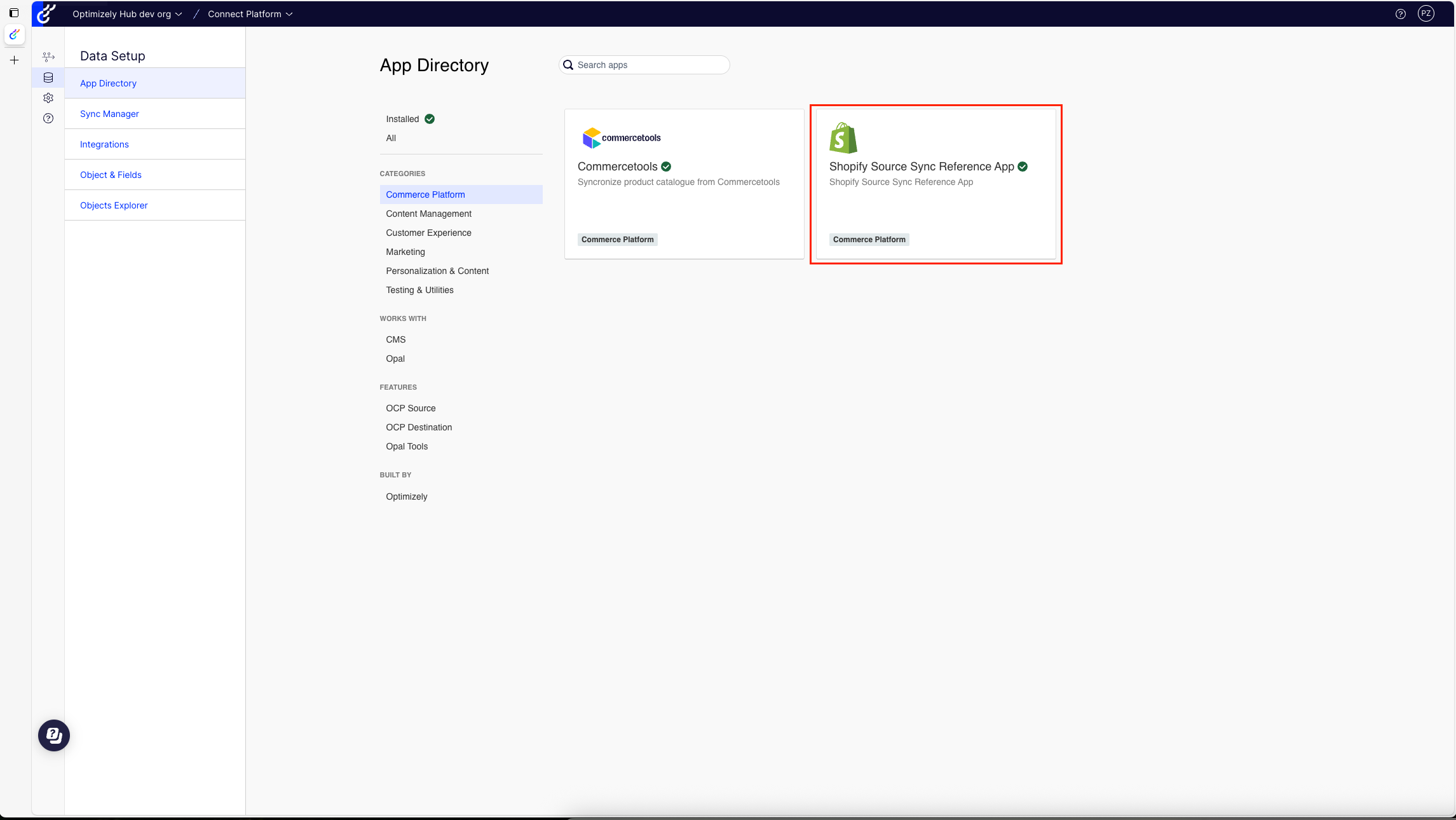
Open your sandbox OCP instance and go to the App Directory. Your app displays in the list of installed apps.
-
Open the Settings tab and configure your Shopify credentials by entering your store URL and access token. Click Save. The app validates credentials and registers webhooks.
-
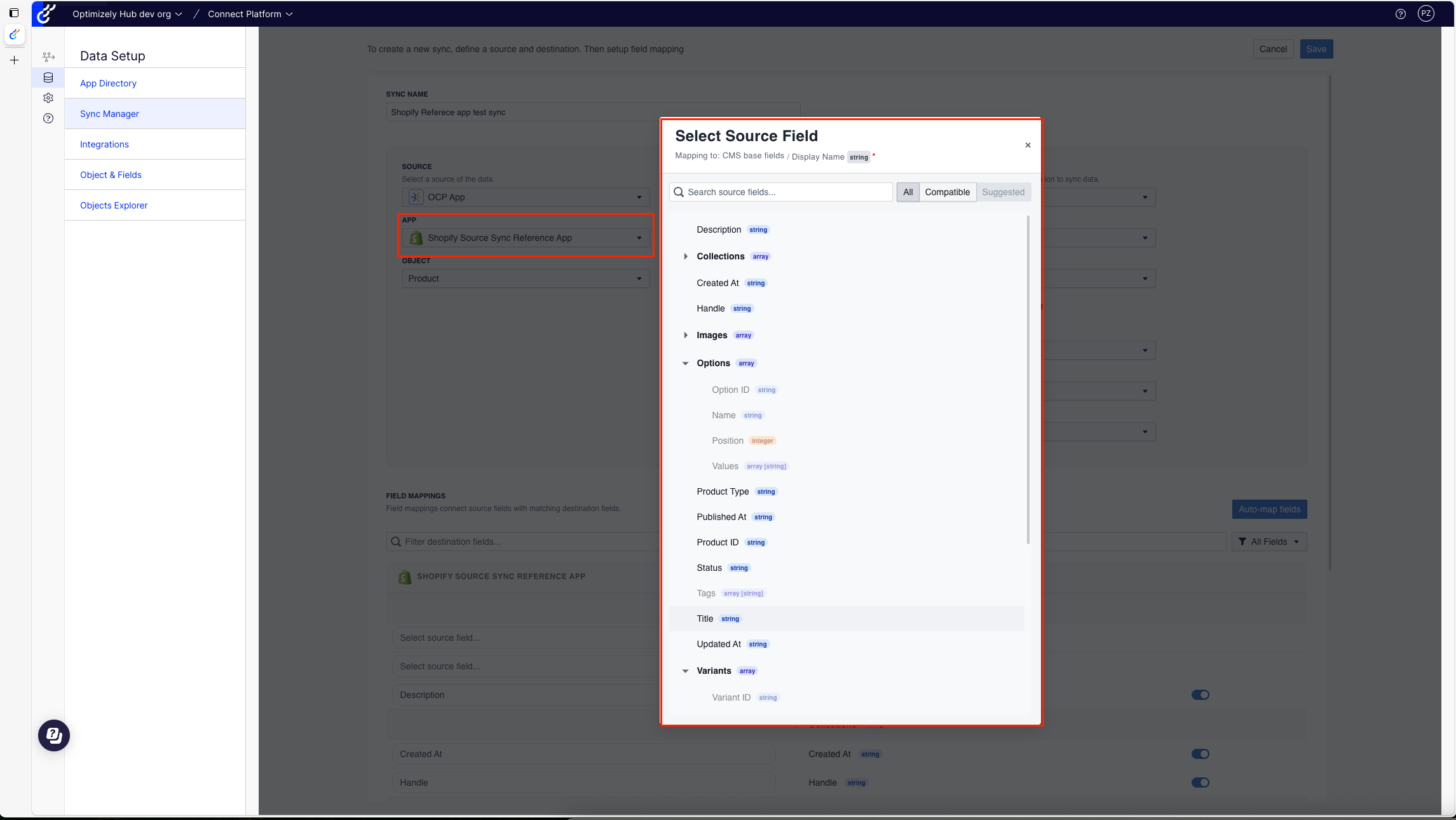
Verify the app is available as a sync Source in the Sync Manager. Configure the sync to the selected Destination.
-
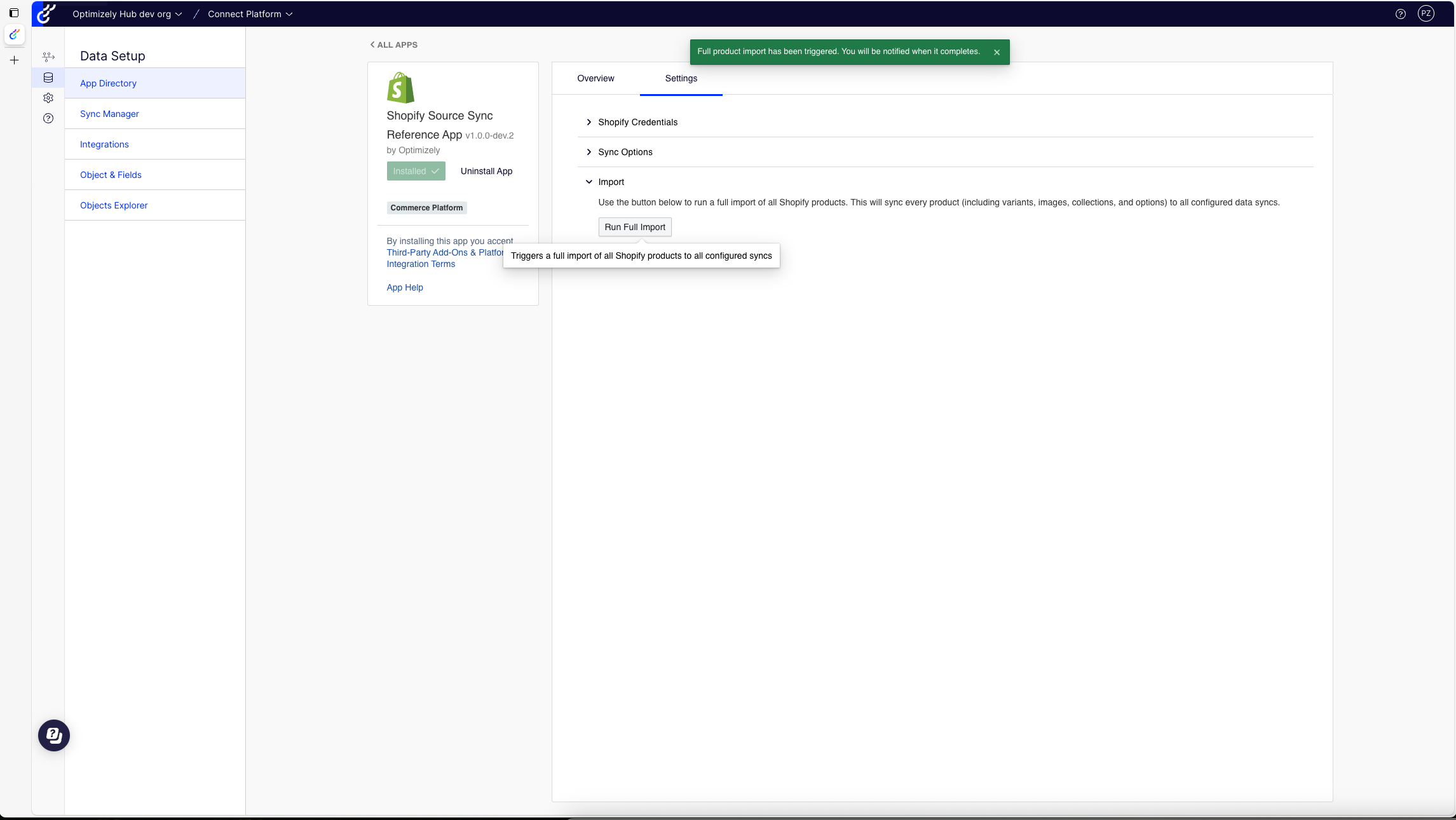
Click Run Full Import to trigger a historical import. The app imports products in batches of 50 and sends a notification when complete.
-
Update a product in Shopify. Verify the change is synced to your Destination.
Release production version
Release the app to production after it performs correctly in the sandbox instance by completing the following steps:
- Release a private version – Your app remains private by default. You control access.
- Release a public version – All Optimizely customers can access your app in the OCP App Directory.
Production checklist
Before releasing to production, ensure the following assets and metadata are complete:
Required assets
assets/icon.svg– App icon displayed in the App Directory. Use square icons, effective in small sizes.assets/logo.svg– App logo displayed in App Settings. Use a wider format.assets/directory/overview.md– Markdown description displayed on your app's App Directory page.
Metadata in app.yml
display_name– User-friendly name for your appsummary– Brief, one-line descriptionsupport_url– Link to your support documentation or contact pagecontact_email– Email address for support inquiriescategories– Relevant categories likeCommerce Platformavailability–allfor publishing your app to all OCP regions
Code quality
- Remove debug logging and console statements.
- Handle all error cases with user-friendly messages.
- Test with various input combinations to ensure robustness.
Release to production
- To release a private production version of your app, add the
-privatesuffix to the version inapp.yml, like1.0.0-privateand runocp app prepare. - To release a public production version of your app, change the version of your app in
app.ymlto a normal semver version, like1.0.0and runocp app prepare.
NoteReleasing a production version requires a review by an Optimizely engineer. The
ocp app preparecommand creates a review automatically. Publish your app to OCP upon approval.
Summary
This guide covered building a complete sync source app for OCP, using Shopify product data as a real-world example. Key concepts include:
Planning and design
- Define clear requirements for data sync (historical import and real-time updates).
- Design the source schema with nested types to model complex product data.
- Choose between GraphQL and REST APIs based on data requirements and efficiency.
Implementation
- Declare sources in
app.ymland define schemas with nested types in YAML. - Create the Settings forms to collect and validate external API credentials.
- Use
sources.emit()to push data into OCP through the Sync Manager. - Implement the
Jobclass withprepare()andperform()for paginated batch imports with retry logic. - Use webhook functions to receive real-time updates from external systems.
- Handle product deletions by emitting
_isDeleted: trueso downstream syncs remove the record. - Handle collection updates by re-fetching and re-emitting all products in the affected collection.
- Re-fetch products on
createorupdatewebhooks to enrich them with collection data not present in webhook payloads. - Manage webhook lifecycle.
Testing and deployment
- Write unit tests for pure functions, webhook handlers, job logic, and lifecycle hooks.
- Test locally using
ocp devbefore publishing. - Publish dev versions for sandbox environment testing.
- Complete the production checklist before releasing.
View the full source code on GitHub.
Updated about 2 months ago