Export segment members from Optimizely to Amazon S3.
| Time | Status | User Agent | |
|---|---|---|---|
Retrieving recent requests… | |||
ImportantThe Segment Member Export API currently supports real-time segments (RTS) only. Standard segments are not supported and cannot be exported through this endpoint.
NoteIn the request body, each value in the
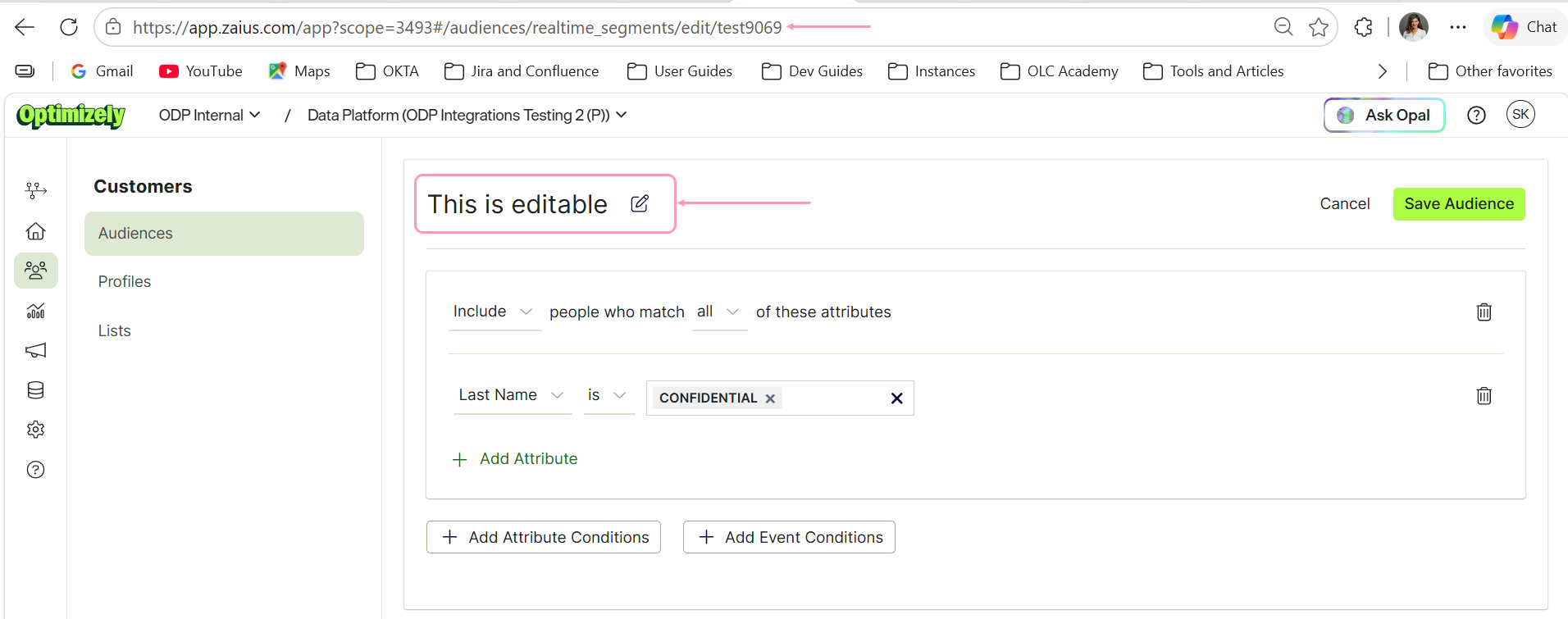
segmentsarray must be the segment's API name, not its display name. The display name is the human-readable label shown at the top of the Audiences page in the Optimizely UI, and it is editable, so it often differs from the API name used in requests. Passing the display name will cause the request to fail.You can edit the display name at any time, but the API name is fixed when you create a segment and cannot be changed. Always use the API name to reference a segment in requests.
To find a segment's API name, go to Customers > Audiences > New Audience and create a Real-Time Audience in the Optimizely UI. The API name is the identifier at the end of the page URL, for example, in
.../audiences/realtime_segments/view/test9069, the API name istest9069.